Unlock a world of possibilities! Login now and discover the exclusive benefits awaiting you.

- Qlik Community
- :
- Forums
- :
- Analytics & AI
- :
- Products & Topics
- :
- Visualization and Usability
- :
- Authentication issue when loading extension - Popu...
- Subscribe to RSS Feed
- Mark Topic as New
- Mark Topic as Read
- Float this Topic for Current User
- Bookmark
- Subscribe
- Mute
- Printer Friendly Page

 morenoju
- Mark as New
- Bookmark
- Subscribe
- Mute
- Subscribe to RSS Feed
- Permalink
- Report Inappropriate Content
Authentication issue when loading extension - Popup asking for credentials
Hi guys,
I'm using basic authentication to access my app from a different machine. It all works well except when I open certain sheets: they always ask for credentials on a popup. Those sheets of my app have in common that they use a custom extension.
Why do you think this custom extension would ask for the credentials? Is it maybe a folder permissions issue? I don't know in what folder Qlik Sense Server stores the extensions after having been imported in QMC, but maybe that folder is not accesible for certain users?
I would like to hear what you think about this. At this point I'm not even sure of what to check!
Thanks much,
Juan
- Tags:
- extension
Accepted Solutions
morenoju
- Mark as New
- Bookmark
- Subscribe
- Mute
- Subscribe to RSS Feed
- Permalink
- Report Inappropriate Content
After a few attempts, I noticed that adding ´..´ to the paths, the calls are done through the virtual proxy.
requirejs.config({
    paths: {
        leaflet: '../extensions/etx-point-map-1/lib/js/leaflet',
        easyButton: '../extensions/etx-point-map-1/lib/js/easy-button',
        markercluster: '../extensions/etx-point-map-1/lib/js/leaflet.markercluster-etx',
        leafletHeatmap: '../extensions/etx-point-map-1/lib/js/leaflet-heatmap',
        heatmap: '../extensions/etx-point-map-1/lib/js/heatmap.min',
        nanobar: '../extensions/etx-point-map-1/lib/js/nanobar.min',
        wellknown: '../extensions/etx-point-map-1/lib/js/wellknown',
        tinycolor: '../extensions/etx-point-map-1/lib/js/tiny-color'
Solved!

 Levi_Turner
- Mark as New
- Bookmark
- Subscribe
- Mute
- Subscribe to RSS Feed
- Permalink
- Report Inappropriate Content
In the abstract, there's going to be a call for an asset used by the extension (e.g. JS / CSS / PNG file) which isn't relative. Here' s an example of an extension behaving properly:
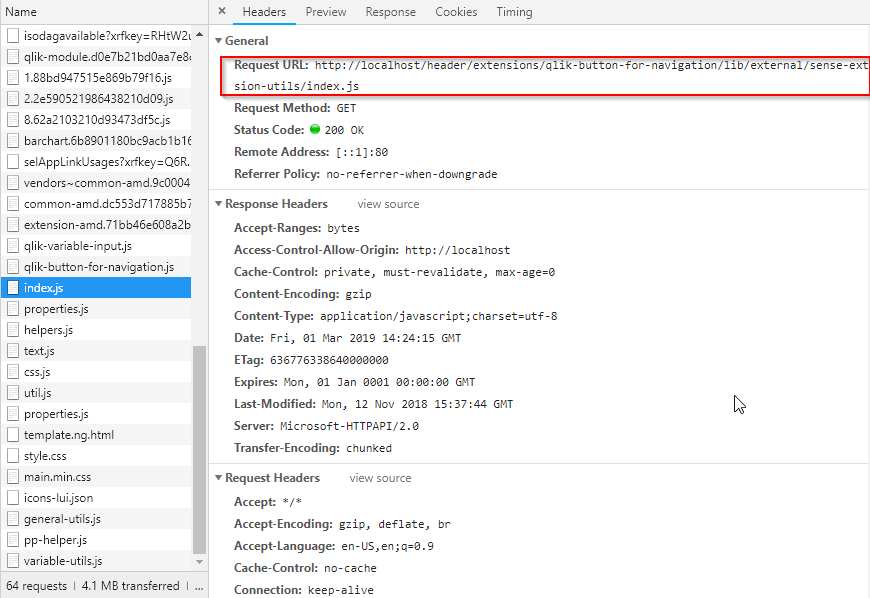
Note how it calls http://localhost{/virtualproxyprefixinuse}/extension..... where it's using the virtual proxy which my user is using rather than http://localhost/extension/.... which does not have a prefix which would be Windows authentication in my environment.
morenoju
- Mark as New
- Bookmark
- Subscribe
- Mute
- Subscribe to RSS Feed
- Permalink
- Report Inappropriate Content
Hi Leviturner, thanks a lot for your reply!
Looks like the extension may have an issue with the paths then. This is at the beginning of the js:
requirejs.config({
    paths: {
        leaflet: '/extensions/etx-point-map-1/lib/js/leaflet',
        easyButton: '/extensions/etx-point-map-1/lib/js/easy-button',
        markercluster: '/extensions/etx-point-map-1/lib/js/leaflet.markercluster-etx',
        leafletHeatmap: '/extensions/etx-point-map-1/lib/js/leaflet-heatmap',
        heatmap: '/extensions/etx-point-map-1/lib/js/heatmap.min',
        nanobar: '/extensions/etx-point-map-1/lib/js/nanobar.min',
        wellknown: '/extensions/etx-point-map-1/lib/js/wellknown',
        tinycolor: '/extensions/etx-point-map-1/lib/js/tiny-color'
    },
How would you define those paths so the virtual proxy is taken into account?
Thanks
morenoju
- Mark as New
- Bookmark
- Subscribe
- Mute
- Subscribe to RSS Feed
- Permalink
- Report Inappropriate Content
After a few attempts, I noticed that adding ´..´ to the paths, the calls are done through the virtual proxy.
requirejs.config({
    paths: {
        leaflet: '../extensions/etx-point-map-1/lib/js/leaflet',
        easyButton: '../extensions/etx-point-map-1/lib/js/easy-button',
        markercluster: '../extensions/etx-point-map-1/lib/js/leaflet.markercluster-etx',
        leafletHeatmap: '../extensions/etx-point-map-1/lib/js/leaflet-heatmap',
        heatmap: '../extensions/etx-point-map-1/lib/js/heatmap.min',
        nanobar: '../extensions/etx-point-map-1/lib/js/nanobar.min',
        wellknown: '../extensions/etx-point-map-1/lib/js/wellknown',
        tinycolor: '../extensions/etx-point-map-1/lib/js/tiny-color'
Solved!
