Unlock a world of possibilities! Login now and discover the exclusive benefits awaiting you.

- Qlik Community
- :
- Forums
- :
- Analytics & AI
- :
- Products & Topics
- :
- Visualization and Usability
- :
- Background Color if Number in Column Bigger then ...
- Subscribe to RSS Feed
- Mark Topic as New
- Mark Topic as Read
- Float this Topic for Current User
- Bookmark
- Subscribe
- Mute
- Printer Friendly Page

 hazevedo
- Mark as New
- Bookmark
- Subscribe
- Mute
- Subscribe to RSS Feed
- Permalink
- Report Inappropriate Content
Background Color if Number in Column Bigger then the Total Average of the Column
Hello,
I didn't find anything about this, so I decided to write my doubt.
I have this table:
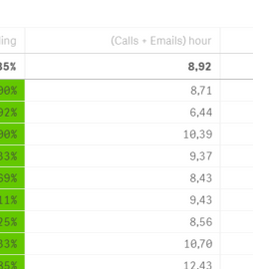
It is a measure: [Calls per Hr]+((If(Count([Email)>0,Count([Email]),0))/[Hours Num Format])
The dimension of the table on left are people's names. And Calls per Hr, Email and Hours Num Format are all from different tables.
The total of the table is an average of the column, that changes every day.
I would like to know the formula to add in the 'Background color expression' in order to have:
- Color green if the number in the column is bigger than the average of the table
Initially I wrote this: (If([(Calls + Emails) hour]> 8.92,RGB(100,200,0))) , but I need the total average (8,92) to be a formula to update itself without having to change the number every day, is it possible?
I attached an example file.
