Unlock a world of possibilities! Login now and discover the exclusive benefits awaiting you.

- Qlik Community
- :
- Forums
- :
- Analytics & AI
- :
- Products & Topics
- :
- Visualization and Usability
- :
- Basic date manipulation
- Subscribe to RSS Feed
- Mark Topic as New
- Mark Topic as Read
- Float this Topic for Current User
- Bookmark
- Subscribe
- Mute
- Printer Friendly Page

 nougatitati
- Mark as New
- Bookmark
- Subscribe
- Mute
- Subscribe to RSS Feed
- Permalink
- Report Inappropriate Content
Basic date manipulation
Hi,
I'm terrible at dealing with dates in Qlik! I can't even resolve this small issue.
I loaded some data with
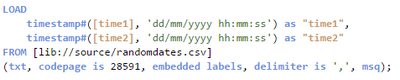
giving me this:
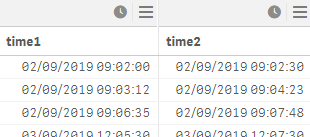
I wanted to take the floor of this to just get the date, with no hh:mm:ss included. I tried to do this:
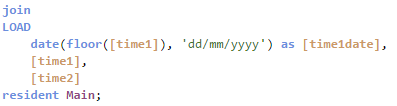
But look at what this results in! For some reason it loses the month field! What could be happening?
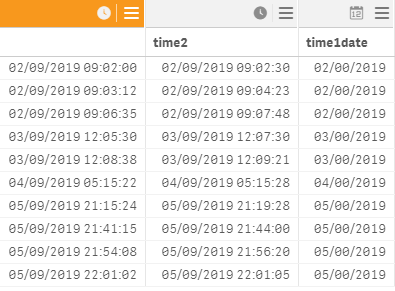
I swear, Qlik Sense just doesn't like me!
Accepted Solutions

 Vegar
Vegar
- Mark as New
- Bookmark
- Subscribe
- Mute
- Subscribe to RSS Feed
- Permalink
- Report Inappropriate Content
You nerd to use MM in upper case. Lower case indicates minutes.
Date(floor(timer1), 'DD/MM/YYYY') as timedate
should give you what you want.
Alternatively
Dayname(timer1) as timedate
Qlik Community MVP
Vegar
- Mark as New
- Bookmark
- Subscribe
- Mute
- Subscribe to RSS Feed
- Permalink
- Report Inappropriate Content
You nerd to use MM in upper case. Lower case indicates minutes.
Date(floor(timer1), 'DD/MM/YYYY') as timedate
should give you what you want.
Alternatively
Dayname(timer1) as timedate
Qlik Community MVP
