Unlock a world of possibilities! Login now and discover the exclusive benefits awaiting you.

- Qlik Community
- :
- Forums
- :
- Analytics & AI
- :
- Products & Topics
- :
- Visualization and Usability
- :
- Blank Row in Straight Table
- Subscribe to RSS Feed
- Mark Topic as New
- Mark Topic as Read
- Float this Topic for Current User
- Bookmark
- Subscribe
- Mute
- Printer Friendly Page

 Vigneshvaran
- Mark as New
- Bookmark
- Subscribe
- Mute
- Subscribe to RSS Feed
- Permalink
- Report Inappropriate Content
Blank Row in Straight Table
Hi,
I have a straight table and it has a column called "Sales ID". Is that possible to leave a blank row after distinct "Sales ID"?
- « Previous Replies
-
- 1
- 2
- Next Replies »

 sunny_talwar
- Mark as New
- Bookmark
- Subscribe
- Mute
- Subscribe to RSS Feed
- Permalink
- Report Inappropriate Content
Just add a calculated dimension with a space between two single quotes ' '
Vigneshvaran
- Mark as New
- Bookmark
- Subscribe
- Mute
- Subscribe to RSS Feed
- Permalink
- Report Inappropriate Content
Hi Sunny,
Could you please explain me the syntax, since am new to Qlik.
sunny_talwar
- Mark as New
- Bookmark
- Subscribe
- Mute
- Subscribe to RSS Feed
- Permalink
- Report Inappropriate Content
Syntax is just this =' ' or without equal sign ' '
Vigneshvaran
- Mark as New
- Bookmark
- Subscribe
- Mute
- Subscribe to RSS Feed
- Permalink
- Report Inappropriate Content
Hi,
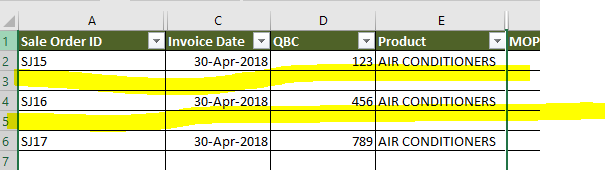
Am sorry I couldn't get you. I need a below output in qliksense straight table, need a blank row after all distinct Sales ID.
sunny_talwar
- Mark as New
- Bookmark
- Subscribe
- Mute
- Subscribe to RSS Feed
- Permalink
- Report Inappropriate Content
My bad, I got myself confused with the columns and rows. I thought you wanted a blank column. My bad.... is this in QlikView or Qlik Sense? and do you know how many blank rows will you need in total or is this dynamic?
Vigneshvaran
- Mark as New
- Bookmark
- Subscribe
- Mute
- Subscribe to RSS Feed
- Permalink
- Report Inappropriate Content
Hi Sunny,
This is in QlikSesnse, We don't have exact numbers, it should be dynamic!
sunny_talwar
- Mark as New
- Bookmark
- Subscribe
- Mute
- Subscribe to RSS Feed
- Permalink
- Report Inappropriate Content
I will check and get back to you
Vigneshvaran
- Mark as New
- Bookmark
- Subscribe
- Mute
- Subscribe to RSS Feed
- Permalink
- Report Inappropriate Content
Thank you so much!
sunny_talwar
- Mark as New
- Bookmark
- Subscribe
- Mute
- Subscribe to RSS Feed
- Permalink
- Report Inappropriate Content
So, I was able to insert a blank row for each SalesOrderID, but I am unable to sort it in a way that it alternate... currently it just shows up at all SalesOrderID together and all empty rows together... this can be fixed if we can add SalesOrderID another time (may be at the end of the table), but this SalesOrderID will show the same number on both rows.... Is that something which can work for you?

- « Previous Replies
-
- 1
- 2
- Next Replies »