Unlock a world of possibilities! Login now and discover the exclusive benefits awaiting you.

- Qlik Community
- :
- Forums
- :
- Analytics & AI
- :
- Products & Topics
- :
- Visualization and Usability
- :
- Calcul dynamique
- Subscribe to RSS Feed
- Mark Topic as New
- Mark Topic as Read
- Float this Topic for Current User
- Bookmark
- Subscribe
- Mute
- Printer Friendly Page

 eprehu
- Mark as New
- Bookmark
- Subscribe
- Mute
- Subscribe to RSS Feed
- Permalink
- Report Inappropriate Content
Calcul dynamique
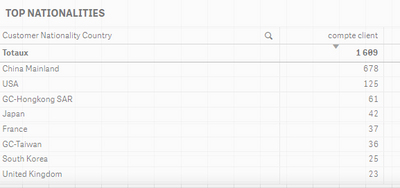
J'aimerais calculer le ratio en fonction du customer nationality country/nombre total => exemple nombre de client china/compte client => 42% =>
count(
{<
$(var_Customer_Begin_Date_Saleforce)={"<=$(var_Date_Sel)"}, $(var_Customer_End_Date_Saleforce)={">=$(var_Date_Sel)"},
$(var_Report_Date), $(var_Reporting_Currency),[Customer Nationality Country] = {'China Mainland'}
>}
distinct$(var_Customer_Key_Saleforce)
)
/
count(
{<
$(var_Customer_Begin_Date_Saleforce)={"<=$(var_Date_Sel)"}, $(var_Customer_End_Date_Saleforce)={">=$(var_Date_Sel)"},
$(var_Report_Date), $(var_Reporting_Currency)
>}
distinct$(var_Customer_Key_Saleforce)
)
Mais j'aimerais afficher le top 5 des pourcentages comme cela :
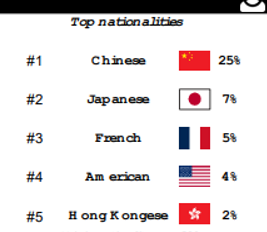
J'aimerais transformer le calcul dynamiquement pour ne pas avoir le china mais je ne sais pas comment
Pouvez vous m'aider?
Merci!
Accepted Solutions

 vinieme12
- Mark as New
- Bookmark
- Subscribe
- Mute
- Subscribe to RSS Feed
- Permalink
- Report Inappropriate Content
Use the TOTAL keyword
=count(
{<
$(var_Customer_Begin_Date_Saleforce)={"<=$(var_Date_Sel)"}, $(var_Customer_End_Date_Saleforce)={">=$(var_Date_Sel)"},
$(var_Report_Date), $(var_Reporting_Currency)
>}
distinct$(var_Customer_Key_Saleforce)
)
/
count(
{<
$(var_Customer_Begin_Date_Saleforce)={"<=$(var_Date_Sel)"}, $(var_Customer_End_Date_Saleforce)={">=$(var_Date_Sel) "},
$(var_Report_Date), $(var_Reporting_Currency)
>}
distinct TOTAL $(var_Customer_Key_Saleforce)
)
If a post helps to resolve your issue, please accept it as a Solution.
vinieme12
- Mark as New
- Bookmark
- Subscribe
- Mute
- Subscribe to RSS Feed
- Permalink
- Report Inappropriate Content
Use the TOTAL keyword
=count(
{<
$(var_Customer_Begin_Date_Saleforce)={"<=$(var_Date_Sel)"}, $(var_Customer_End_Date_Saleforce)={">=$(var_Date_Sel)"},
$(var_Report_Date), $(var_Reporting_Currency)
>}
distinct$(var_Customer_Key_Saleforce)
)
/
count(
{<
$(var_Customer_Begin_Date_Saleforce)={"<=$(var_Date_Sel)"}, $(var_Customer_End_Date_Saleforce)={">=$(var_Date_Sel) "},
$(var_Report_Date), $(var_Reporting_Currency)
>}
distinct TOTAL $(var_Customer_Key_Saleforce)
)
If a post helps to resolve your issue, please accept it as a Solution.
vinieme12
- Mark as New
- Bookmark
- Subscribe
- Mute
- Subscribe to RSS Feed
- Permalink
- Report Inappropriate Content
Refer
https://community.qlik.com/t5/QlikView-App-Dev/Keywords-TOTAL-ALL-DISTINCT/m-p/143516
If a post helps to resolve your issue, please accept it as a Solution.
eprehu
- Mark as New
- Bookmark
- Subscribe
- Mute
- Subscribe to RSS Feed
- Permalink
- Report Inappropriate Content
Thanks a lot !!!!!!
vinieme12
- Mark as New
- Bookmark
- Subscribe
- Mute
- Subscribe to RSS Feed
- Permalink
- Report Inappropriate Content
please close resolved threads by marking a response as a solution
If a post helps to resolve your issue, please accept it as a Solution.
