Unlock a world of possibilities! Login now and discover the exclusive benefits awaiting you.

Announcements
Talend Cloud AWS EU Scheduled Outage: Starting Tues 26 May 21:00 CEST with expected completion Wed 27 May 01:00 CEST
- Qlik Community
- :
- Forums
- :
- Analytics & AI
- :
- Products & Topics
- :
- Visualization and Usability
- :
- Re: Can you aggr () on a Total column ?
Options
- Subscribe to RSS Feed
- Mark Topic as New
- Mark Topic as Read
- Float this Topic for Current User
- Bookmark
- Subscribe
- Mute
- Printer Friendly Page
Turn on suggestions
Auto-suggest helps you quickly narrow down your search results by suggesting possible matches as you type.
Showing results for

 claudialet
Contributor III
2019-02-15
01:28 PM
- Mark as New
- Bookmark
- Subscribe
- Mute
- Subscribe to RSS Feed
- Permalink
- Report Inappropriate Content
Can you aggr () on a Total column ?
Please see attached qvf.
There is an auto generated 'Total' column.
For row 'yellow' - how do I return the total sum of row 'red' + row 'purple' instead ? Should be returning 19.7

1,017 Views
1 Solution
Accepted Solutions

 sunny_talwar
MVP
2019-02-15
01:46 PM
- Mark as New
- Bookmark
- Subscribe
- Mute
- Subscribe to RSS Feed
- Permalink
- Report Inappropriate Content
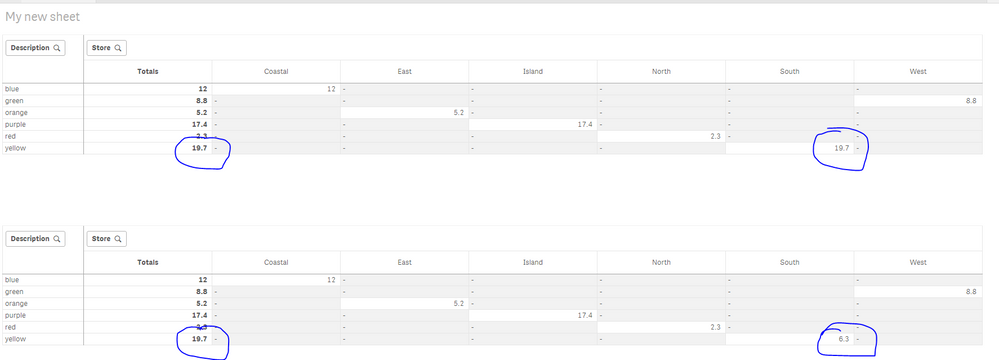
Do you want one of these?
Top chart expression
If(Description = 'yellow', Sum(TOTAL {<Description = {'red', 'purple'}>}Amount * Rate), Sum(Amount * Rate))Bottom chart expression
If(Description = 'yellow' and SecondaryDimensionality() = 0, Sum(TOTAL {<Description = {'red', 'purple'}>}Amount * Rate), Sum(Amount * Rate))
3 Replies

 Channa
Specialist III
2019-02-15
01:34 PM
- Mark as New
- Bookmark
- Subscribe
- Mute
- Subscribe to RSS Feed
- Permalink
- Report Inappropriate Content
in that case what you do about South 6.3
Channa
1,011 Views
claudialet
Contributor III
2019-02-15
01:40 PM
Author
- Mark as New
- Bookmark
- Subscribe
- Mute
- Subscribe to RSS Feed
- Permalink
- Report Inappropriate Content
That value is to be not displayed.
Only need to fix 'Total' column . Please help !
1,006 Views
sunny_talwar
MVP
2019-02-15
01:46 PM
- Mark as New
- Bookmark
- Subscribe
- Mute
- Subscribe to RSS Feed
- Permalink
- Report Inappropriate Content
Do you want one of these?
Top chart expression
If(Description = 'yellow', Sum(TOTAL {<Description = {'red', 'purple'}>}Amount * Rate), Sum(Amount * Rate))Bottom chart expression
If(Description = 'yellow' and SecondaryDimensionality() = 0, Sum(TOTAL {<Description = {'red', 'purple'}>}Amount * Rate), Sum(Amount * Rate))
