Unlock a world of possibilities! Login now and discover the exclusive benefits awaiting you.

Announcements
Want to see what's currently in public preview? We've pulled it all together in one place. Check it out here
- Qlik Community
- :
- Forums
- :
- Analytics & AI
- :
- Products & Topics
- :
- Visualization and Usability
- :
- Change Color QMC Topbar
Options
- Subscribe to RSS Feed
- Mark Topic as New
- Mark Topic as Read
- Float this Topic for Current User
- Bookmark
- Subscribe
- Mute
- Printer Friendly Page
Turn on suggestions
Auto-suggest helps you quickly narrow down your search results by suggesting possible matches as you type.
Showing results for

 ift_isabelle
Partner - Creator III
2019-06-18
05:20 AM
- Mark as New
- Bookmark
- Subscribe
- Mute
- Subscribe to RSS Feed
- Permalink
- Report Inappropriate Content
Change Color QMC Topbar
Hi,
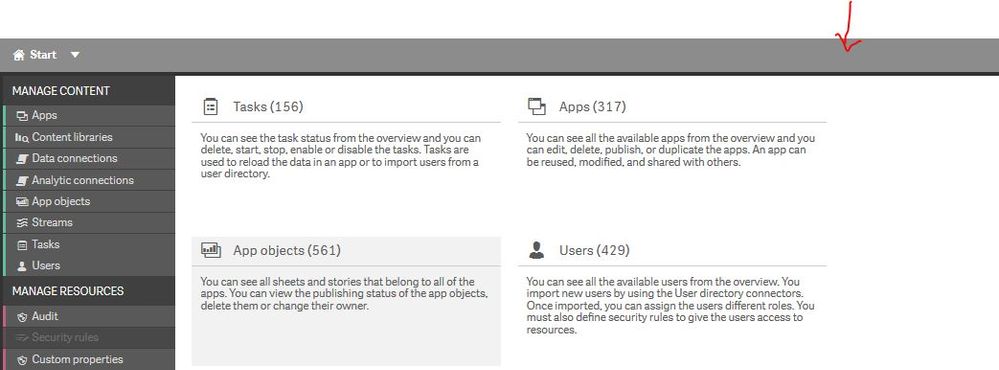
I want to change the color of the topbar of the QMC so i can distinguish my Test and Production environment.
I found the location of the CSS file for the QMC (..\Qlik\Sense\Client\qmc.css), but does anyone has any idea which element I have to change to turn it red?
Thanks in advance,
Kind Regards,
Isabelle
2,993 Views
1 Solution
Accepted Solutions
 EliGohar
Partner - Specialist
2019-06-18
05:33 AM
- Mark as New
- Bookmark
- Subscribe
- Mute
- Subscribe to RSS Feed
- Permalink
- Report Inappropriate Content
Hi @ift_isabelle ,
You correct about the qmc.css file location.
Open it and find this definition (qmc-toolbar element)
qmc-toolbar {
  display: -webkit-box;
  display: -moz-box;
  display: -webkit-flex;
  display: -ms-flexbox;
  display: flex;
  -webkit-box-direction: normal;
  -moz-box-direction: normal;
  -webkit-box-orient: horizontal;
  -moz-box-orient: horizontal;
  -webkit-flex-direction: row;
  -ms-flex-direction: row;
  flex-direction: row;
  -webkit-box-flex: none;
  -moz-box-flex: none;
  -webkit-flex: none;
  -ms-flex: none;
  flex: none;
  padding: 6px 10px;
  background-color: #8C8C8C;
}
Simply change the background-color property to:
background-color: red;Result:

2,988 Views
2 Replies
EliGohar
Partner - Specialist
2019-06-18
05:33 AM
- Mark as New
- Bookmark
- Subscribe
- Mute
- Subscribe to RSS Feed
- Permalink
- Report Inappropriate Content
Hi @ift_isabelle ,
You correct about the qmc.css file location.
Open it and find this definition (qmc-toolbar element)
qmc-toolbar {
  display: -webkit-box;
  display: -moz-box;
  display: -webkit-flex;
  display: -ms-flexbox;
  display: flex;
  -webkit-box-direction: normal;
  -moz-box-direction: normal;
  -webkit-box-orient: horizontal;
  -moz-box-orient: horizontal;
  -webkit-flex-direction: row;
  -ms-flex-direction: row;
  flex-direction: row;
  -webkit-box-flex: none;
  -moz-box-flex: none;
  -webkit-flex: none;
  -ms-flex: none;
  flex: none;
  padding: 6px 10px;
  background-color: #8C8C8C;
}
Simply change the background-color property to:
background-color: red;Result:
2,989 Views
ift_isabelle
Partner - Creator III
2019-06-18
06:00 AM
Author
- Mark as New
- Bookmark
- Subscribe
- Mute
- Subscribe to RSS Feed
- Permalink
- Report Inappropriate Content
Works perfect! Thanks!
