Unlock a world of possibilities! Login now and discover the exclusive benefits awaiting you.

- Qlik Community
- :
- Forums
- :
- Analytics & AI
- :
- Products & Topics
- :
- Visualization and Usability
- :
- Change Dimension Name Through Set analysis
- Subscribe to RSS Feed
- Mark Topic as New
- Mark Topic as Read
- Float this Topic for Current User
- Bookmark
- Subscribe
- Mute
- Printer Friendly Page

 IgorGol
- Mark as New
- Bookmark
- Subscribe
- Mute
- Subscribe to RSS Feed
- Permalink
- Report Inappropriate Content
Change Dimension Name Through Set analysis
Hi,
I want to change The name of Dimension with Set analysis, how can I do it?
now the exp is : =Department
and I want a different word (cause in the graph it should be represented with "Head of Department ")
Thanks!

 rwunderlich
- Mark as New
- Bookmark
- Subscribe
- Mute
- Subscribe to RSS Feed
- Permalink
- Report Inappropriate Content
Can you just set the Label value in the Dimension?
-Rob

 shivanisapkale
- Mark as New
- Bookmark
- Subscribe
- Mute
- Subscribe to RSS Feed
- Permalink
- Report Inappropriate Content
Hello,
The graph in which you are using these department dimension in that add "Head of Department " as label for Dimension
Regards,
Shivani Sapkale
IgorGol
- Mark as New
- Bookmark
- Subscribe
- Mute
- Subscribe to RSS Feed
- Permalink
- Report Inappropriate Content
Hi,
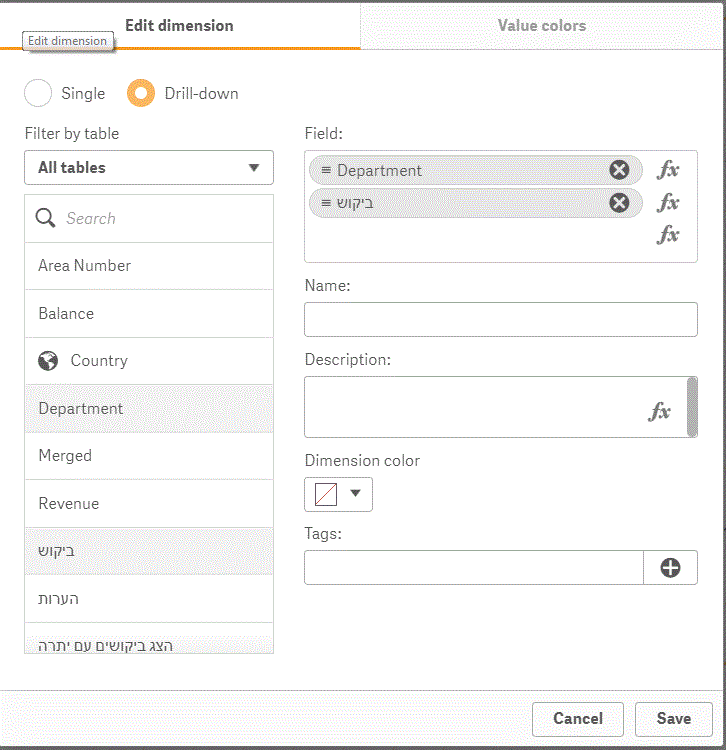
The Dimension I created as drill dimension in Master Items so I can't change the label in graph
How Can I change it in Master items?
 IgorGol
- Mark as New
- Bookmark
- Subscribe
- Mute
- Subscribe to RSS Feed
- Permalink
- Report Inappropriate Content
Hi,
The Dimension I created as drill dimension in Master Items so I can't change the label in graph
How Can I change it in Master items?

 Qlik1_User1
- Mark as New
- Bookmark
- Subscribe
- Mute
- Subscribe to RSS Feed
- Permalink
- Report Inappropriate Content
Try if this helps..
=GetFieldSelections(groupname)
IgorGol
- Mark as New
- Bookmark
- Subscribe
- Mute
- Subscribe to RSS Feed
- Permalink
- Report Inappropriate Content
Sorry for my question but where I should use it?
=GetFieldSelections(groupname)
