Unlock a world of possibilities! Login now and discover the exclusive benefits awaiting you.

Announcements
Share your agentic AI experience, learn from others, and earn a new badge: Put Agentic AI to Work
- Qlik Community
- :
- Forums
- :
- Analytics & AI
- :
- Products & Topics
- :
- Visualization and Usability
- :
- Change text box Bg color based on string values
Options
- Subscribe to RSS Feed
- Mark Topic as New
- Mark Topic as Read
- Float this Topic for Current User
- Bookmark
- Subscribe
- Mute
- Printer Friendly Page
Turn on suggestions
Auto-suggest helps you quickly narrow down your search results by suggesting possible matches as you type.
Showing results for

 Omkar13
Contributor III
2021-02-25
07:43 PM
- Mark as New
- Bookmark
- Subscribe
- Mute
- Subscribe to RSS Feed
- Permalink
- Report Inappropriate Content
Change text box Bg color based on string values
Hi experts,
I want to change the bg color of text box based on String value. I have 4 string values for priority Critical, High, moderate and Low and bg color are Red, Yellow, Green and blue respectively.
I was able to achieve similar on table values based on measure and adding if condition but it doesn't seems to work with text box bg. Does anyone know a solution for this?
1,823 Views
2 Solutions
Accepted Solutions
Omkar13
Contributor III
2021-02-25
08:17 PM
Author
- Mark as New
- Bookmark
- Subscribe
- Mute
- Subscribe to RSS Feed
- Permalink
- Report Inappropriate Content
Solution:
=if(Priority = '2 - High', red(), If(Priority ='1 - Critical', yellow(), If(Priority ='3 - Moderate', green(),If(Priority ='4 - Low', blue()))))
1,809 Views


2021-02-25
08:21 PM
- Mark as New
- Bookmark
- Subscribe
- Mute
- Subscribe to RSS Feed
- Permalink
- Report Inappropriate Content
Try this expression, in the Calculated Color
Pick(Match(String,'Critical','High','Moderate','Low'),Red(),Yellow(),Green(),Blue())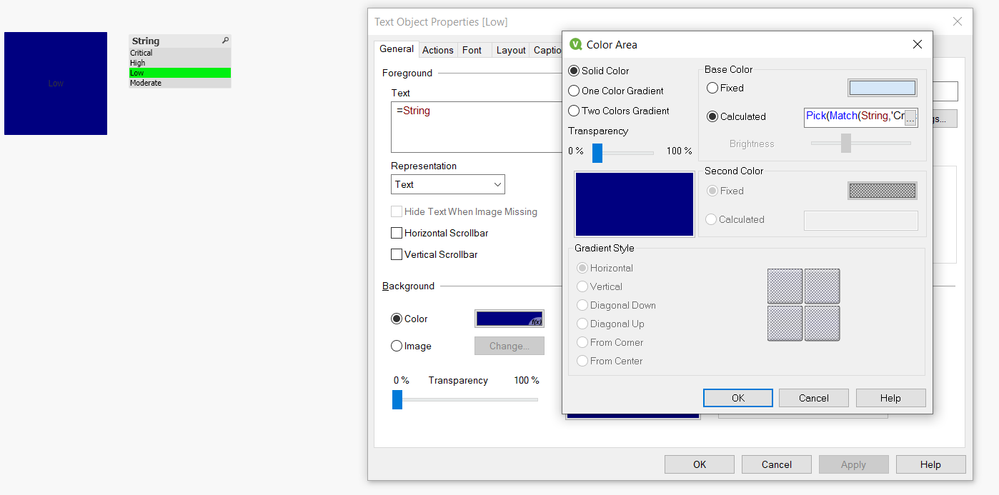
4 Replies
Omkar13
Contributor III
2021-02-25
08:17 PM
Author
- Mark as New
- Bookmark
- Subscribe
- Mute
- Subscribe to RSS Feed
- Permalink
- Report Inappropriate Content
Solution:
=if(Priority = '2 - High', red(), If(Priority ='1 - Critical', yellow(), If(Priority ='3 - Moderate', green(),If(Priority ='4 - Low', blue()))))
1,810 Views
2021-02-25
08:21 PM
- Mark as New
- Bookmark
- Subscribe
- Mute
- Subscribe to RSS Feed
- Permalink
- Report Inappropriate Content
Try this expression, in the Calculated Color
Pick(Match(String,'Critical','High','Moderate','Low'),Red(),Yellow(),Green(),Blue())
Omkar13
Contributor III
2021-02-25
08:27 PM
Author
- Mark as New
- Bookmark
- Subscribe
- Mute
- Subscribe to RSS Feed
- Permalink
- Report Inappropriate Content
Thanks @Saravanan_Desingh I will see if this expression also work with qlik sense. Appreciate it
Omkar13
Contributor III
2021-02-25
08:32 PM
Author
- Mark as New
- Bookmark
- Subscribe
- Mute
- Subscribe to RSS Feed
- Permalink
- Report Inappropriate Content
@Saravanan_Desingh It worked😁. Thanks, I have more ways to highlight text now. 😍
