Unlock a world of possibilities! Login now and discover the exclusive benefits awaiting you.

Announcements
Share your agentic AI experience, learn from others, and earn a new badge: Put Agentic AI to Work
- Qlik Community
- :
- Forums
- :
- Analytics & AI
- :
- Products & Topics
- :
- Visualization and Usability
- :
- Change text colour for dimensions Multi KPI
Options
- Subscribe to RSS Feed
- Mark Topic as New
- Mark Topic as Read
- Float this Topic for Current User
- Bookmark
- Subscribe
- Mute
- Printer Friendly Page
Turn on suggestions
Auto-suggest helps you quickly narrow down your search results by suggesting possible matches as you type.
Showing results for

 Woppi
Woppi
Contributor II
2021-11-01
08:26 AM
- Mark as New
- Bookmark
- Subscribe
- Mute
- Subscribe to RSS Feed
- Permalink
- Report Inappropriate Content
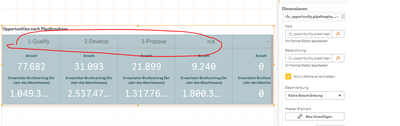
Change text colour for dimensions Multi KPI
2,499 Views
1 Solution
Accepted Solutions

 BenjaminT
Partner - Creator
2021-11-01
08:52 AM
- Mark as New
- Bookmark
- Subscribe
- Mute
- Subscribe to RSS Feed
- Permalink
- Report Inappropriate Content
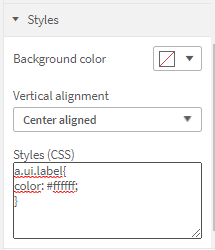
Hi, you can do this with css under Appearance -> Styles
Add the following to change the text color:
a.ui.label{
color: #ffffff;
}
Hope this helps
Ben
2 Replies
BenjaminT
Partner - Creator
2021-11-01
08:52 AM
- Mark as New
- Bookmark
- Subscribe
- Mute
- Subscribe to RSS Feed
- Permalink
- Report Inappropriate Content
Hi, you can do this with css under Appearance -> Styles
Add the following to change the text color:
a.ui.label{
color: #ffffff;
}
Hope this helps
Ben
Woppi
Contributor II
2021-11-01
10:49 AM
Author
- Mark as New
- Bookmark
- Subscribe
- Mute
- Subscribe to RSS Feed
- Permalink
- Report Inappropriate Content
Thank you for the quick answer and solution
