Unlock a world of possibilities! Login now and discover the exclusive benefits awaiting you.

- Qlik Community
- :
- Forums
- :
- Analytics & AI
- :
- Products & Topics
- :
- Visualization and Usability
- :
- Changing the labels name in bar chart
- Subscribe to RSS Feed
- Mark Topic as New
- Mark Topic as Read
- Float this Topic for Current User
- Bookmark
- Subscribe
- Mute
- Printer Friendly Page

- Mark as New
- Bookmark
- Subscribe
- Mute
- Subscribe to RSS Feed
- Permalink
- Report Inappropriate Content
Changing the labels name in bar chart
HI all,
I want to change the labels name in the bar chart. so i have used the below query for dimensions.
IF(match(question_id, '1'), Replace(question_id, '1', 'Q1'),
IF(match(question_id, '2'), Replace(question_id, '2', 'Q2'),
IF(match(question_id, '3'), Replace(question_id, '3', 'Q3'),
IF(match(question_id, '4'), Replace(question_id, '4', 'Q4'),
IF(match(question_id, '5'), Replace(question_id, '5', 'Q5'),
IF(match(question_id, '6'), Replace(question_id, '6', 'Q6'),
IF(match(question_id, '7'), Replace(question_id, '7', 'Q7'),
IF(match(question_id, '8'), Replace(question_id, '8', 'Q8'),
IF(match(question_id, '9'), Replace(question_id, '9', 'Q9'),
IF(match(question_id, '10'), Replace(question_id, '10', 'Q10'),question_id))))))))))
To restrict the data to 10 bars i have used Limitation to "Fixed number".
But it is displaying some other question id's from the table.
Please see the image i have attached.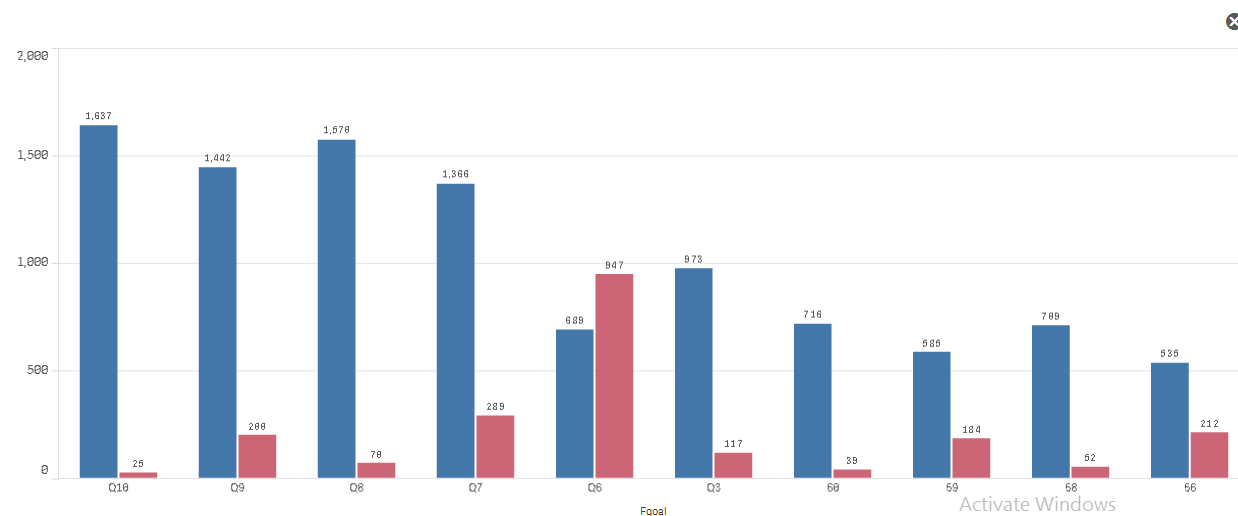
Thanks,
Pramod
- Tags:
- barchart
- « Previous Replies
-
- 1
- 2
- Next Replies »

 jagan
jagan
- Mark as New
- Bookmark
- Subscribe
- Mute
- Subscribe to RSS Feed
- Permalink
- Report Inappropriate Content
Hi,
Can you upload some sample data, I don't have Qliksense installed in my current PC.
Regards,
Jagan.
- Mark as New
- Bookmark
- Subscribe
- Mute
- Subscribe to RSS Feed
- Permalink
- Report Inappropriate Content
Hi jagan,
please find the sample data.
Thanks,
Pramod
- « Previous Replies
-
- 1
- 2
- Next Replies »