Unlock a world of possibilities! Login now and discover the exclusive benefits awaiting you.

- Qlik Community
- :
- Forums
- :
- Analytics & AI
- :
- Products & Topics
- :
- Visualization and Usability
- :
- Charting a sum
- Subscribe to RSS Feed
- Mark Topic as New
- Mark Topic as Read
- Float this Topic for Current User
- Bookmark
- Subscribe
- Mute
- Printer Friendly Page

 gkluca82
- Mark as New
- Bookmark
- Subscribe
- Mute
- Subscribe to RSS Feed
- Permalink
- Report Inappropriate Content
Charting a sum
Hi guys,
i've got a problem.
I'm trying to bar chart a simply measure but i can't get any result.
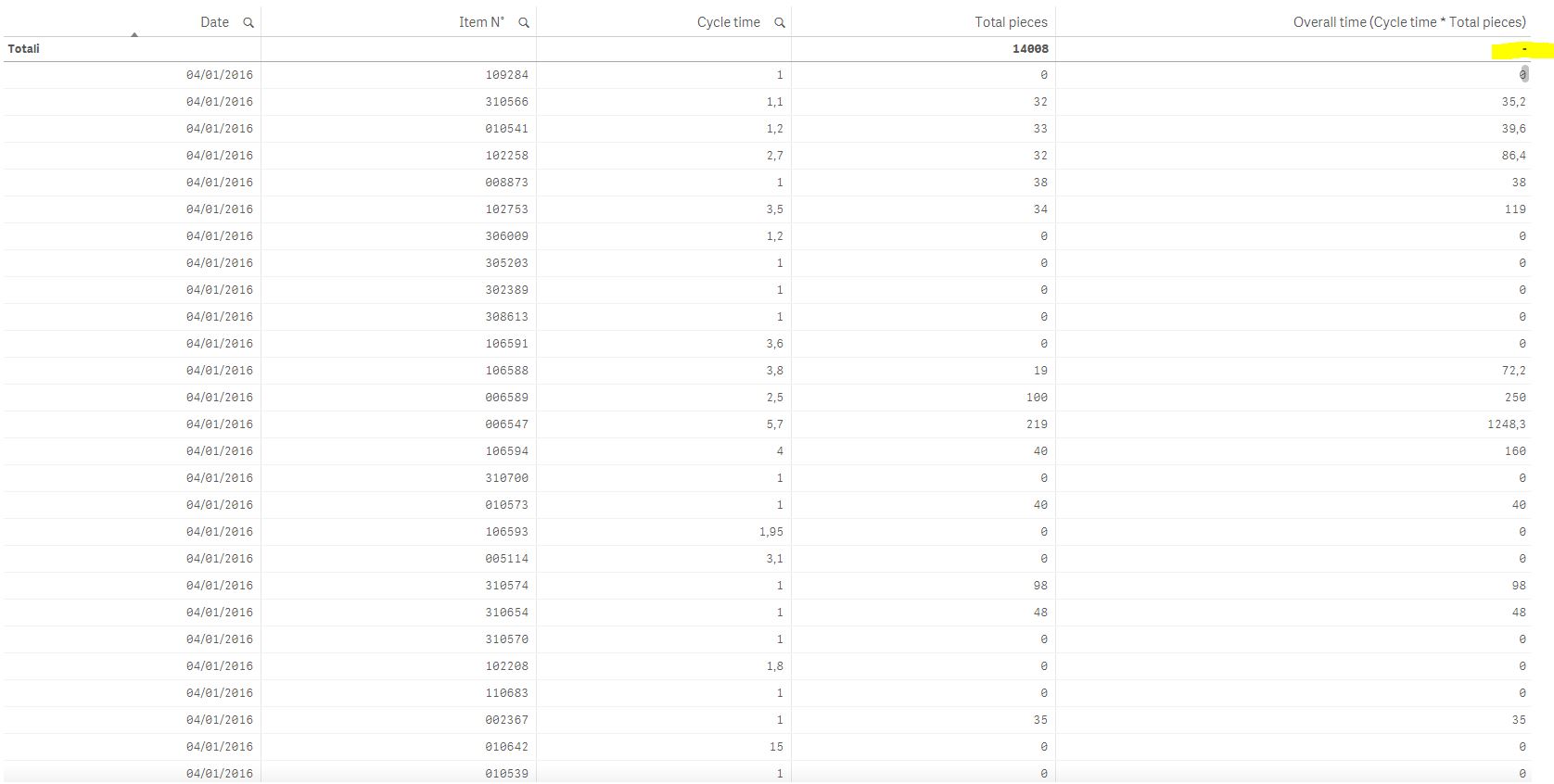
I want the date on X axis and the Overall time on Y axis but for some reason it doesnt aggregate the value.
In this screenshot i get this value on a row level but it doesnt work on a bar chart.
[Date] (dimension) [Item N°] (dimension) [Cycle Time] (dimension) [Total pieces] (measure) [Overall time](measure)
Any help?
Accepted Solutions
 brijesh1991
- Mark as New
- Bookmark
- Subscribe
- Mute
- Subscribe to RSS Feed
- Permalink
- Report Inappropriate Content
Sum(Aggr(Expression,Dim1, Dim2,Dim3.....))
Where Expression is your sum(Something) and Dim1, Dim2, Dim3 etc are available dimensions in your table.

 reddy-s
- Mark as New
- Bookmark
- Subscribe
- Mute
- Subscribe to RSS Feed
- Permalink
- Report Inappropriate Content
Hi Luca,
Are you trying to sum a text field? just make use of the num#() function to convert it into a num, and then try the sum() function.
Thanks,
Sangram.
gkluca82
- Mark as New
- Bookmark
- Subscribe
- Mute
- Subscribe to RSS Feed
- Permalink
- Report Inappropriate Content
Hi Sangram,
it doesnt work.
this is what i'd like to do:
for each [Date]
for each [Item n°]
a sum of [Total pieces]*[Cycle time]
to obtain a total time for every item in that date.
Strangely, if i select from the table above a [Cycle time], using it like a filter, the bar chart works, but clearly it show me only the sum of the [Item n°] associated for that particular [cycle time] * [Total pieces].

- Mark as New
- Bookmark
- Subscribe
- Mute
- Subscribe to RSS Feed
- Permalink
- Report Inappropriate Content
try like this?
Expression: sum(num#([Overall time]))
 jagan
jagan
- Mark as New
- Bookmark
- Subscribe
- Mute
- Subscribe to RSS Feed
- Permalink
- Report Inappropriate Content
Hi,
Try
Sum([Cycle Time] * [Total Pieces])
Hope this helps you.
Regards,
Jagan.
gkluca82
- Mark as New
- Bookmark
- Subscribe
- Mute
- Subscribe to RSS Feed
- Permalink
- Report Inappropriate Content
nope.
the [total pieces] is a measure: (sum(xxx)+sum(yyy))
it seems that the [cycle time] is interpreted like a label instead of a number, but in the data model is formatted like a number
brijesh1991
- Mark as New
- Bookmark
- Subscribe
- Mute
- Subscribe to RSS Feed
- Permalink
- Report Inappropriate Content
Sum(Aggr(Expression,Dim1, Dim2,Dim3.....))
Where Expression is your sum(Something) and Dim1, Dim2, Dim3 etc are available dimensions in your table.
gkluca82
- Mark as New
- Bookmark
- Subscribe
- Mute
- Subscribe to RSS Feed
- Permalink
- Report Inappropriate Content
thank you, it works!!!