Unlock a world of possibilities! Login now and discover the exclusive benefits awaiting you.

- Qlik Community
- :
- Forums
- :
- Analytics & AI
- :
- Products & Topics
- :
- Visualization and Usability
- :
- Re: Compare dates between previously loaded record...
- Subscribe to RSS Feed
- Mark Topic as New
- Mark Topic as Read
- Float this Topic for Current User
- Bookmark
- Subscribe
- Mute
- Printer Friendly Page

 MadiF
MadiF
- Mark as New
- Bookmark
- Subscribe
- Mute
- Subscribe to RSS Feed
- Permalink
- Report Inappropriate Content
Compare dates between previously loaded records and current line
Hello everyone; I want to know if there's a way, while a table is loading, to check the lines already loaded for a date comparison. I'm hoping the exists() function might be able to get me there but I haven't been able to make it work. Imagine a table like the one below:
Table:
Row Num | Date Field A | Date Field B | Y/N Goal Result
1 | 10/2/2019 | 11/5/2019 | -
2 | 10/3/2019 | 11/5/2019 | Y
3 | 11/1/2019 | 12/10/2019 | Y
4 | 12/13/2019 | 12/15/2019 | N
5 | 12/20/2019 | 1/5/2020 | N
The logic I'm trying to execute is, as each line loads, ask the question: 'has there been a line (aka exists?) with a 'date field B' value that is greater than the current 'date field A' value? This would create a Y/N flag for each individual line (would of course be null for line 1 as there is no prior entry). Sample displays there is no exact pattern to the date ranges that appear in my dataset but I am at least able to load in date field A order as a start. Recognize I may end up needing some alternate loop/peek structure but trying to avoid loops if possible. Thanks for any help/hacks.
Accepted Solutions

 mato32188
- Mark as New
- Bookmark
- Subscribe
- Mute
- Subscribe to RSS Feed
- Permalink
- Report Inappropriate Content
This is my script
SET ThousandSep=',';
SET DecimalSep='.';
SET MoneyThousandSep=',';
SET MoneyDecimalSep='.';
SET MoneyFormat='$#,##0.00;-$#,##0.00';
SET TimeFormat='h:mm:ss TT';
SET DateFormat='MM/DD/YYYY';
SET TimestampFormat='M/D/YYYY h:mm:ss[.fff] TT';
SET FirstWeekDay=6;
SET BrokenWeeks=1;
SET ReferenceDay=0;
SET FirstMonthOfYear=1;
SET CollationLocale='en-US';
SET MonthNames='Jan;Feb;Mar;Apr;May;Jun;Jul;Aug;Sep;Oct;Nov;Dec';
SET LongMonthNames='January;February;March;April;May;June;July;August;September;October;November;December';
SET DayNames='Mon;Tue;Wed;Thu;Fri;Sat;Sun';
SET LongDayNames='Monday;Tuesday;Wednesday;Thursday;Friday;Saturday;Sunday';
SET NumericalAbbreviation='3:k;6:M;9:G;12:T;15:P;18:E;21:Z;24:Y;-3:m;-6:μ;-9:n;-12:p;-15:f;-18:a;-21:z;-24:y';
tmp:
load * Inline [
DateA,DateB
10/2/2019,11/5/2019
10/3/2019,11/5/2019
11/1/2019,12/10/2019
12/13/2019,12/15/2019
12/20/2019,1/5/2020
];
tmp2:
Load
DateA,
DateB,
tmpRangeCurrentMax,
Peek(tmpRangeCurrentMax) as tmpRangeUpToCurrentMaxExcl,
if(Peek(tmpRangeCurrentMax)>DateA,'Y','N') as "Y/N Goal Result"
;
Load
DateA,
DateB,
if(RecNo()=1,null(),if(RangeMax(DateB,Peek('Test'))>DateA,'Y','N')) as Test,
RangeMax(DateB,Peek('tmpRangeCurrentMax')) as tmpRangeCurrentMax
Resident tmp;
Drop table tmp;
with the result:
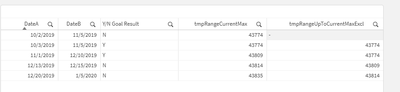
Could you please copy it and check result with your logic? We will find the proper solution for you.
Thank you.
m
mato32188
- Mark as New
- Bookmark
- Subscribe
- Mute
- Subscribe to RSS Feed
- Permalink
- Report Inappropriate Content
Hi MadiF,
I hope this could help you.
First load your original table. Then
Table2:
Load
DateA,
DateB,
if(Peek(tmpRangeCurrentMax)>DateA,'Y','N') as "Y/N Goal Result" //find range maximum up to current row (excl.) and create Y/N flag
;
Load
DateA,
DateB,
RangeMax(DateB,Peek('tmpRangeCurrentMax')) as tmpRangeCurrentMax //find range maximum including current row
Resident Table;
Drop table Table;
Thanks.
m
MadiF
- Mark as New
- Bookmark
- Subscribe
- Mute
- Subscribe to RSS Feed
- Permalink
- Report Inappropriate Content
@mato32188 - When I test the first part of your suggestion (listed under Table2), every result is 'N'- where I know by my original post logic I should definitely have some yeses
mato32188
- Mark as New
- Bookmark
- Subscribe
- Mute
- Subscribe to RSS Feed
- Permalink
- Report Inappropriate Content
This is my script
SET ThousandSep=',';
SET DecimalSep='.';
SET MoneyThousandSep=',';
SET MoneyDecimalSep='.';
SET MoneyFormat='$#,##0.00;-$#,##0.00';
SET TimeFormat='h:mm:ss TT';
SET DateFormat='MM/DD/YYYY';
SET TimestampFormat='M/D/YYYY h:mm:ss[.fff] TT';
SET FirstWeekDay=6;
SET BrokenWeeks=1;
SET ReferenceDay=0;
SET FirstMonthOfYear=1;
SET CollationLocale='en-US';
SET MonthNames='Jan;Feb;Mar;Apr;May;Jun;Jul;Aug;Sep;Oct;Nov;Dec';
SET LongMonthNames='January;February;March;April;May;June;July;August;September;October;November;December';
SET DayNames='Mon;Tue;Wed;Thu;Fri;Sat;Sun';
SET LongDayNames='Monday;Tuesday;Wednesday;Thursday;Friday;Saturday;Sunday';
SET NumericalAbbreviation='3:k;6:M;9:G;12:T;15:P;18:E;21:Z;24:Y;-3:m;-6:μ;-9:n;-12:p;-15:f;-18:a;-21:z;-24:y';
tmp:
load * Inline [
DateA,DateB
10/2/2019,11/5/2019
10/3/2019,11/5/2019
11/1/2019,12/10/2019
12/13/2019,12/15/2019
12/20/2019,1/5/2020
];
tmp2:
Load
DateA,
DateB,
tmpRangeCurrentMax,
Peek(tmpRangeCurrentMax) as tmpRangeUpToCurrentMaxExcl,
if(Peek(tmpRangeCurrentMax)>DateA,'Y','N') as "Y/N Goal Result"
;
Load
DateA,
DateB,
if(RecNo()=1,null(),if(RangeMax(DateB,Peek('Test'))>DateA,'Y','N')) as Test,
RangeMax(DateB,Peek('tmpRangeCurrentMax')) as tmpRangeCurrentMax
Resident tmp;
Drop table tmp;
with the result:
Could you please copy it and check result with your logic? We will find the proper solution for you.
Thank you.
m
MadiF
- Mark as New
- Bookmark
- Subscribe
- Mute
- Subscribe to RSS Feed
- Permalink
- Report Inappropriate Content
@mato32188 your logic worked, thank you so much!
mato32188
- Mark as New
- Bookmark
- Subscribe
- Mute
- Subscribe to RSS Feed
- Permalink
- Report Inappropriate Content
No problem 🙂
