Unlock a world of possibilities! Login now and discover the exclusive benefits awaiting you.

- Qlik Community
- :
- Forums
- :
- Analytics & AI
- :
- Products & Topics
- :
- Visualization and Usability
- :
- Concatenate two fields with space in between
- Subscribe to RSS Feed
- Mark Topic as New
- Mark Topic as Read
- Float this Topic for Current User
- Bookmark
- Subscribe
- Mute
- Printer Friendly Page

 CreepyCatLady
- Mark as New
- Bookmark
- Subscribe
- Mute
- Subscribe to RSS Feed
- Permalink
- Report Inappropriate Content
Concatenate two fields with space in between
Hello all. I have searched the forums for an answer to this and have not found exactly what I need.
I have two fields that I want to combine to make a third. I have successfully accomplished this in the data load editor using the concatenate function as follows:
"OS_VERSION",
CONCAT("OS_NAME", "OS_VERSION") AS "OS_FULL",
Of course, this results in the fields appearing without a space between them. When I try using SQL syntax to add a space, I get an error upon loading the data. I have tried the following to no avail:
"OS_VERSION",
CONCAT("OS_NAME", " ", "OS_VERSION") AS "OS_FULL", (results in error)
"OS_VERSION",
CONCAT("OS_NAME", ' ', "OS_VERSION") AS "OS_FULL", (results in error)
"OS_VERSION",
CONCAT("OS_NAME" & & "OS_VERSION") AS "OS_FULL", (results in error)
What is the proper Qlik syntax for this, please?
- « Previous Replies
-
- 1
- 2
- Next Replies »
Accepted Solutions

 dplr-rn
- Mark as New
- Bookmark
- Subscribe
- Mute
- Subscribe to RSS Feed
- Permalink
- Report Inappropriate Content
you are doing that in the sql statement.
in the sql statement only sql syntax will work. (and that depends on your DB)
what i was suggesting is this
load *

,"OS_NAME" & ' ' & "OS_VERSION" AS "OS_FULL"
;

sql

select......
dplr-rn
- Mark as New
- Bookmark
- Subscribe
- Mute
- Subscribe to RSS Feed
- Permalink
- Report Inappropriate Content
i am assuming you are not doing a group by. if so try below
"OS_NAME" & ' ' & "OS_VERSION" AS "OS_FULL",
CreepyCatLady
- Mark as New
- Bookmark
- Subscribe
- Mute
- Subscribe to RSS Feed
- Permalink
- Report Inappropriate Content
Correct, I am not doing a group by. I just tried this, both with and without the CONCAT function, and it did not work.
CONCAT("OS_NAME" & ' ' & "OS_VERSION") AS "OS_FULL", (results in error)
"OS_NAME" & ' ' & "OS_VERSION" AS "OS_FULL", (results in error)
("OS_NAME" & ' ' & "OS_VERSION") AS "OS_FULL", (results in error)
dplr-rn
- Mark as New
- Bookmark
- Subscribe
- Mute
- Subscribe to RSS Feed
- Permalink
- Report Inappropriate Content
this should not result in error "OS_NAME" & ' ' & "OS_VERSION" AS "OS_FULL",
whats the error you are getting?
share the full statement and the error
CreepyCatLady
- Mark as New
- Bookmark
- Subscribe
- Mute
- Subscribe to RSS Feed
- Permalink
- Report Inappropriate Content
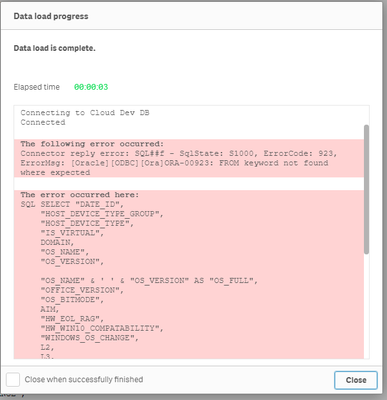

 marcus_sommer
- Mark as New
- Bookmark
- Subscribe
- Mute
- Subscribe to RSS Feed
- Permalink
- Report Inappropriate Content
The suggestion from dilipranjith is correct and should work. Just ensure that the field-wrapping are double-quotes and not just two single-quotes (you may also replace the double-quotes with square-brackets [ ]) and that there are no further issues in your load.
- Marcus
dplr-rn
- Mark as New
- Bookmark
- Subscribe
- Mute
- Subscribe to RSS Feed
- Permalink
- Report Inappropriate Content
you are doing that in the sql statement.
in the sql statement only sql syntax will work. (and that depends on your DB)
what i was suggesting is this
load *

,"OS_NAME" & ' ' & "OS_VERSION" AS "OS_FULL"
;

sql

select......
marcus_sommer
- Mark as New
- Bookmark
- Subscribe
- Mute
- Subscribe to RSS Feed
- Permalink
- Report Inappropriate Content
Don't apply it within the sql else within a preceeding load, like:
table:
load *, YourMergeStatement;
sql select * from ...;
- Marcus
dplr-rn
- Mark as New
- Bookmark
- Subscribe
- Mute
- Subscribe to RSS Feed
- Permalink
- Report Inappropriate Content
i see you are using oracle. in oracle sql concatete is using pipes. so something like below in sql query
"OS_NAME" ||' ' || "OS_VERSION"
CreepyCatLady
- Mark as New
- Bookmark
- Subscribe
- Mute
- Subscribe to RSS Feed
- Permalink
- Report Inappropriate Content
That worked! Thank you so much. I am very green to Qlik and still get confused on where to put code. Thanks again for the help and your patience.

- « Previous Replies
-
- 1
- 2
- Next Replies »