Unlock a world of possibilities! Login now and discover the exclusive benefits awaiting you.

- Qlik Community
- :
- Forums
- :
- Analytics & AI
- :
- Products & Topics
- :
- Visualization and Usability
- :
- Conditional Visibility
Options
- Subscribe to RSS Feed
- Mark Topic as New
- Mark Topic as Read
- Float this Topic for Current User
- Bookmark
- Subscribe
- Mute
- Printer Friendly Page
Turn on suggestions
Auto-suggest helps you quickly narrow down your search results by suggesting possible matches as you type.
Showing results for

 BouwerVa
Contributor III
2019-07-23
08:48 AM
- Mark as New
- Bookmark
- Subscribe
- Mute
- Subscribe to RSS Feed
- Permalink
- Report Inappropriate Content
Conditional Visibility
Hi
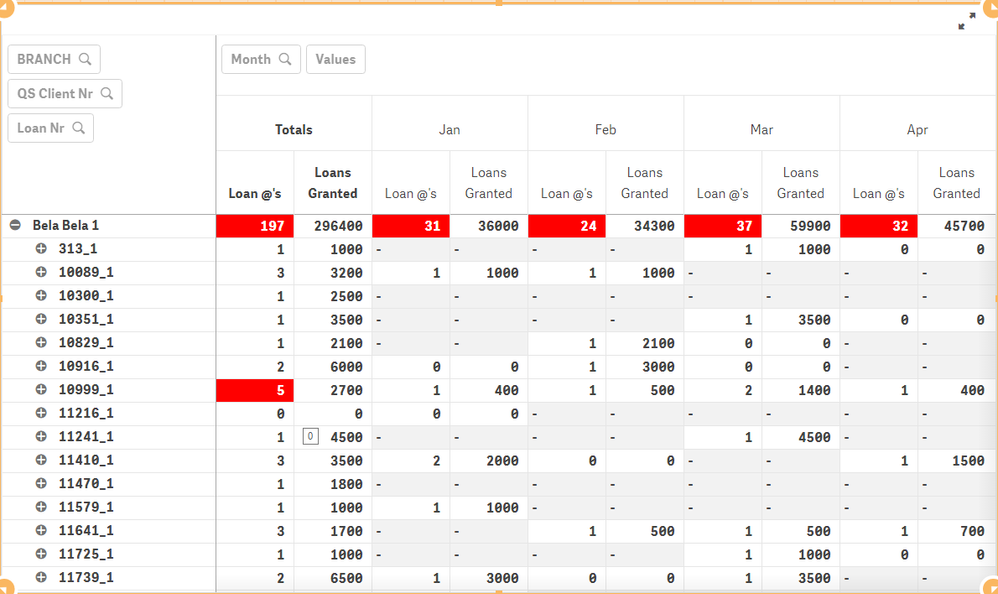
I created a Pivot Table.
But I only want to show the Rows in red.
Any Suggestions:
2,123 Views
1 Solution
Accepted Solutions

 JordyWegman
Partner - Master
2019-07-23
09:44 AM
- Mark as New
- Bookmark
- Subscribe
- Mute
- Subscribe to RSS Feed
- Permalink
- Report Inappropriate Content
Hi,
Use the conditional coloring code also for your measures. But instead or returning LightRed(), return null(). Then you should go to Data Handling in your pivot table properties and disable include null values.
Jordy
Climber
Work smarter, not harder
2,114 Views
2 Replies
JordyWegman
Partner - Master
2019-07-23
09:44 AM
- Mark as New
- Bookmark
- Subscribe
- Mute
- Subscribe to RSS Feed
- Permalink
- Report Inappropriate Content
Hi,
Use the conditional coloring code also for your measures. But instead or returning LightRed(), return null(). Then you should go to Data Handling in your pivot table properties and disable include null values.
Jordy
Climber
Work smarter, not harder
2,115 Views
BouwerVa
Contributor III
2019-07-24
03:31 AM
Author
- Mark as New
- Bookmark
- Subscribe
- Mute
- Subscribe to RSS Feed
- Permalink
- Report Inappropriate Content
It Worked somewhat but it still will not hide the null values.
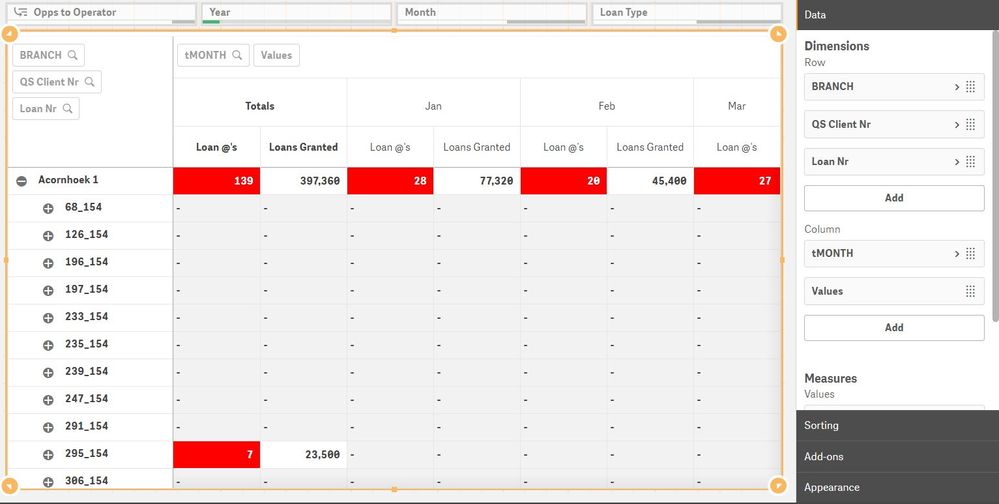
- "Include Null Values" is unticked in all Dimensions
- My Loan at's Formula :
- if(sum(if(TTYPE ='Lo',1)) > 3, sum(if(TTYPE ='Lo',1)), Null())
- My Loans Granted Formula:
- if(sum(if(TTYPE ='Lo',1)) > 3, sum(if(TTYPE = 'Lo', CAPITAL)), Null())
Not sure what I'm doing wrong
2,103 Views
