Unlock a world of possibilities! Login now and discover the exclusive benefits awaiting you.

- Qlik Community
- :
- Forums
- :
- Analytics & AI
- :
- Products & Topics
- :
- Visualization and Usability
- :
- Conditional calculation Qlik Sense
- Subscribe to RSS Feed
- Mark Topic as New
- Mark Topic as Read
- Float this Topic for Current User
- Bookmark
- Subscribe
- Mute
- Printer Friendly Page

- Mark as New
- Bookmark
- Subscribe
- Mute
- Subscribe to RSS Feed
- Permalink
- Report Inappropriate Content
Conditional calculation Qlik Sense
Hello all,
I have a table of activities in Qlik Sense displayed by month.
I just want the expression to be calculated by month ONLY when the month is selected. If not, I don't want to show this column in the table.
For example: if the user selects JANUARY, I Just want to show this month, not the others.
I think it is not possible with Sense because I can only put a condition in the whole object (table) not in each expression.
Thank you in advance.
- Tags:
- calculate-dimension
- « Previous Replies
-
- 1
- 2
- Next Replies »

 satishkurra
- Mark as New
- Bookmark
- Subscribe
- Mute
- Subscribe to RSS Feed
- Permalink
- Report Inappropriate Content
May be this expression in calculated condition.
GetSelectedCount(Month) > 0
Here Month is your column name.
- Mark as New
- Bookmark
- Subscribe
- Mute
- Subscribe to RSS Feed
- Permalink
- Report Inappropriate Content
Yes, thanks, I have this one in the whole object (table).
But I need this condition by each month, because I have 12 columns and I want to show only those which are selected.
satishkurra
- Mark as New
- Bookmark
- Subscribe
- Mute
- Subscribe to RSS Feed
- Permalink
- Report Inappropriate Content
Please share sample data or app

 reddy-s
- Mark as New
- Bookmark
- Subscribe
- Mute
- Subscribe to RSS Feed
- Permalink
- Report Inappropriate Content
Hi Anna,
Try this in the set analysis of all your measures:
Example:
Sum({$< Month = {$(=GetFieldSelections(Month))} >} Sales)

 TKendrick20
- Mark as New
- Bookmark
- Subscribe
- Mute
- Subscribe to RSS Feed
- Permalink
- Report Inappropriate Content
I don't think you can conditionally show an entire column in a table. However, I am doing something similar in one of my apps where I rename an existing column and show different data if a value is selected in field using IF(GetSelectedCount(field) > 0, **, **)
- Mark as New
- Bookmark
- Subscribe
- Mute
- Subscribe to RSS Feed
- Permalink
- Report Inappropriate Content
I have tried your suggestion but it did not work 
- Mark as New
- Bookmark
- Subscribe
- Mute
- Subscribe to RSS Feed
- Permalink
- Report Inappropriate Content
This:
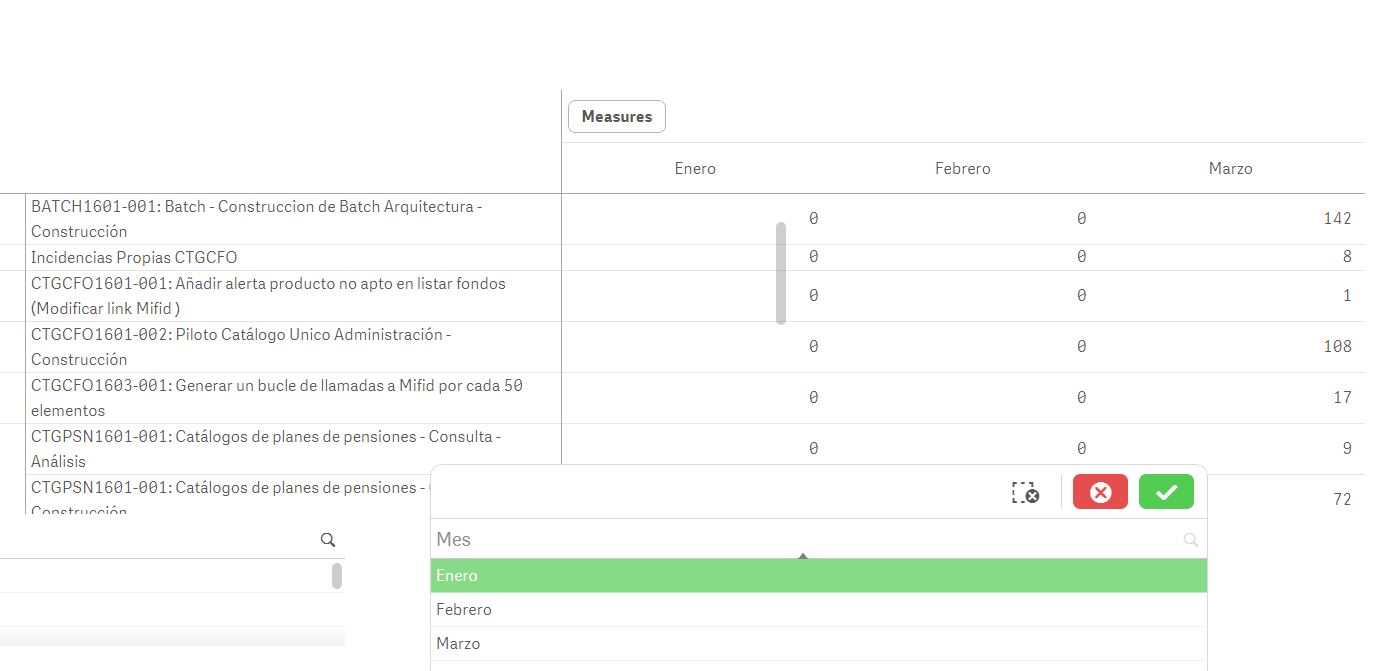
In this case I just want to show Enero because it is the only one selected
- Mark as New
- Bookmark
- Subscribe
- Mute
- Subscribe to RSS Feed
- Permalink
- Report Inappropriate Content
This is my script: I have data in months by columns and I had to make an inline table to link them:
[Sheet1]:
tabla1:
LOAD [Cod. Cambio],
[Descripción],
[Trabajador],
If([Total Imputado]='',NULL(),[Total Imputado]) as [Total Imputado],
If(Enero='' or Enero=0,NULL(),Enero) as Enero,
If(Febrero='',NULL(),Febrero) as Febrero,
If(Marzo='',NULL(),Marzo) as Marzo,
If(Abril='' or Abril=0 or len(Abril)=0,NULL(),Abril) as Abril,
If(Mayo='',NULL(),Mayo) as Mayo,
If(Junio='',NULL(),Junio) as Junio,
If(Julio='',NULL(),Julio) as Julio,
If(Agosto='',NULL(),Agosto) as Agosto,
If(Septiembre='',NULL(),Septiembre) as Septiembre,
If(Octubre='',NULL(),Octubre) as Octubre,
If(Noviembre='',NULL(),Noviembre) as Noviembre,
If(Diciembre='',NULL(),Diciembre) as Diciembre
FROM [lib://Desktop/Book3.xlsx]
(ooxml, embedded labels, table is Sheet1, filters(
Remove(Row, RowCnd(Compound,
RowCnd(CellValue, 1, StrCnd(null)),
RowCnd(CellValue, 2, StrCnd(null)),
RowCnd(CellValue, 3, StrCnd(null))
)),
Replace(1, top, StrCnd(null)),
Replace(2, top, StrCnd(null))
));
tabla2:
load *,
if(len([Cod. Cambio])<>0 and len(Descripción)<>0 and len(Trabajador)=0,'Total',Trabajador) as Trabajador2
resident tabla1;
drop table tabla1;
Mes:
load * inline [id, meses
1, Enero
2, Febrero
3, Marzo
4, Abril
5, Mayo
6, Junio
7, Julio
8, Agosto
9, Septiembre
10, Octubre
11, Noviembre
12, Diciembre
];
- Mark as New
- Bookmark
- Subscribe
- Mute
- Subscribe to RSS Feed
- Permalink
- Report Inappropriate Content
Hello Tim, this is my script and I show a imagen example also:
I have data in months by columns and I had to make an inline table to link them:
[Sheet1]:
tabla1:
LOAD [Cod. Cambio],
[Descripción],
[Trabajador],
If([Total Imputado]='',NULL(),[Total Imputado]) as [Total Imputado],
If(Enero='' or Enero=0,NULL(),Enero) as Enero,
If(Febrero='',NULL(),Febrero) as Febrero,
If(Marzo='',NULL(),Marzo) as Marzo,
If(Abril='' or Abril=0 or len(Abril)=0,NULL(),Abril) as Abril,
If(Mayo='',NULL(),Mayo) as Mayo,
If(Junio='',NULL(),Junio) as Junio,
If(Julio='',NULL(),Julio) as Julio,
If(Agosto='',NULL(),Agosto) as Agosto,
If(Septiembre='',NULL(),Septiembre) as Septiembre,
If(Octubre='',NULL(),Octubre) as Octubre,
If(Noviembre='',NULL(),Noviembre) as Noviembre,
If(Diciembre='',NULL(),Diciembre) as Diciembre
FROM [lib://Desktop/Book3.xlsx]
(ooxml, embedded labels, table is Sheet1, filters(
Remove(Row, RowCnd(Compound,
RowCnd(CellValue, 1, StrCnd(null)),
RowCnd(CellValue, 2, StrCnd(null)),
RowCnd(CellValue, 3, StrCnd(null))
)),
Replace(1, top, StrCnd(null)),
Replace(2, top, StrCnd(null))
));
tabla2:
load *,
if(len([Cod. Cambio])<>0 and len(Descripción)<>0 and len(Trabajador)=0,'Total',Trabajador) as Trabajador2
resident tabla1;
drop table tabla1;
Mes:
load * inline [id, meses
1, Enero
2, Febrero
3, Marzo
4, Abril
5, Mayo
6, Junio
7, Julio
8, Agosto
9, Septiembre
10, Octubre
11, Noviembre
12, Diciembre
];
- « Previous Replies
-
- 1
- 2
- Next Replies »