Unlock a world of possibilities! Login now and discover the exclusive benefits awaiting you.

- Qlik Community
- :
- Forums
- :
- Analytics & AI
- :
- Products & Topics
- :
- Visualization and Usability
- :
- Converting a list to Dates in the Script
- Subscribe to RSS Feed
- Mark Topic as New
- Mark Topic as Read
- Float this Topic for Current User
- Bookmark
- Subscribe
- Mute
- Printer Friendly Page

 hammermill21
- Mark as New
- Bookmark
- Subscribe
- Mute
- Subscribe to RSS Feed
- Permalink
- Report Inappropriate Content
Converting a list to Dates in the Script
Hello!
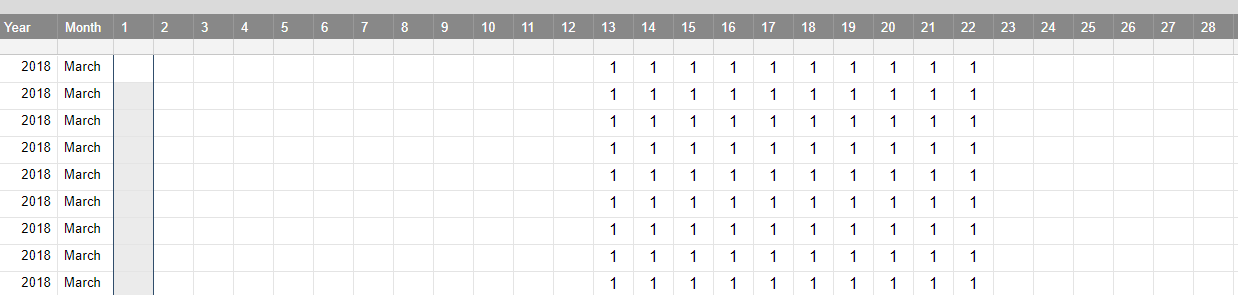
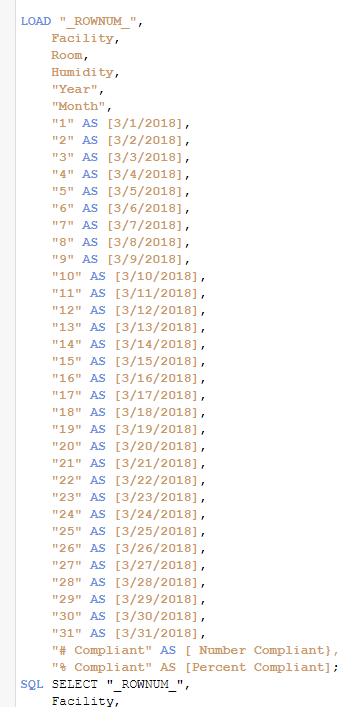
I have data I am pulling from excel that has columns numbers 1 -31 which represent dates, so 1 is 3/1/2018 and so on. When load the script is there any way to change it do it's read as dates? I'd like to create a filter on an app of dates and they it is now I can't.
My Excel sheet:
And my Script:
Thank you!
Accepted Solutions

 Digvijay_Singh
- Mark as New
- Bookmark
- Subscribe
- Mute
- Subscribe to RSS Feed
- Permalink
- Report Inappropriate Content
I tried this way, it worked -
Input:
CrossTable(DayDate,Value,2)
LOAD
"Year",
March,
"1",
"2",
"3"
FROM [lib://Data/1457845.xlsx]
(ooxml, embedded labels, table is Sheet1);
Final:
Load *,MakeDate(2018,03,trim(DayDate)) as ActualDate
Resident Input;
Drop table Input;
Sample data used in excel as -
| Year | March | 1 | 2 | 3 |
| 2018 | March | 1 | ||
| 2018 | March | 1 | 1 | 1 |
| 2018 | March | 1 |
Digvijay_Singh
- Mark as New
- Bookmark
- Subscribe
- Mute
- Subscribe to RSS Feed
- Permalink
- Report Inappropriate Content
Use Cross table load and later in resident load convert the new date field( which has values as 1,2,3,4,5) into the actual date like -
MakeDate(2018,03,Date) as Datefield
hammermill21
- Mark as New
- Bookmark
- Subscribe
- Mute
- Subscribe to RSS Feed
- Permalink
- Report Inappropriate Content
Got it! But I think I'm doing something wrong on my crosstable (first time I've tried this  )
)
TEMP:
LOAD "_ROWNUM_" AS [Record ID],
Facility,
Room,
Humidity,
"Year",
"Month",
"1",
"2",
"3",
"4",
"5",
"6",
"7",
"8",
"9",
"10",
"11",
"12",
"13",
"14",
"15",
"16",
"17",
"18",
"19",
"20",
"21",
"22",
"23",
"24",
"25",
"26",
"27",
"28",
"29",
"30",
"31",
"# Compliant" AS [Number Compliant],
"% Compliant" AS [Percent Compliant];
TEMP2:
CrossTable([Date], DateField, 31)
LOAD
[Record ID],
Facility,
Room,
Humidity,
"Year",
"Month",
"1",
"2",
"3",
"4",
"5",
"6",
"7",
"8",
"9",
"10",
"11",
"12",
"13",
"14",
"15",
"16",
"17",
"18",
"19",
"20",
"21",
"22",
"23",
"24",
"25",
"26",
"27",
"28",
"29",
"30",
"31",
"Number Compliant",
"Percent Compliant"
RESIDENT TEMP;
Drop Table TEMP;
[ALL DATA]:
LOAD [Record ID] AS ID,
MakeDate(2018,03,Date) AS DateField,
*
Resident TEMP2;
Drop Table TEMP2;
Drop Fields [Date];
Digvijay_Singh
- Mark as New
- Bookmark
- Subscribe
- Mute
- Subscribe to RSS Feed
- Permalink
- Report Inappropriate Content
ur crosstable statement needs 2 instead of 31 as u hv got two columns before ur values.
NOt sure why do u need TEMP table load.
hammermill21
- Mark as New
- Bookmark
- Subscribe
- Mute
- Subscribe to RSS Feed
- Permalink
- Report Inappropriate Content
I was following another example on how to do the crosstable that's' why I have it that way.
I'm still getting an error when I load though:
The following error occurred:
Field names must be unique within table
The error occurred here:
[ALL DATA]: LOAD [Record ID] AS ID, MakeDate(2018,03,Date) AS DateField, * Resident TEMP2
Digvijay_Singh
- Mark as New
- Bookmark
- Subscribe
- Mute
- Subscribe to RSS Feed
- Permalink
- Report Inappropriate Content
I tried this way, it worked -
Input:
CrossTable(DayDate,Value,2)
LOAD
"Year",
March,
"1",
"2",
"3"
FROM [lib://Data/1457845.xlsx]
(ooxml, embedded labels, table is Sheet1);
Final:
Load *,MakeDate(2018,03,trim(DayDate)) as ActualDate
Resident Input;
Drop table Input;
Sample data used in excel as -
| Year | March | 1 | 2 | 3 |
| 2018 | March | 1 | ||
| 2018 | March | 1 | 1 | 1 |
| 2018 | March | 1 |
hammermill21
- Mark as New
- Bookmark
- Subscribe
- Mute
- Subscribe to RSS Feed
- Permalink
- Report Inappropriate Content
Hi, thank you! That works but I need to put 8 instead of two:
Input:
CrossTable(DayDate,Value,8)
LOAD
[Record ID],
Facility,
Room,
Humidity,
"Year",
"Month",
"Number Compliant",
"Percent Compliant",
"1",
Thank you so much!!!
