Unlock a world of possibilities! Login now and discover the exclusive benefits awaiting you.

- Qlik Community
- :
- Forums
- :
- Analytics & AI
- :
- Products & Topics
- :
- Visualization and Usability
- :
- Count events if interval between 2 dates is less t...
Options
- Subscribe to RSS Feed
- Mark Topic as New
- Mark Topic as Read
- Float this Topic for Current User
- Bookmark
- Subscribe
- Mute
- Printer Friendly Page
Turn on suggestions
Auto-suggest helps you quickly narrow down your search results by suggesting possible matches as you type.
Showing results for

 adias102
Contributor III
2020-01-16
08:31 AM
- Mark as New
- Bookmark
- Subscribe
- Mute
- Subscribe to RSS Feed
- Permalink
- Report Inappropriate Content
Count events if interval between 2 dates is less than x seconds
Spoiler
Hi all,
I need to count the events for which the interval between start and end date is less than 40 seconds.
Start and end are datetime values dd/mm/yyyy hh:mm:ss.
Since I'm very new to Qlik Sense I tried to do it step by step.
1st step - calculating the interval between the 2 dates: interval(End- Start, 'ss') as A
2nd step - trying an IF calculation: if(num#(A) < 40, 1, 0) as B
I've tried several ways to count the events based on these 2 steps with no success.
sum(B) returns 0
count(if(num#(A)<40, Event)) also returns 0
Thank you.
I need to count the events for which the interval between start and end date is less than 40 seconds.
Start and end are datetime values dd/mm/yyyy hh:mm:ss.
Since I'm very new to Qlik Sense I tried to do it step by step.
1st step - calculating the interval between the 2 dates: interval(End- Start, 'ss') as A
2nd step - trying an IF calculation: if(num#(A) < 40, 1, 0) as B
I've tried several ways to count the events based on these 2 steps with no success.
sum(B) returns 0
count(if(num#(A)<40, Event)) also returns 0
Thank you.
5 Replies

 Taoufiq_Zarra
MVP
2020-01-16
08:53 AM
- Mark as New
- Bookmark
- Subscribe
- Mute
- Subscribe to RSS Feed
- Permalink
- Report Inappropriate Content
you just need to add :
if(Time(end-start,'hh:mm:ss')>'00:00:40',1,0) as B,
Regards,
Taoufiq ZARRA
"Please LIKE posts and "Accept as Solution" if the provided solution is helpful "
(you can mark up to 3 "solutions") 😉
Taoufiq ZARRA
"Please LIKE posts and "Accept as Solution" if the provided solution is helpful "
(you can mark up to 3 "solutions") 😉
adias102
Contributor III
2020-01-16
10:04 AM
Author
- Mark as New
- Bookmark
- Subscribe
- Mute
- Subscribe to RSS Feed
- Permalink
- Report Inappropriate Content
Hi,
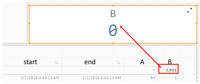
I used this formula in a table chart object and it works fine. also, I have the correct value at the total line.
I want to add a KPI object to display the same value. How can I create a KPI based on a calculated measure?
I want the total value of B (shown in the red rectangle) as a KPI by itself.

2,283 Views
Taoufiq_Zarra
MVP
2020-01-16
10:08 AM
- Mark as New
- Bookmark
- Subscribe
- Mute
- Subscribe to RSS Feed
- Permalink
- Report Inappropriate Content
if I understand correctly
=sum(B)
?
Regards,
Taoufiq ZARRA
"Please LIKE posts and "Accept as Solution" if the provided solution is helpful "
(you can mark up to 3 "solutions") 😉
Taoufiq ZARRA
"Please LIKE posts and "Accept as Solution" if the provided solution is helpful "
(you can mark up to 3 "solutions") 😉
adias102
Contributor III
2020-01-19
01:46 AM
Author
- Mark as New
- Bookmark
- Subscribe
- Mute
- Subscribe to RSS Feed
- Permalink
- Report Inappropriate Content
Hi,
I think it should be something as simple as that but I get 0.
2,244 Views
Taoufiq_Zarra
MVP
2020-01-19
06:46 AM
- Mark as New
- Bookmark
- Subscribe
- Mute
- Subscribe to RSS Feed
- Permalink
- Report Inappropriate Content
can you share your qlik file or a sample data to look
Regards,
Taoufiq ZARRA
"Please LIKE posts and "Accept as Solution" if the provided solution is helpful "
(you can mark up to 3 "solutions") 😉
Taoufiq ZARRA
"Please LIKE posts and "Accept as Solution" if the provided solution is helpful "
(you can mark up to 3 "solutions") 😉
2,235 Views
