Unlock a world of possibilities! Login now and discover the exclusive benefits awaiting you.

- Qlik Community
- :
- Forums
- :
- Analytics & AI
- :
- Products & Topics
- :
- Visualization and Usability
- :
- Count last 12 month KPI
- Subscribe to RSS Feed
- Mark Topic as New
- Mark Topic as Read
- Float this Topic for Current User
- Bookmark
- Subscribe
- Mute
- Printer Friendly Page

 nlucia
- Mark as New
- Bookmark
- Subscribe
- Mute
- Subscribe to RSS Feed
- Permalink
- Report Inappropriate Content
Count last 12 month KPI
Hello Everybody!
I need help with this KPI.
I have field [date_submitted.autoCalendar.Month]
And I need to count Quantity of opportunities Opened the last 12 month.
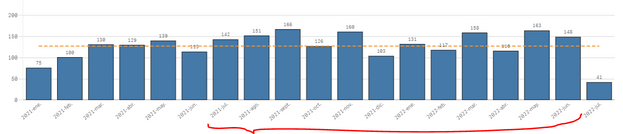
Total last 12 month= 1680 opportunities
then I need to calculate the average:
1680/12 = Avg 140 opportunities
something Like that??
=count( { < date_submited = {"Month(AddMonths(Today(),-12)) "} > } opportunities ) /12
Thaks for your Hep!

 ggijben
- Mark as New
- Bookmark
- Subscribe
- Mute
- Subscribe to RSS Feed
- Permalink
- Report Inappropriate Content
Hi @nlucia ,
Can you try:
count( { < date_submited = {">=$(=Monthstart(AddMonths(Today(),-12))) <= $(=Monthend(AddMonths(Today(),-1)))"} > } opportunities ) / 12- Mark as New
- Bookmark
- Subscribe
- Mute
- Subscribe to RSS Feed
- Permalink
- Report Inappropriate Content
thanks @ggijben .
this does not works. I keep trying
ggijben
- Mark as New
- Bookmark
- Subscribe
- Mute
- Subscribe to RSS Feed
- Permalink
- Report Inappropriate Content
Can you provide the value of the Dimension and Measure used in your bar chart?
nlucia
- Mark as New
- Bookmark
- Subscribe
- Mute
- Subscribe to RSS Feed
- Permalink
- Report Inappropriate Content
This is the Dimension

and the Measure

ggijben
- Mark as New
- Bookmark
- Subscribe
- Mute
- Subscribe to RSS Feed
- Permalink
- Report Inappropriate Content
Can you try
count(distinct { < date_submited = {">=$(=Monthstart(AddMonths(Today(),-12))) <= $(=Monthend(AddMonths(Today(),-1)))"} > } OpprId ) / 12Or else:
SUM( AGGR( count(distinct { < date_submited = {">=$(=Monthstart(AddMonths(Today(),-12))) <= $(=Monthend(AddMonths(Today(),-1)))"} > } OpprId ), [date_submitted.autoCalendar.YearMonth])) / 12
 vinieme12
- Mark as New
- Bookmark
- Subscribe
- Mute
- Subscribe to RSS Feed
- Permalink
- Report Inappropriate Content
You need to compare date_submitted with date values and not Month values
=count( { < date_submited = {">=$(=Monthstart(Max([date_submitted.autoCalendar.DATEFIELD] ),-12))"} > } opportunities )
replace DATEFIELD with actual datefield name
If a post helps to resolve your issue, please accept it as a Solution.
nlucia
- Mark as New
- Bookmark
- Subscribe
- Mute
- Subscribe to RSS Feed
- Permalink
- Report Inappropriate Content
I tried but it doesn't work and I don't know why. From what I searched on the internet it seems to be the solution... 😪
vinieme12
- Mark as New
- Bookmark
- Subscribe
- Mute
- Subscribe to RSS Feed
- Permalink
- Report Inappropriate Content
can you post the exact expression you used?
and a screenshot of the entire expression editor
If a post helps to resolve your issue, please accept it as a Solution.
