Unlock a world of possibilities! Login now and discover the exclusive benefits awaiting you.

- Qlik Community
- :
- Forums
- :
- Analytics & AI
- :
- Products & Topics
- :
- Visualization and Usability
- :
- Count only a certain part of the text, how to?
- Subscribe to RSS Feed
- Mark Topic as New
- Mark Topic as Read
- Float this Topic for Current User
- Bookmark
- Subscribe
- Mute
- Printer Friendly Page

- Mark as New
- Bookmark
- Subscribe
- Mute
- Subscribe to RSS Feed
- Permalink
- Report Inappropriate Content
Count only a certain part of the text, how to?
Dear All*
I've got a question regarding the Count function on a certain bulk of data.
00-00
00-10
01-00
01-02
01-33
01-56
01-89
02-01
02-04
02-09
02-30
02-35
etc. etc. Up till 99-99
I want to make a pie chart out of this data based on the first two numbers. So basically in the example above:
2x 00
5x 01
5x 02
What I have now is that the count function does not group the numbers based on the first two. Anyone got suggestions?
Thanks in advance! (My first week using QV, hope it isnt an ultra newbie queston )
)
Accepted Solutions

 brian_booden
- Mark as New
- Bookmark
- Subscribe
- Mute
- Subscribe to RSS Feed
- Permalink
- Report Inappropriate Content
Hi,
You can edit the Dimension to use an expression such as the below to get the first 2 characters:
=Left(FieldName, 2)
See example below.
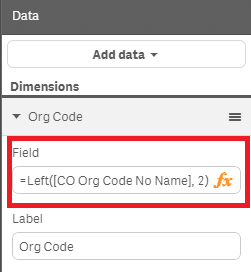
Regards,
Brian
brian_booden
- Mark as New
- Bookmark
- Subscribe
- Mute
- Subscribe to RSS Feed
- Permalink
- Report Inappropriate Content
Hi,
You can edit the Dimension to use an expression such as the below to get the first 2 characters:
=Left(FieldName, 2)
See example below.
Regards,
Brian