Unlock a world of possibilities! Login now and discover the exclusive benefits awaiting you.

- Qlik Community
- :
- Forums
- :
- Analytics & AI
- :
- Products & Topics
- :
- Visualization and Usability
- :
- Creating an Exponential Decay
- Subscribe to RSS Feed
- Mark Topic as New
- Mark Topic as Read
- Float this Topic for Current User
- Bookmark
- Subscribe
- Mute
- Printer Friendly Page

- Mark as New
- Bookmark
- Subscribe
- Mute
- Subscribe to RSS Feed
- Permalink
- Report Inappropriate Content
Creating an Exponential Decay
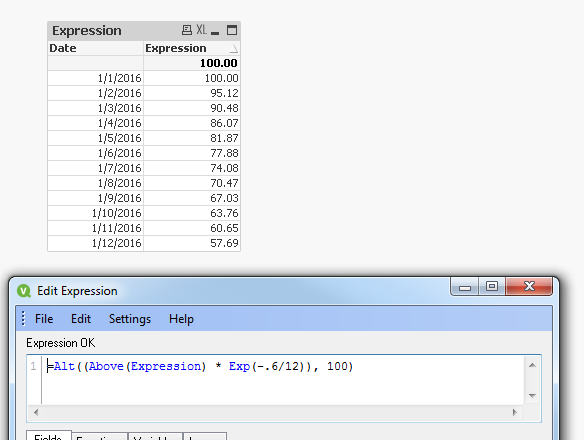
I am attempting to create a calculation that uses an exponential decay. In Excel, this is very easy since I can reference the cell that was calculated above the cell that is currently being calculated. Here is what it looks like in Excel.
| Exponential Rate of Decay | 0.6 |
| Decay Calculation | =Current Balance * EXP(- Rate of Decay / 12) |
| Date | Balance |
| 1/1/2016 | 100.00 |
| 1/2/2016 | 95.12 |
| 1/3/2016 | 90.48 |
| 1/4/2016 | 86.07 |
| 1/5/2016 | 81.87 |
| 1/6/2016 | 77.88 |
| 1/7/2016 | 74.08 |
| 1/8/2016 | 70.47 |
| 1/9/2016 | 67.03 |
| 1/10/2016 | 63.76 |
| 1/11/2016 | 60.65 |
| 1/12/2016 | 57.69 |
I have tried the above() function but it will not calculate the values. I am guessing since there is a calculation inside of a calculation it is getting lost. Here is the calc:
above((Sum([Static Raw Value])/Sum([Static Number of Sites])/Sum([Static Number of Days In Month]))
*exp(-.6/12))*exp(-0.6/12)
Anyone have any ideas? Any help would be appreciated.
Accepted Solutions

 sunny_talwar
- Mark as New
- Bookmark
- Subscribe
- Mute
- Subscribe to RSS Feed
- Permalink
- Report Inappropriate Content
sunny_talwar
- Mark as New
- Bookmark
- Subscribe
- Mute
- Subscribe to RSS Feed
- Permalink
- Report Inappropriate Content
Like this?
sunny_talwar
- Mark as New
- Bookmark
- Subscribe
- Mute
- Subscribe to RSS Feed
- Permalink
- Report Inappropriate Content
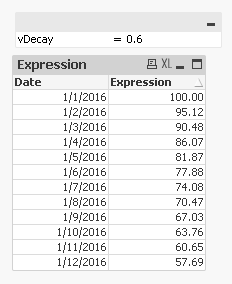
or may be this where vDecay can be changed by the users
=Alt((Above(Expression) * Exp(-vDecay/12)), Value)
- Mark as New
- Bookmark
- Subscribe
- Mute
- Subscribe to RSS Feed
- Permalink
- Report Inappropriate Content
Sunny,
Thanks that worked perfectly. Qlik Sense gives an error on the expression but will execute with the correct answer anyway.
Thanks for the help.
Here is the final expression:
alt((above(Exponential))*exp(-.6/12),(Sum([Static Raw Value])/Sum([Static Number of Sites])/Sum([Static Number of Days In Month])))
FYI, "Exponential" is the name of the column that this expression resides in.