Unlock a world of possibilities! Login now and discover the exclusive benefits awaiting you.

- Qlik Community
- :
- Forums
- :
- Analytics & AI
- :
- Products & Topics
- :
- Visualization and Usability
- :
- Re: Creating categories with IF statement
- Subscribe to RSS Feed
- Mark Topic as New
- Mark Topic as Read
- Float this Topic for Current User
- Bookmark
- Subscribe
- Mute
- Printer Friendly Page

 GreatGreekYogur
- Mark as New
- Bookmark
- Subscribe
- Mute
- Subscribe to RSS Feed
- Permalink
- Report Inappropriate Content
Creating categories with IF statement
Good Evening,
I have problems creating category with if statement. For one if statement it returns null value instead of string 'Lost'. I don't have an idea why.
SET vPurchaseYear=2017;
Table1:
Load
[Customer ID],
Year([Order Date]) as [Year],
[Net Sales],
[Days From Purchase],
[Lost Customer Flag]
resident Purchases;
Left Join(Purchases)
Load
[Customer ID],
if(sum([Net Sales])<500,'Ordinary',
if(sum([Net Sales])<1000,'Business',
if(sum([Net Sales])>1000,'VIP',
if(Sum([Lost Customer Flag])>=1,'Lost')))) as [Customer Category]
resident Table1
where ([Year]=$(vPurchaseYear))
GROUP BY [Customer ID];
DROP TABLE Table1;
I used Sum([Lost Customer Flag])>=1, since Group by requires aggregation for all statements and it returned Invalid expression error if I just left the field name [Lost Customer Flag].
I need 'Lost' in the same field [Customer Category] together with others 'VIP', 'Business' etc.
What could be the possible reason for giving null here?
Accepted Solutions

- Mark as New
- Bookmark
- Subscribe
- Mute
- Subscribe to RSS Feed
- Permalink
- Report Inappropriate Content
Maybe you can try this or something similar:
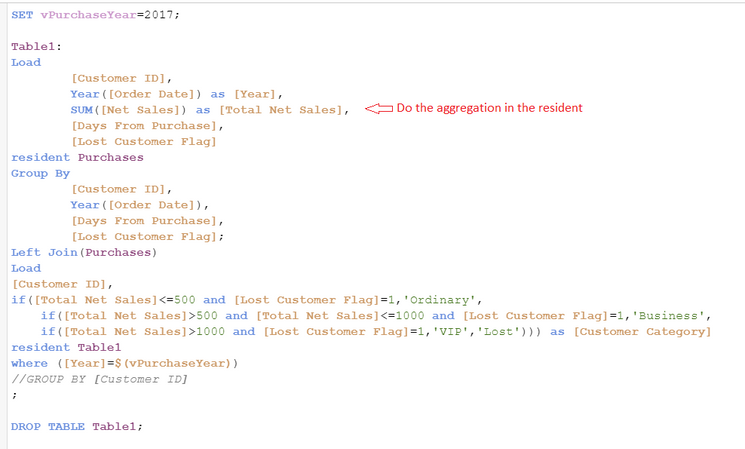
But if I were in your situation I would rather create preceding load opposed to a resident load.

 marcus_sommer
- Mark as New
- Bookmark
- Subscribe
- Mute
- Subscribe to RSS Feed
- Permalink
- Report Inappropriate Content
Try it with a different order within the if-loop - means querying the [Lost Customer Flag] at first before your sum-cluster starts and also set an else-value for the case that no check has been true, for example:
… Sum([Lost Customer Flag]) & '|' & sum([Net Sales]) ...
- Marcus
- Mark as New
- Bookmark
- Subscribe
- Mute
- Subscribe to RSS Feed
- Permalink
- Report Inappropriate Content
Maybe you can try this or something similar:
But if I were in your situation I would rather create preceding load opposed to a resident load.