Unlock a world of possibilities! Login now and discover the exclusive benefits awaiting you.

- Qlik Community
- :
- Forums
- :
- Analytics & AI
- :
- Products & Topics
- :
- Visualization and Usability
- :
- Cumulative expression quarters
- Subscribe to RSS Feed
- Mark Topic as New
- Mark Topic as Read
- Float this Topic for Current User
- Bookmark
- Subscribe
- Mute
- Printer Friendly Page

- Mark as New
- Bookmark
- Subscribe
- Mute
- Subscribe to RSS Feed
- Permalink
- Report Inappropriate Content
Cumulative expression quarters
Hi guys,
I want to show our sales in the current year vs the cumulative sales of the quarters last year. At this period of the year, this means that I need to show the cumulative sales of Q1 and Q2. I want a function that automatically shows the the cumulative sales of Q1, Q2 and Q3 when Q3 has started.
I tried the following script, but that did not work as I hoped for:
SUM({1<Date ={">=$(=date(QuarterStart(=max({<year>}Year)-1))) <=$(=date(QuarterEnd(Today(),-4)))"}>}[Nett Amount new EUR])
Any ideas?
Cheers,
Mike
Accepted Solutions

 sunny_talwar
- Mark as New
- Bookmark
- Subscribe
- Mute
- Subscribe to RSS Feed
- Permalink
- Report Inappropriate Content
May be try this
Sum({1<Date = {">=$(=Date(YearStart(Today(), -1)))<$(=Date(QuarterStart(AddYears(Today(), -1), 1)))"}>}[Nett Amount new EUR])
sunny_talwar
- Mark as New
- Bookmark
- Subscribe
- Mute
- Subscribe to RSS Feed
- Permalink
- Report Inappropriate Content
What is your chart dimension where you are trying this?
- Mark as New
- Bookmark
- Subscribe
- Mute
- Subscribe to RSS Feed
- Permalink
- Report Inappropriate Content
I'm using a few KPI object to show the following measures:
CYTD vs LYTD (which is working)
CYTD vs Last years Quarters (in this case Q1 and Q2) - Not working
CYTD vs Target (which is working)
Edit*
In the KPI object it's not possible to use a dimension..

 OmarBenSalem
- Mark as New
- Bookmark
- Subscribe
- Mute
- Subscribe to RSS Feed
- Permalink
- Report Inappropriate Content
Suppose You have expression:
Sum({<Date=,Year=,Year={"$(=max(Year))"} , Date={"<= max(Date)"}>} Sales) : the sum of sales for the max selected (year) till the max selected date (or existing date, if no selection has been made).
You'll only need to put as a dimension:
Quarter:
And alter your expression as follow:
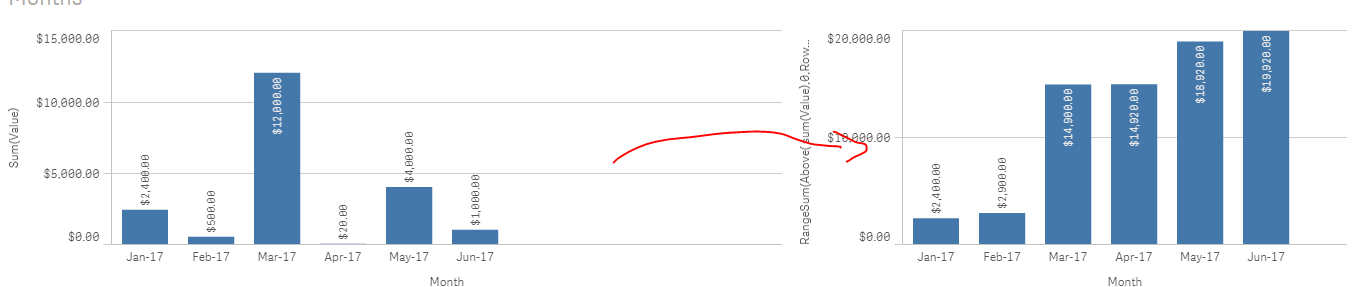
RangeSum(Above(Sum({<Date=,Year=,Year={"$(=max(Year))"} , Date={"<= max(Date)"}>} Sales),0,rowno()))
And add a second one for the previous year:
RangeSum(Above(Sum({<Date=,Year=,Year={"$(=max(Year)-1)"} , Date={"<= max(Date)"}>} Sales),0,rowno()))
Per analogy:
Dim: Month / Measure: Sum(Sales)
vs
Dim: Month / Measure: RangeSum(Above(Sum(Sales),0,rowno()))
sunny_talwar
- Mark as New
- Bookmark
- Subscribe
- Mute
- Subscribe to RSS Feed
- Permalink
- Report Inappropriate Content
May be try this
Sum({1<Date = {">=$(=Date(YearStart(Today(), -1)))<$(=Date(QuarterStart(AddYears(Today(), -1), 1)))"}>}[Nett Amount new EUR])
- Mark as New
- Bookmark
- Subscribe
- Mute
- Subscribe to RSS Feed
- Permalink
- Report Inappropriate Content
Thanks a lot Sunny, you're expression helped me!
I used the following expression to get a percentage of CYTD vs Last year quarters (the quarters that already have passed and the quarter we're currently in).
sum({1< Year={"$(=max({<year>}Year))"}>}[Nett Amount new EUR])
/
Sum({1<Date = {">=$(=Date(YearStart(Today(), -1)))<$(=Date(QuarterStart(AddYears(Today(), -1), 1)))"}>}[Nett Amount new EUR])
- Mark as New
- Bookmark
- Subscribe
- Mute
- Subscribe to RSS Feed
- Permalink
- Report Inappropriate Content
Thanks for your reply Omar, the problem in this case was that it was not possible to add a dimension in a KPI object.
Still a helpfull reply!:)
sunny_talwar
- Mark as New
- Bookmark
- Subscribe
- Mute
- Subscribe to RSS Feed
- Permalink
- Report Inappropriate Content
Super 