Unlock a world of possibilities! Login now and discover the exclusive benefits awaiting you.

- Qlik Community
- :
- Forums
- :
- Analytics & AI
- :
- Products & Topics
- :
- Visualization and Usability
- :
- Currency Conversion in double step on script
- Subscribe to RSS Feed
- Mark Topic as New
- Mark Topic as Read
- Float this Topic for Current User
- Bookmark
- Subscribe
- Mute
- Printer Friendly Page

 mike_spada
- Mark as New
- Bookmark
- Subscribe
- Mute
- Subscribe to RSS Feed
- Permalink
- Report Inappropriate Content
Currency Conversion in double step on script
Hi to all,
I have a table with currency rates, done in this way:
| Date | Currency From | Currency To | Rate |
| 07.11.2019 | AUD | CHF | 0.6870 |
| 07.11.2019 | EUR | CHF | 1.1017 |
I only have the conversions for "every" currency vs CHF. But I need to calculate a conversion beetween AUD / EUR, in this case I'd need to do [Rate for AUD to CHF] / [Rate for EUR to CHF].
I'd like to create a table to store with all these exchange rates that are not "to CHF", I need to proceed to a kind of "double step" but I don't know how to do this.
I'd like to obtain a table in this way
| Date | Currency From | Currency To | Rate |
| 07.11.2019 | AUD | EUR | 0.6235 |
Someone can help, please?
Thank you!
Mike
Accepted Solutions

 kaanerisen
- Mark as New
- Bookmark
- Subscribe
- Mute
- Subscribe to RSS Feed
- Permalink
- Report Inappropriate Content
Hi Mike,
You can try this.
TABLE:
load
Date(Date) as Date,CurrencyFrom,CurrencyTo,Rate
Inline [
Date,CurrencyFrom,CurrencyTo,Rate
7.11.2019,AUD,CHF,0.6870
7.11.2019,EUR,CHF,1.1017
7.11.2019,USD,CHF,0.9820
8.11.2019,AUD,CHF,0.6870
8.11.2019,EUR,CHF,1.1017
8.11.2019,USD,CHF,0.9810
9.11.2019,AUD,CHF,0.6850
9.11.2019,EUR,CHF,1.1025
9.11.2019,USD,CHF,0.9790
];

left Join
Load
	Date,CurrencyTo,CurrencyFrom as CurrencyFrom2, Rate as Rate2
Resident TABLE;

NoConcatenate

FinalTable:
Load
 Date,CurrencyFrom,CurrencyFrom2 as CurrencyTo,Rate/Rate2 as Rate
resident TABLE
where CurrencyFrom<>CurrencyFrom2;

drop Table TABLE;

Hope it helps..
 jensmunnichs
- Mark as New
- Bookmark
- Subscribe
- Mute
- Subscribe to RSS Feed
- Permalink
- Report Inappropriate Content
There are probably better ways of achieving this but this is all I can think of for now:
CurrencyRatesDataCHF:
LOAD *
FROM <YourDataSource>;
LEFT JOIN (CurrencyRatesDataCHF)
LOAD Date, [Currency From], [Currency To], Rate as EURRate
Resident CurrencyRatesDataCHF
Where [Currency From] = 'EUR' AND [Currency To] = 'CHF';
CurrencyRatesDataEUR:
LOAD Date, [Currency From], 'EUR' as [Currency To], Rate/EURRate as RateToEUR
Resident CurrencyRatesDataCHF;
Drop Field EURRate from CurrencyRatesDataCHF;
Hope this helps!
jensmunnichs
- Mark as New
- Bookmark
- Subscribe
- Mute
- Subscribe to RSS Feed
- Permalink
- Report Inappropriate Content
Forgot to add this, you will have to rename some fields to avoid a synthetic key.
kaanerisen
- Mark as New
- Bookmark
- Subscribe
- Mute
- Subscribe to RSS Feed
- Permalink
- Report Inappropriate Content
Hi Mike,
You can try this.
TABLE:
load
Date(Date) as Date,CurrencyFrom,CurrencyTo,Rate
Inline [
Date,CurrencyFrom,CurrencyTo,Rate
7.11.2019,AUD,CHF,0.6870
7.11.2019,EUR,CHF,1.1017
7.11.2019,USD,CHF,0.9820
8.11.2019,AUD,CHF,0.6870
8.11.2019,EUR,CHF,1.1017
8.11.2019,USD,CHF,0.9810
9.11.2019,AUD,CHF,0.6850
9.11.2019,EUR,CHF,1.1025
9.11.2019,USD,CHF,0.9790
];

left Join
Load
	Date,CurrencyTo,CurrencyFrom as CurrencyFrom2, Rate as Rate2
Resident TABLE;

NoConcatenate

FinalTable:
Load
 Date,CurrencyFrom,CurrencyFrom2 as CurrencyTo,Rate/Rate2 as Rate
resident TABLE
where CurrencyFrom<>CurrencyFrom2;

drop Table TABLE;
Hope it helps..

 JordyWegman
- Mark as New
- Bookmark
- Subscribe
- Mute
- Subscribe to RSS Feed
- Permalink
- Report Inappropriate Content
Hi Mike,
Try this:
Table:
Load
   *,
   PreviousRate / Rate as NewRate
Where not Isnull(PreviousRate / Rate)
;
Load
  *,
  IF(Previous(Date) = Date and Previous(CurrencyTo) = CurrencyTo,Previous(Rate),null()) as PreviousRate,
  IF(Previous(Date) = Date and Previous(CurrencyTo) = CurrencyTo,Previous(CurrencyFrom),null()) as PreviousCurrencyFrom
;
Load * Inline [
Date,	CurrencyFrom,	CurrencyTo,	Rate
07.11.2019,	AUD,	CHF,	0.6870
07.11.2019,	EUR,	CHF,	1.1017

];

Drop fields PreviousRate, PreviousCurrencyFrom from Table;
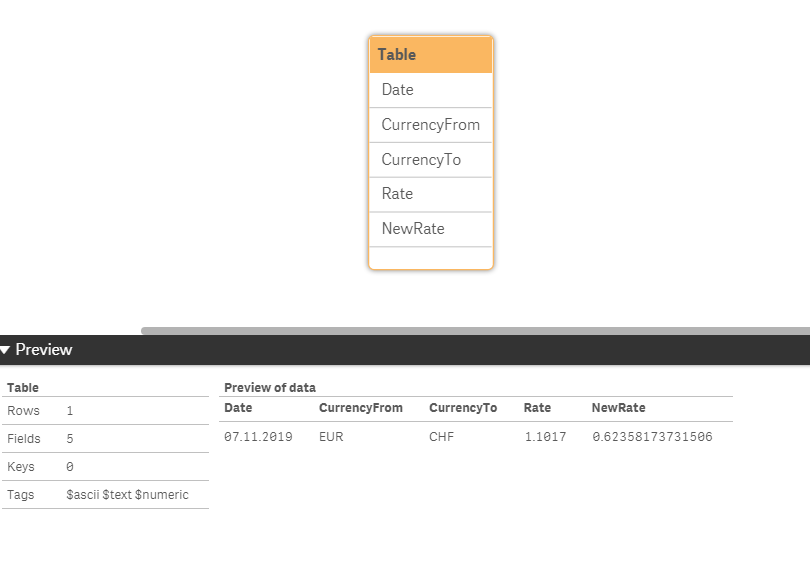
This is the result:
Jordy
Climber
mike_spada
- Mark as New
- Bookmark
- Subscribe
- Mute
- Subscribe to RSS Feed
- Permalink
- Report Inappropriate Content
Thank you!
It's perfect for me!
Mike
