Unlock a world of possibilities! Login now and discover the exclusive benefits awaiting you.

- Qlik Community
- :
- Forums
- :
- Analytics & AI
- :
- Products & Topics
- :
- Visualization and Usability
- :
- Custom Color in Measure Without Value List
- Subscribe to RSS Feed
- Mark Topic as New
- Mark Topic as Read
- Float this Topic for Current User
- Bookmark
- Subscribe
- Mute
- Printer Friendly Page

 scotly-victor
- Mark as New
- Bookmark
- Subscribe
- Mute
- Subscribe to RSS Feed
- Permalink
- Report Inappropriate Content
Custom Color in Measure Without Value List
Hi Eveyone,
I have one dimension and three measures , I wanted give color based on measure value ,I know by using value list we can achieve it .However my requirement is without using valuelist I wanted to give color to my three measure
- « Previous Replies
-
- 1
- 2
- Next Replies »
 ishanbhatt
- Mark as New
- Bookmark
- Subscribe
- Mute
- Subscribe to RSS Feed
- Permalink
- Report Inappropriate Content
Hi Patric,
Thanks a lot. I'll check it and if this run then it'll solve 70% design issues.
ishanbhatt
- Mark as New
- Bookmark
- Subscribe
- Mute
- Subscribe to RSS Feed
- Permalink
- Report Inappropriate Content
Hi Scotly,
Download and update Qliksense Desktop 3.1 t0 3.2 and follow the patric answer.
Ishan
 priyasawant
- Mark as New
- Bookmark
- Subscribe
- Mute
- Subscribe to RSS Feed
- Permalink
- Report Inappropriate Content
Hi... First create an inline for sales.
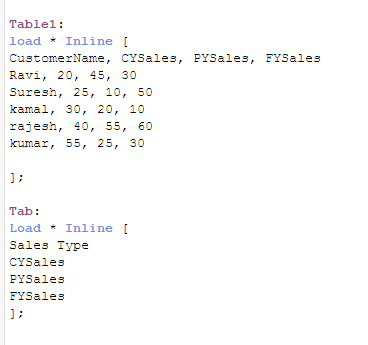
Then select both the dimensions and create measure
pick(Match([Sales Type],'CYSales','PYSales','FYSales'),sum(CYSales),sum(PYSales),sum(FYSales))
and mention the same in Appearance --> colors and legend --> Color By Expression --> and write your required color
Pick(Match([Sales Type],'CYSales','PYSales','FYSales'),Red(),Green(),Yellow())
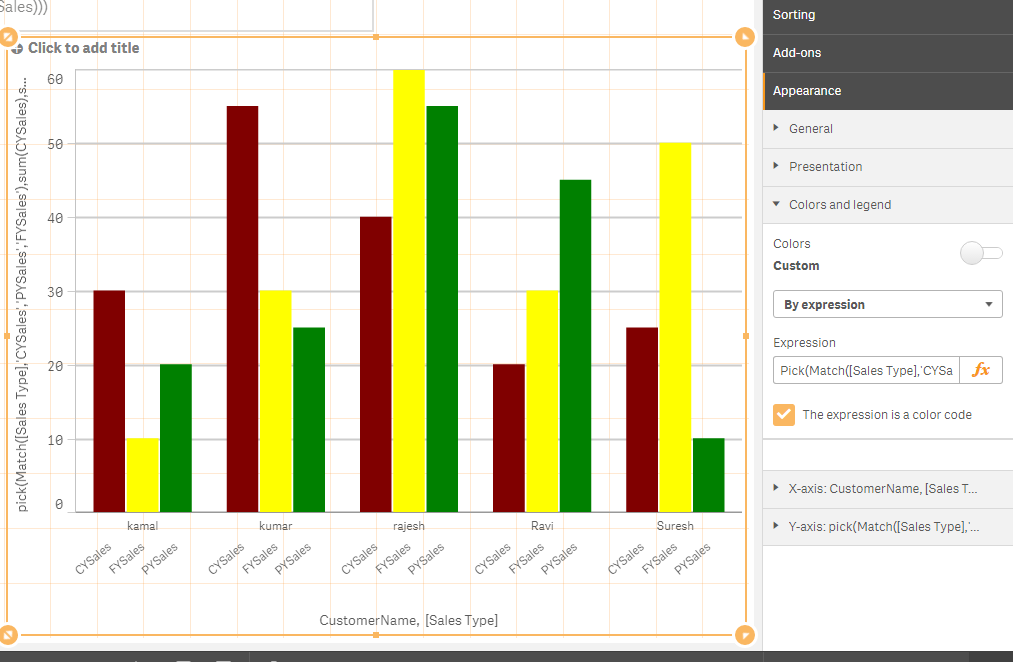
For further clarification please find the attached QVF...

- « Previous Replies
-
- 1
- 2
- Next Replies »