Unlock a world of possibilities! Login now and discover the exclusive benefits awaiting you.

- Qlik Community
- :
- Forums
- :
- Analytics & AI
- :
- Products & Topics
- :
- Visualization and Usability
- :
- Cyclic Grouping
- Subscribe to RSS Feed
- Mark Topic as New
- Mark Topic as Read
- Float this Topic for Current User
- Bookmark
- Subscribe
- Mute
- Printer Friendly Page

 TomBond77
- Mark as New
- Bookmark
- Subscribe
- Mute
- Subscribe to RSS Feed
- Permalink
- Report Inappropriate Content
Cyclic Grouping
Hi experts
I have designed a master item (dimension) with three dimensions:
=pick(match(vDimension, [Konto.IdDesc], [Ansv.DivisionIdName], [Kontogrupp]), 'Konto', 'Cost Center', 'Kontogrupp')
Definition of Variable VDimension: [Konto.IdDesc]
But a listbox through a straight table with vDimension as Dimension doesn't work. Where is the problem? Anything missing?
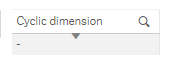
Any ideas? Many thanks for your help.
Tom
TomBond77
- Mark as New
- Bookmark
- Subscribe
- Mute
- Subscribe to RSS Feed
- Permalink
- Report Inappropriate Content
correction: the listbox has the master item "cyclic dimension" as dimension.

 Digvijay_Singh
- Mark as New
- Bookmark
- Subscribe
- Mute
- Subscribe to RSS Feed
- Permalink
- Report Inappropriate Content
Not sure what exactly you are trying to achieve but you might need to format it something like this -
=pick(match('$(vDimension)', '[Konto.IdDesc]', '[Ansv.DivisionIdName]', '[Kontogrupp]'), 'Konto', 'Cost Center', 'Kontogrupp')
TomBond77
- Mark as New
- Bookmark
- Subscribe
- Mute
- Subscribe to RSS Feed
- Permalink
- Report Inappropriate Content
thank you, that helped a bit. Now I am able to see "Konto" in the list box, but not the other two dimensions.
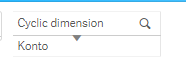
I would like to get the same as in this video, up to min 3 everything is told...
https://www.youtube.com/watch?v=mb4cr8UD7Is
Any ideas how to fix this?
Digvijay_Singh
- Mark as New
- Bookmark
- Subscribe
- Mute
- Subscribe to RSS Feed
- Permalink
- Report Inappropriate Content
I think you missed using $Field system field in your master dimension, I suggest you watch it from the beginning and update your master item as below -
=pick(match($Field, 'Country','City','Shipper'),'Country Name','City Name','Shipper Name')
TomBond77
- Mark as New
- Bookmark
- Subscribe
- Mute
- Subscribe to RSS Feed
- Permalink
- Report Inappropriate Content
Thanks
I had to single quote $field to get a correct syntax.

Furthermore I have defined these variables:
vCyclicDimension: if(len('$(vCyclicValue)')>0, '$(vCyclicValue)', '[Konto.IdDesc]')
vCyclicValue: $field
Finally I am getting $field instead of the requested dimensions (Konto.IdDesc, Ansv.DivisionidName, Kontogrupp).
I went through the video many times, but not getting the right results. Any ideas?
