Unlock a world of possibilities! Login now and discover the exclusive benefits awaiting you.

- Qlik Community
- :
- Forums
- :
- Analytics & AI
- :
- Products & Topics
- :
- Visualization and Usability
- :
- Re: DIVISION BY FIXED value of a variable
- Subscribe to RSS Feed
- Mark Topic as New
- Mark Topic as Read
- Float this Topic for Current User
- Bookmark
- Subscribe
- Mute
- Printer Friendly Page

 flames
- Mark as New
- Bookmark
- Subscribe
- Mute
- Subscribe to RSS Feed
- Permalink
- Report Inappropriate Content
DIVISION BY FIXED value of a variable
Hello,
I am trying to divide COST column by COST of VERSION=**. i am using below code for that.
[ (Sum({<VG={"POS"},METRIC={"AMT $"}>}VALUE)/1000000) - (Sum({<VG={"POS"},METRIC={"MARGIN $"}>}VALUE)/1000000) )
/
(Sum({<VG={"POS"},METRIC={"QTY #"}>}VALUE)/10000 ]
/
[ (Sum({<VG={"POS"},VERSION={"**"},METRIC={"AMT $"}>}VALUE)/1000000) - (Sum({<VG={"POS"},VERSION={"**"},METRIC={"MARGIN $"}>}VALUE)/1000000) )
/
(Sum({<VG={"POS"},VERSION={"**"},METRIC={"QTY #"}>}VALUE)/10000 ]
But, the above code is doing COST/COST - for respective VERSIONS. But I need all the costs should be divided by hte cost of VERSION = ** .
| VERSION | AMT | MARGIN | QTY | COST (AMT-MARGIN/QTY) | GETTING | BUT I NEED |
| ** | $3,195.15 | $1,635.47 | 2,659 | $0.59 | $1.00 | $1.00 |
| *AI | $544.54 | $377.88 | 149 | $1.12 | $1.00 | $1.91 |
| *BP | $584.71 | $355.52 | 345 | $0.66 | $1.00 | $1.13 |
| *CA | $1,441.26 | $764.90 | 612 | $1.10 | $1.00 | $1.88 |
How can i achieve the result of
COST/Cost of VERSION=**.
Thanks.
Accepted Solutions

 sunny_talwar
- Mark as New
- Bookmark
- Subscribe
- Mute
- Subscribe to RSS Feed
- Permalink
- Report Inappropriate Content
Try this
((Sum({<VG = {"POS"}, METRIC = {"AMT $"}>} VALUE)/1000000) -
 (Sum({<VG = {"POS"}, METRIC = {"MARGIN $"}>} VALUE)/1000000))
/
(Sum({<VG = {"POS"}, METRIC = {"QTY #"}>} VALUE)/10000)

/

((Sum(TOTAL {<VG = {"POS"}, VERSION = {'**'}, METRIC = {"AMT $"}>} VALUE)/1000000) -
 (Sum(TOTAL {<VG = {"POS"}, VERSION = {'**'}, METRIC = {"MARGIN $"}>} VALUE)/1000000))
/
(Sum(TOTAL {<VG = {"POS"}, VERSION = {'**'}, METRIC = {"QTY #"}>} VALUE)/10000)
sunny_talwar
- Mark as New
- Bookmark
- Subscribe
- Mute
- Subscribe to RSS Feed
- Permalink
- Report Inappropriate Content
Based on the sample provided... this type of expression should work
Alt(Sum(COST)/Sum(TOTAL <PRODUCT> {<VERSION = {'**'}>} COST), 0)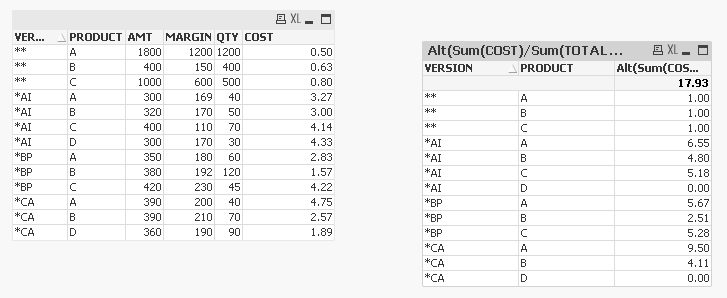 sunny_talwar
- Mark as New
- Bookmark
- Subscribe
- Mute
- Subscribe to RSS Feed
- Permalink
- Report Inappropriate Content
Try this
((Sum({<VG = {"POS"}, METRIC = {"AMT $"}>} VALUE)/1000000) -
 (Sum({<VG = {"POS"}, METRIC = {"MARGIN $"}>} VALUE)/1000000))
/
(Sum({<VG = {"POS"}, METRIC = {"QTY #"}>} VALUE)/10000)

/

((Sum(TOTAL {<VG = {"POS"}, VERSION = {'**'}, METRIC = {"AMT $"}>} VALUE)/1000000) -
 (Sum(TOTAL {<VG = {"POS"}, VERSION = {'**'}, METRIC = {"MARGIN $"}>} VALUE)/1000000))
/
(Sum(TOTAL {<VG = {"POS"}, VERSION = {'**'}, METRIC = {"QTY #"}>} VALUE)/10000)
flames
- Mark as New
- Bookmark
- Subscribe
- Mute
- Subscribe to RSS Feed
- Permalink
- Report Inappropriate Content
Thank you Sunny, That helped.
I am alos stuck with another thing in the similar prolem, there is a new column PRODUCT.
and i need to take care of it while divided by...
like, Cost of VERSION = AI , PRODUCT = A should be divided by COST of VERSION =**, PRODUCT = A and so on.
please help in this, thanks in advance.
here is the table explanation.
| VERSION | PRODUCT | AMT | MARGIN | QTY | COST (AMT-MARGIN/QTY) | NEED | HOW ? |
| ** | A | 1800 | 1200 | 1200 | $ 0.50 | 1.00 | COST( **,A ) / COST(**,A) |
| ** | B | 400 | 150 | 400 | $ 0.63 | 1.00 | COST( **,B) / COST(**,B) |
| ** | C | 1000 | 600 | 500 | $ 0.80 | 1.00 | COST( **,C) / COST(**,C) |
| *AI | A | 300 | 169 | 40 | $ 3.28 | 6.55 | COST( *AI,A ) / COST(**,A) |
| *AI | B | 320 | 170 | 50 | $ 3.00 | 4.80 | COST( *AI,B) / COST(**,B) |
| *AI | C | 400 | 110 | 70 | $ 4.14 | 5.18 | COST( *AI,C) / COST(**,C) |
| *AI | D | 300 | 170 | 30 | $ 4.33 | 0.00 | COST( *AI,D) / COST(**,D) [**, D not exists] |
| *BP | A | 350 | 180 | 60 | $ 2.83 | 5.67 | COST( *BP,A ) / COST(**,A) |
| *BP | B | 380 | 192 | 120 | $ 1.57 | 2.51 | COST( *BP,B) / COST(**,B) |
| *BP | C | 420 | 230 | 45 | $ 4.22 | 5.28 | COST( *BP,C) / COST(**,C) |
| *CA | A | 390 | 200 | 40 | $ 4.75 | 9.50 | COST( *CA,A / COST(**,A) |
| *CA | B | 390 | 210 | 70 | $ 2.57 | 4.11 | COST( *CA,B) / COST(**,B) |
| *CA | D | 360 | 190 | 90 | $ 1.89 | 0.00 | COST( *CA,D) / COST(**,D) |
sunny_talwar
- Mark as New
- Bookmark
- Subscribe
- Mute
- Subscribe to RSS Feed
- Permalink
- Report Inappropriate Content
Based on the sample provided... this type of expression should work
Alt(Sum(COST)/Sum(TOTAL <PRODUCT> {<VERSION = {'**'}>} COST), 0)
.png "Former Employee") Sue_Macaluso
Sue_Macaluso
- Mark as New
- Bookmark
- Subscribe
- Mute
- Subscribe to RSS Feed
- Permalink
- Report Inappropriate Content
