Unlock a world of possibilities! Login now and discover the exclusive benefits awaiting you.

- Qlik Community
- :
- Forums
- :
- Analytics & AI
- :
- Products & Topics
- :
- Visualization and Usability
- :
- Re: Data Load with Dates as column fields
- Subscribe to RSS Feed
- Mark Topic as New
- Mark Topic as Read
- Float this Topic for Current User
- Bookmark
- Subscribe
- Mute
- Printer Friendly Page

 MPH
MPH
- Mark as New
- Bookmark
- Subscribe
- Mute
- Subscribe to RSS Feed
- Permalink
- Report Inappropriate Content
Data Load with Dates as column fields
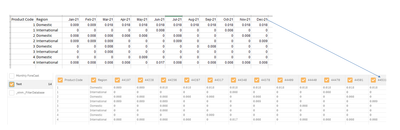
I am trying to load data that has a month as a column field and get these results, not sure what is needed to get desired results of excel sample shown
 sbarro1
- Mark as New
- Bookmark
- Subscribe
- Mute
- Subscribe to RSS Feed
- Permalink
- Report Inappropriate Content
Hello,
As a reminder, Qlik interpret dates (coming from your Excel file) like numerical values! So, you need to convert your headers (directly in your Excel file) into text. It's simple, just add a single quote at the start for each text (inside each cell).
Regards.

 AnkitMadhukar
- Mark as New
- Bookmark
- Subscribe
- Mute
- Subscribe to RSS Feed
- Permalink
- Report Inappropriate Content
Hi @MPH ,
I had a similar problem were I was not able to modify the column names to date format
For values inside fields its possible to use date() function to format them as data , but I didn't find a solution to do so for column headers.
We can manually rename them in data manager window , if its a one time thing
