Unlock a world of possibilities! Login now and discover the exclusive benefits awaiting you.

- Qlik Community
- :
- Forums
- :
- Analytics & AI
- :
- Products & Topics
- :
- Visualization and Usability
- :
- Date Picker
- Subscribe to RSS Feed
- Mark Topic as New
- Mark Topic as Read
- Float this Topic for Current User
- Bookmark
- Subscribe
- Mute
- Printer Friendly Page

 RajaRajput28
- Mark as New
- Bookmark
- Subscribe
- Mute
- Subscribe to RSS Feed
- Permalink
- Report Inappropriate Content
Date Picker
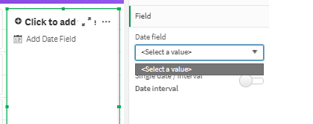
Hi All , I am building a Dashboard where we need to show up Weekly report. To get the weekly report , we first need to select up the date. i have 2 date fields - Start time and End Time but date picker is not showing me both in the option . My date field format (For both start time and End time) is as - 25-NOV-21 01.15.25.000000 AM . is this the reason I am not getting the option in Start time ?? I have loaded the data by script .

 Alan_Slaughter
- Mark as New
- Bookmark
- Subscribe
- Mute
- Subscribe to RSS Feed
- Permalink
- Report Inappropriate Content
Hello, maybe this will help:
During the normal configuration of the Date Picker extension, you configure both a start and an end date. I've attached some information that should assist you.
Article links:
1. Date range picker
https://www.youtube.com/watch?v=3N4XDj1gaAM
2. Creating a date range picker

 paulcalvet
- Mark as New
- Bookmark
- Subscribe
- Mute
- Subscribe to RSS Feed
- Permalink
- Report Inappropriate Content
Hello,
It seems that your date is a timestamp.
If you convert it to date format (eg 25/11/2021) it will appears in the selection.
Regards,
