Unlock a world of possibilities! Login now and discover the exclusive benefits awaiting you.

- Qlik Community
- :
- Forums
- :
- Analytics & AI
- :
- Products & Topics
- :
- Visualization and Usability
- :
- Date field inconsistent
- Subscribe to RSS Feed
- Mark Topic as New
- Mark Topic as Read
- Float this Topic for Current User
- Bookmark
- Subscribe
- Mute
- Printer Friendly Page

 gnmq
gnmq
- Mark as New
- Bookmark
- Subscribe
- Mute
- Subscribe to RSS Feed
- Permalink
- Report Inappropriate Content
Date field inconsistent
Hi,
I have difficulties on combining two tables with different date format
Table A: YYYYMMDD
Table B: MM/DD/YYYY HH:MM:SS TT
LOAD
DATE(FLOOR(DATEFIELD),'YYYYMMDD') AS DATEFIELD;
[TABLE_B]:
SELECT DATEFIELD FROM <DB>;
CONCATENATE(TABLE_A)
LOAD DATE(FLOOR(DATEFIELD),'YYYYMMDD') AS DATEFIELD
RESIDENT TABLE_B;
DROP TABLE TABLE_B;
The final table is showing table A's date as YYYYMMDD but table B's date values are in numeric format (5 digits).. May I know how to format this? Would appreciate your help on this. Thank you.
Accepted Solutions

 DavidM
- Mark as New
- Bookmark
- Subscribe
- Mute
- Subscribe to RSS Feed
- Permalink
- Report Inappropriate Content
You can either format table A to number Num(Datefield) or probably better solution convert table B to date:
Date(Datefield,'YYYYMMDD')
However, before you do that, check whether Table A and Table B are interpreted as dates, load table and in data model viewer and check whether the fields have tags $timestamp and $date. If not, you need to interpret them as date with Date# function.
DavidM
- Mark as New
- Bookmark
- Subscribe
- Mute
- Subscribe to RSS Feed
- Permalink
- Report Inappropriate Content
You can either format table A to number Num(Datefield) or probably better solution convert table B to date:
Date(Datefield,'YYYYMMDD')
However, before you do that, check whether Table A and Table B are interpreted as dates, load table and in data model viewer and check whether the fields have tags $timestamp and $date. If not, you need to interpret them as date with Date# function.
 Akshada
- Mark as New
- Bookmark
- Subscribe
- Mute
- Subscribe to RSS Feed
- Permalink
- Report Inappropriate Content
Hello,
I have replicated your scenario with inline table. Hope it will be helpful to you. Please check and confirm.
T1:
load *,
DATE(DATE#(Date,'YYYYMMDD'),'DD-MM-YYYY') as Date1;
load * Inline [
Date, Sale
20190822, 455
20190823, 435
20190915, 534
20191030, 635
];
T2:
Load *,
DATE(Date#(Date,'MM/DD/YYYY HH:MM:SS TT'),'DD-MM-YYYY') as Date1;
load * inline [
Date, Sale
01/25/2020 02:02:00 AM, 300
01/26/2020 07:05:00 AM, 545
01/28/2020 04:06:00 AM, 885
01/29/2020 06:10:00 AM, 656
];
Drop Field Date;
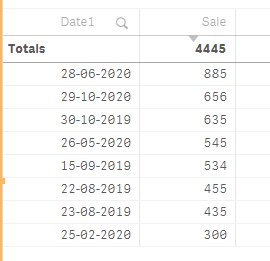
table will be auto concatenate.
Output: