Unlock a world of possibilities! Login now and discover the exclusive benefits awaiting you.

- Qlik Community
- :
- Forums
- :
- Analytics & AI
- :
- Products & Topics
- :
- Visualization and Usability
- :
- Re: Dates after year 2079 do not work
- Subscribe to RSS Feed
- Mark Topic as New
- Mark Topic as Read
- Float this Topic for Current User
- Bookmark
- Subscribe
- Mute
- Printer Friendly Page

 jukah_do
- Mark as New
- Bookmark
- Subscribe
- Mute
- Subscribe to RSS Feed
- Permalink
- Report Inappropriate Content
Dates after year 2079 do not work
Hi all,
I have weird problem with my dates. When I use this script combined with autoCalendar I get the date fields derived as expected:
Data:
Load
Document,
Date(Start_Date,'MM.DD.YYYY') AS Start_Date,
Date(End_Date,'MM.DD.YYYY') AS End_Date
Inline
[
Document,Start_Date,End_Date
A,05.10.2015,31.12.2055
B,12.10.2016,31.12.2079
C,06.06.2017,31.12.2079
]
(Delimiter is ',');
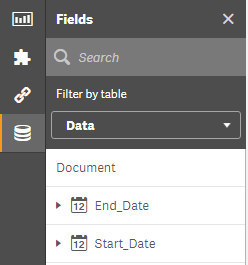
However, if a date is in year 2080 or later, Qlik Sense does not generate the date field:
Data:
Load
Document,
Date(Start_Date,'MM.DD.YYYY') AS Start_Date,
Date(End_Date,'MM.DD.YYYY') AS End_Date
Inline
[
Document,Start_Date,End_Date
A,05.10.2015,31.12.2055
B,12.10.2016,31.12.2079
C,06.06.2017,31.12.2080
]
(Delimiter is ',');

Any idea what is going on here? Thanks!
- « Previous Replies
-
- 1
- 2
- Next Replies »
Accepted Solutions

- Mark as New
- Bookmark
- Subscribe
- Mute
- Subscribe to RSS Feed
- Permalink
- Report Inappropriate Content
Try adding tag field EndDate with '$Date'; to your script.
Its a workaround but I hope that it will solve your issue!
/J

 Mark_Little
- Mark as New
- Bookmark
- Subscribe
- Mute
- Subscribe to RSS Feed
- Permalink
- Report Inappropriate Content
Hi,
I have just load your second script in my Qlik Sense and it loads fine.
I would check what your date format is set to in your load script.
Mine is SET DateFormat='DD.MM.YYYY'; - to match the base data.
Also i am on the latest version of sense
Mark
jukah_do
- Mark as New
- Bookmark
- Subscribe
- Mute
- Subscribe to RSS Feed
- Permalink
- Report Inappropriate Content
Hi!
Mine is SET DateFormat='DD.MM.YYYY';
I don't think this is the problem since it works with all years before 2079.
Mark_Little
- Mark as New
- Bookmark
- Subscribe
- Mute
- Subscribe to RSS Feed
- Permalink
- Report Inappropriate Content
I am on the latest release of QlikSense.
I have copied your script and change the Date Format and it loads fine.
jukah_do
- Mark as New
- Bookmark
- Subscribe
- Mute
- Subscribe to RSS Feed
- Permalink
- Report Inappropriate Content
I am also on the latest version. Could you please post your app?

 rbecher
- Mark as New
- Bookmark
- Subscribe
- Mute
- Subscribe to RSS Feed
- Permalink
- Report Inappropriate Content
The LOAD should work like this:
Date(Date#(Start_Date,'MM.DD.YYYY')) AS Start_Date,
Date(Date#(End_Date,'MM.DD.YYYY')) AS End_Date
jukah_do
- Mark as New
- Bookmark
- Subscribe
- Mute
- Subscribe to RSS Feed
- Permalink
- Report Inappropriate Content
Thanks for the suggestion, but it does not help 😕
rbecher
- Mark as New
- Bookmark
- Subscribe
- Mute
- Subscribe to RSS Feed
- Permalink
- Report Inappropriate Content
it's wrong formatted:
Date(Date#(Start_Date,'DD.MM.YYYY')) AS Start_Date,
Date(Date#(End_Date,'DD.MM.YYYY')) AS End_Date
jukah_do
- Mark as New
- Bookmark
- Subscribe
- Mute
- Subscribe to RSS Feed
- Permalink
- Report Inappropriate Content
Yes, I saw that and tried like this, not helping.
jukah_do
- Mark as New
- Bookmark
- Subscribe
- Mute
- Subscribe to RSS Feed
- Permalink
- Report Inappropriate Content
I can confirm now that if the date is until 18.01.2080 everything works perfectly with my script.
If the date is 19.01.2080 and later, the problem appears.
- « Previous Replies
-
- 1
- 2
- Next Replies »