Unlock a world of possibilities! Login now and discover the exclusive benefits awaiting you.

- Qlik Community
- :
- Forums
- :
- Analytics & AI
- :
- Products & Topics
- :
- Visualization and Usability
- :
- Re: Delete row from table
- Subscribe to RSS Feed
- Mark Topic as New
- Mark Topic as Read
- Float this Topic for Current User
- Bookmark
- Subscribe
- Mute
- Printer Friendly Page

 ketanvaria
- Mark as New
- Bookmark
- Subscribe
- Mute
- Subscribe to RSS Feed
- Permalink
- Report Inappropriate Content
Delete row from table
I have a table here (with sample data) where the last two is just a sum of the all the months. I don't want to see this in the sheets and analysis. I know how to hid a column from analysis but how do you hide a row from analysis?
- « Previous Replies
-
- 1
- 2
- Next Replies »
ketanvaria
- Mark as New
- Bookmark
- Subscribe
- Mute
- Subscribe to RSS Feed
- Permalink
- Report Inappropriate Content
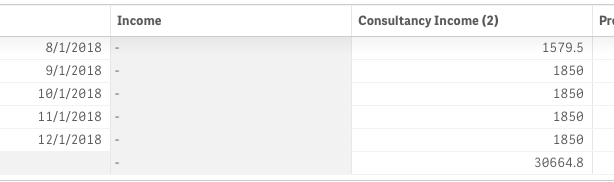

ketanvaria
- Mark as New
- Bookmark
- Subscribe
- Mute
- Subscribe to RSS Feed
- Permalink
- Report Inappropriate Content
see my further point below - for A KPI

 achakilam1022
- Mark as New
- Bookmark
- Subscribe
- Mute
- Subscribe to RSS Feed
- Permalink
- Report Inappropriate Content
May be
sum({<Date-={}>}ConsultancyIncome(2))

 nsetty
- Mark as New
- Bookmark
- Subscribe
- Mute
- Subscribe to RSS Feed
- Permalink
- Report Inappropriate Content
Try excluding the records while loading itself.
[Sheet1]:
LOAD
Date([Date] ) AS [Date],
[Income],
[Consultancy Income (2)],
[Product Income (3)],
[Interest earned]
 FROM [lib://qlikid_ketanvaria/cross_Table_Sample.xlsx]
(ooxml, embedded labels, table is Sheet1)
WHERE Len(Date)<>0;
Add
WHERE Len(Date)<>0;

 agigliotti
- Mark as New
- Bookmark
- Subscribe
- Mute
- Subscribe to RSS Feed
- Permalink
- Report Inappropriate Content
you can use the expression below:
SUM( {< Date = {"*"} >} [Consultancy Income (2)] )
I hope it helps.
Follow me on my LinkedIn | Know Gamma Informatica at gammainformatica.it
agigliotti
- Mark as New
- Bookmark
- Subscribe
- Mute
- Subscribe to RSS Feed
- Permalink
- Report Inappropriate Content
Please mark the answers as Helpful / Correct if applicable to help others cummunity members.
Thanks.
Follow me on my LinkedIn | Know Gamma Informatica at gammainformatica.it

- « Previous Replies
-
- 1
- 2
- Next Replies »