Unlock a world of possibilities! Login now and discover the exclusive benefits awaiting you.

- Qlik Community
- :
- Forums
- :
- Analytics & AI
- :
- Products & Topics
- :
- Visualization and Usability
- :
- Re: Disable Insight Advisor on QMC
- Subscribe to RSS Feed
- Mark Topic as New
- Mark Topic as Read
- Float this Topic for Current User
- Bookmark
- Subscribe
- Mute
- Printer Friendly Page

 amirmohamed
- Mark as New
- Bookmark
- Subscribe
- Mute
- Subscribe to RSS Feed
- Permalink
- Report Inappropriate Content
Disable Insight Advisor on QMC
Hi all,
I have upgraded our server to Qlik Sense September 18 with Patch 1, but I need to disable the Insight Advisor through QMC, is there anyway to do that, or what is the App Object type for this
Many thanks,

 Giuseppe_Panell
- Mark as New
- Bookmark
- Subscribe
- Mute
- Subscribe to RSS Feed
- Permalink
- Report Inappropriate Content

 taylorking
- Mark as New
- Bookmark
- Subscribe
- Mute
- Subscribe to RSS Feed
- Permalink
- Report Inappropriate Content
Hi,
Did you ever find a solution to disabling the Insight Advisor globally?
I know its possible to remove the feature from a specific app using:
SET DISABLE_AUTO_CHART=1;
SET DISABLE_INSIGHTS=1;
However I am looking to hide these features across our environment.
Kind regards,
Taylor

 Suus
Suus
- Mark as New
- Bookmark
- Subscribe
- Mute
- Subscribe to RSS Feed
- Permalink
- Report Inappropriate Content
Thanks Taylor, used SET DISABLE_INSIGHTS=1 succesfully.
Now I want to reverse the setting; showing Insights again.
My logic tried two things. SET DISABLE_INSIGHTS=0; and later added SET ENABLE_INSIGHTS=1;
Both gave no effect. I see this in Variables:

and this in app settings
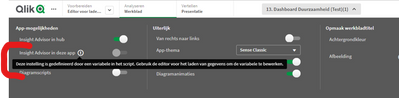
Translated: "setting is created through a variable in script....'
Any solution?
Suus
- Mark as New
- Bookmark
- Subscribe
- Mute
- Subscribe to RSS Feed
- Permalink
- Report Inappropriate Content
Update> found it: Enable Insights Advisor - Qlik Community - 1560988
