Unlock a world of possibilities! Login now and discover the exclusive benefits awaiting you.

- Qlik Community
- :
- Forums
- :
- Analytics & AI
- :
- Products & Topics
- :
- Visualization and Usability
- :
- Re: Display Background color
- Subscribe to RSS Feed
- Mark Topic as New
- Mark Topic as Read
- Float this Topic for Current User
- Bookmark
- Subscribe
- Mute
- Printer Friendly Page

 sjar1290
- Mark as New
- Bookmark
- Subscribe
- Mute
- Subscribe to RSS Feed
- Permalink
- Report Inappropriate Content
Display Background color
Hi All,
I need to achieve the following scenario.
I have a output like this:
| Fields | Access A | Access B |
| Field 1 | Yes | No |
| Field 2 | Yes | No |
| Field 3 | No | Yes |
| Field 4 | Yes | No |
| Field 5 | Yes | No |
| Field 6 | Yes | No |
| Field 7 | No | Yes |
| Field 8 | No | Yes |
| Field 9 | Yes | No |
| Field 10 | Yes | No |
But I need to achieve this, where ever 'Access A' has value 'NO' and 'Access B' has 'Yes' I need to display the background color as 'RED'
Instead of Yes and No, I am using Green tick Icon instead of Yes and Red hand Icon instead of No in the Qlik sense table chart.
How can I achieve this.
Any help would be much appreciated.
Thank you!

 ajaykakkar93
- Mark as New
- Bookmark
- Subscribe
- Mute
- Subscribe to RSS Feed
- Permalink
- Report Inappropriate Content
hi,
below is the code for the same
data:
load * Inline [
Fields,Access A,Access B
Field 1,Yes,No
Field 2,Yes,No
Field 3,No,Yes
Field 4,Yes,No
Field 5,Yes,No
Field 6,Yes,No
Field 7,No,Yes
Field 8,No,Yes
Field 9,Yes,No
Field 10,Yes,No
];
Left Join (data)
// [Access A]:
// add sumbol
load * Inline [
Access A,Access Symbol A
Yes,▲
No,▼
];
Left Join (data)
// [Access B]:
// add sumbol
load * Inline [
Access B,Access Symbol B
Yes,▲
No,▼
];
exit Script;
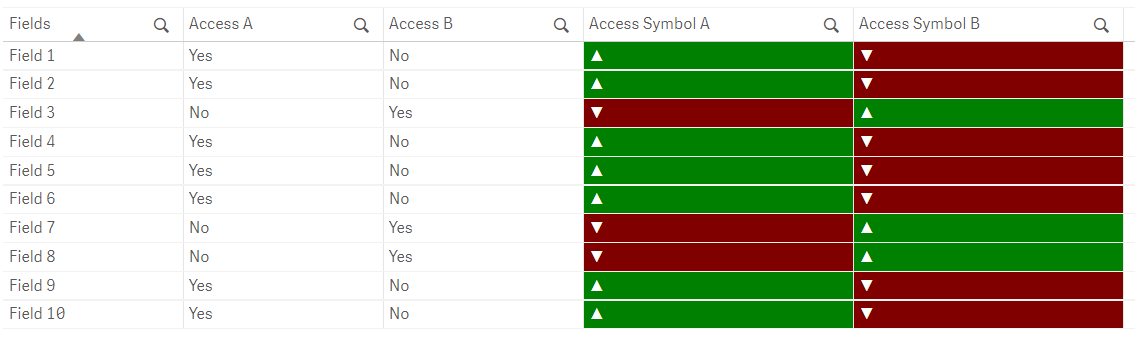
Background or Color expression
=if([Access B] = 'Yes' , green(),red())
sjar1290
- Mark as New
- Bookmark
- Subscribe
- Mute
- Subscribe to RSS Feed
- Permalink
- Report Inappropriate Content
Hi Ajay,
Thanks for the code.
but what I need is where ever Access A is 'NO' and Access B is 'YES' the background color should be RED() otherwise Green().
both these conditions should met (Access A is 'NO' and Access B is 'YES')
for Example: background color for rows of field 3, field 7 and field 8 should be RED()
I am using this expression
if(Access A='No',RED(), if(Acceess B ='Yes', RED(), Green()))
if(Access A='No',RED() and Acceess B ='Yes', RED(), Green())
But I am not getting the desires result with the above expressions.
please help me with the correct expression
Thank you!

 QFabian
- Mark as New
- Bookmark
- Subscribe
- Mute
- Subscribe to RSS Feed
- Permalink
- Report Inappropriate Content
Hi @sjar1290 , you can try this expression in the table Chart Property Background Color expression, for each column of the table:
if([Access A] = 'No' and [Access B] = 'Yes', lightred())


did it work for you? give like and mark the solution as accepted.
ajaykakkar93
- Mark as New
- Bookmark
- Subscribe
- Mute
- Subscribe to RSS Feed
- Permalink
- Report Inappropriate Content
 sjar1290
- Mark as New
- Bookmark
- Subscribe
- Mute
- Subscribe to RSS Feed
- Permalink
- Report Inappropriate Content
Thank you for helping me.
ajaykakkar93
- Mark as New
- Bookmark
- Subscribe
- Mute
- Subscribe to RSS Feed
- Permalink
- Report Inappropriate Content
hi,
below is the code for the same
data:
load * Inline [
Fields,Access A,Access B
Field 1,Yes,No
Field 2,Yes,No
Field 3,No,Yes
Field 4,Yes,No
Field 5,Yes,No
Field 6,Yes,No
Field 7,No,Yes
Field 8,No,Yes
Field 9,Yes,No
Field 10,Yes,No
];
Left Join (data)
// [Access A]:
// add sumbol
load * Inline [
Access A,Access Symbol A
Yes,▲
No,▼
];
Left Join (data)
// [Access B]:
// add sumbol
load * Inline [
Access B,Access Symbol B
Yes,▲
No,▼
];
exit Script;
Background or Color expression
=if([Access B] = 'Yes' , green(),red())
