Unlock a world of possibilities! Login now and discover the exclusive benefits awaiting you.

- Qlik Community
- :
- Forums
- :
- Analytics & AI
- :
- Products & Topics
- :
- Visualization and Usability
- :
- Display aging based on specified date range.
- Subscribe to RSS Feed
- Mark Topic as New
- Mark Topic as Read
- Float this Topic for Current User
- Bookmark
- Subscribe
- Mute
- Printer Friendly Page

- Mark as New
- Bookmark
- Subscribe
- Mute
- Subscribe to RSS Feed
- Permalink
- Report Inappropriate Content
Display aging based on specified date range.
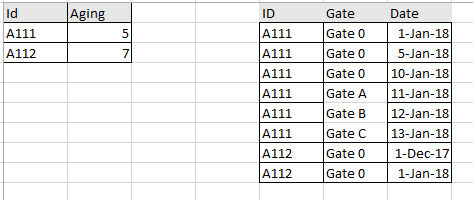
How can I show aging in my KPI only for Id that have minimum Gate 0 date that equal or greater than 1 Jan 2018?
Based on below example, my KPI should show 5.
Please advise. Thanks.
Accepted Solutions

 sunny_talwar
- Mark as New
- Bookmark
- Subscribe
- Mute
- Subscribe to RSS Feed
- Permalink
- Report Inappropriate Content
May be something like this
=Num(Avg(ProjectID = {"=Max({<Gate = {'Gate 0'}>}Date) > MakeDate(2018, 1, 1)"}>} ([Modified]-[Created])),'##.0')

 ajsjoshua
- Mark as New
- Bookmark
- Subscribe
- Mute
- Subscribe to RSS Feed
- Permalink
- Report Inappropriate Content
Dear Ahmad,
Try this expression
MinString({<Gate={Gate0},Date={">=1/1/2018"}>}Aging)
sunny_talwar
- Mark as New
- Bookmark
- Subscribe
- Mute
- Subscribe to RSS Feed
- Permalink
- Report Inappropriate Content
I am not sure I understand how you are getting Aging? Is that a column from your table? Also, can you may be re-explain the logic behind seeing only A111's aging?
- Mark as New
- Bookmark
- Subscribe
- Mute
- Subscribe to RSS Feed
- Permalink
- Report Inappropriate Content
Hi Sunny,
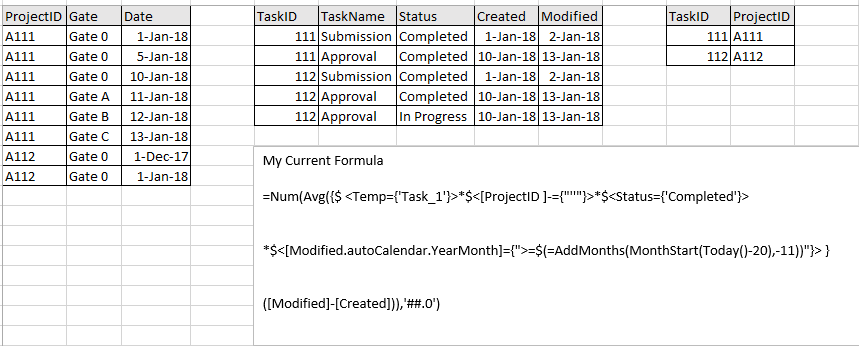
Please refer below data. Basically, i want to exclude project that have minimum Gate 0 that less than 1 Jan 2018.
TaskName is loaded as Temp in data load editor.
- Submission as Task_1
- Approval as Task_2
So based on below data, my KPI aging will show only for project A111 because A112 has minimum gate 0 less than 1 Jan 2018.
Current formula:
=Num(Avg({$ <Temp={'Task_1'}>*$<[ProjectID ]-={"''"}>*$<Status={'Completed'}>
*$<[Modified.autoCalendar.YearMonth]={">=$(=AddMonths(MonthStart(Today()-20),-11))"}> }
([Modified]-[Created])),'##.0')
sunny_talwar
- Mark as New
- Bookmark
- Subscribe
- Mute
- Subscribe to RSS Feed
- Permalink
- Report Inappropriate Content
May be something like this
=Num(Avg(ProjectID = {"=Max({<Gate = {'Gate 0'}>}Date) > MakeDate(2018, 1, 1)"}>} ([Modified]-[Created])),'##.0')
- Mark as New
- Bookmark
- Subscribe
- Mute
- Subscribe to RSS Feed
- Permalink
- Report Inappropriate Content
Hi Sunny,
With a bit modification to suit my need. i manage to get what i want. Thanks.