Unlock a world of possibilities! Login now and discover the exclusive benefits awaiting you.

- Qlik Community
- :
- Forums
- :
- Analytics & AI
- :
- Products & Topics
- :
- Visualization and Usability
- :
- Display values using Filter
- Subscribe to RSS Feed
- Mark Topic as New
- Mark Topic as Read
- Float this Topic for Current User
- Bookmark
- Subscribe
- Mute
- Printer Friendly Page

- Mark as New
- Bookmark
- Subscribe
- Mute
- Subscribe to RSS Feed
- Permalink
- Report Inappropriate Content
Display values using Filter
Hi !
I have a language table

Now i will add language name to a filter When i click on enlish it should display one value when i click on French it should show another value.How can i do it
For exaple the code should be like this,this code is executed in power bi by taking a text and adding the measure value in it But not in qlick sense.can u plz help me
Measure 2 = IF(SELECTEDVALUE('LANGUAGE'[LANGUAGENAME])="ENGLISH","Number of hours of training followed",IF(SELECTEDVALUE('LANGUAGE'[LANGUAGENAME])="FRENCH","NNombre d'heures de formation suivies","Aantal trainingsuren gevolgd"))
- « Previous Replies
-
- 1
- 2
- Next Replies »

 petter
- Mark as New
- Bookmark
- Subscribe
- Mute
- Subscribe to RSS Feed
- Permalink
- Report Inappropriate Content
The equivalent Qlik expression would be something like this:
=Pick( Min(LANGUAGEID) , 'Number of hours of training','Nombre d''heures de formation suivies','Aantal trainingsuren gevolgd')
I would actually rather extend the language table to also contain the strings and make the expression simpler and the translations much more maintainable by not including them in individual chart expressions....
- Mark as New
- Bookmark
- Subscribe
- Mute
- Subscribe to RSS Feed
- Permalink
- Report Inappropriate Content
Thank you But i want to use Language name in Filter not language Id
petter
- Mark as New
- Bookmark
- Subscribe
- Mute
- Subscribe to RSS Feed
- Permalink
- Report Inappropriate Content
Then it is:
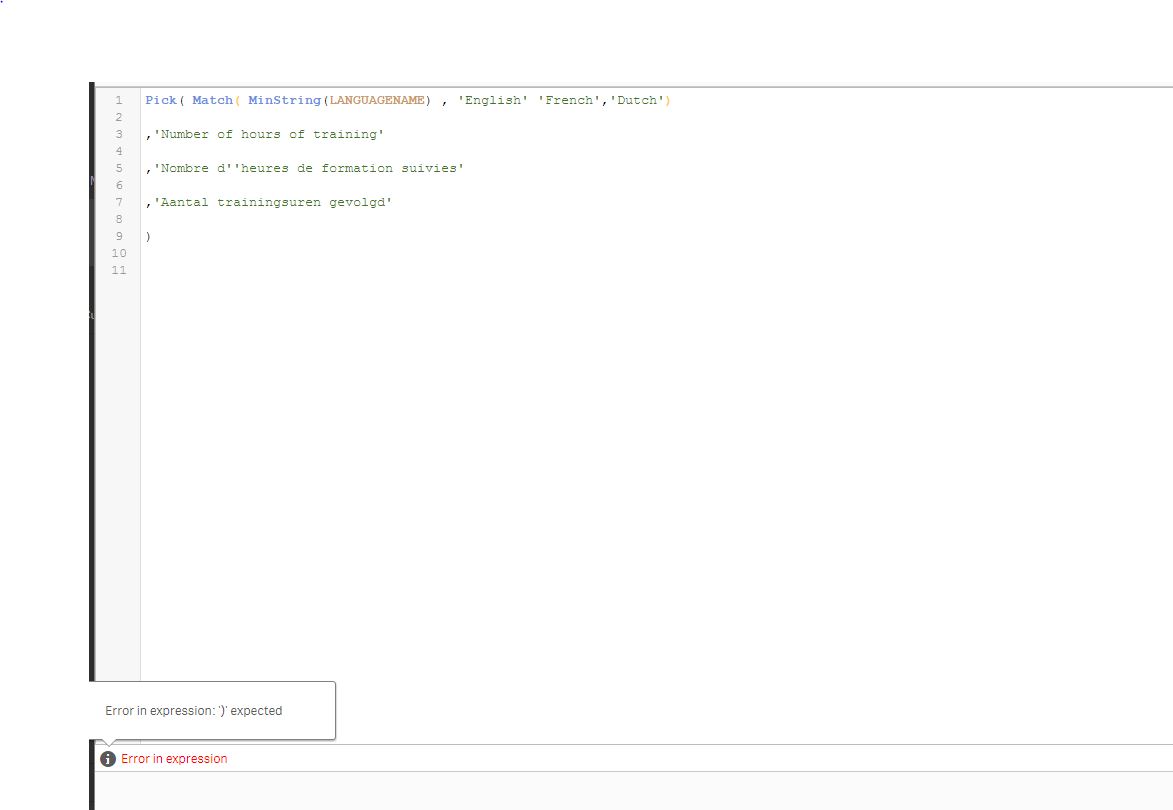
Pick( Match( MinString(LANGUAGENAME) , 'English' 'French','Dutch')
,'Number of hours of training'
,'Nombre d''heures de formation suivies'
,'Aantal trainingsuren gevolgd'
)
petter
- Mark as New
- Bookmark
- Subscribe
- Mute
- Subscribe to RSS Feed
- Permalink
- Report Inappropriate Content
Notice that Minstring is used in case the user has selected none of the languages or more than one. Then it will always be able to make a translation as it will pick the first selected language.
petter
- Mark as New
- Bookmark
- Subscribe
- Mute
- Subscribe to RSS Feed
- Permalink
- Report Inappropriate Content
Also be aware that you can use LANGUAGENAME as a filter and still use LANGUAGEID in your expression due to the associative data model in Qlik.
- Mark as New
- Bookmark
- Subscribe
- Mute
- Subscribe to RSS Feed
- Permalink
- Report Inappropriate Content
I am getting an error in Expression
petter
- Mark as New
- Bookmark
- Subscribe
- Mute
- Subscribe to RSS Feed
- Permalink
- Report Inappropriate Content
Add an extra closing paranthesis after LANGUAGNAME)
Like this:
Pick( Match( MinString(LANGUAGENAME)) , 'English','French','Dutch' )
.....
.....
)
- Mark as New
- Bookmark
- Subscribe
- Mute
- Subscribe to RSS Feed
- Permalink
- Report Inappropriate Content
No When i added another paranthasis there it is showing another error as Match takes 2 parameters,then i removed Language name and added as
Pick( Match( MinString('English','French','Dutch')) , 'English','French','Dutch' )
.....
.....
)
Then error is minstring takes only one parameter
petter
- Mark as New
- Bookmark
- Subscribe
- Mute
- Subscribe to RSS Feed
- Permalink
- Report Inappropriate Content
If you take my original Pick(Match( expression and add a comma in between the 'English' and 'French' it will be a valid expression... I missed out a comma ....
- « Previous Replies
-
- 1
- 2
- Next Replies »