Unlock a world of possibilities! Login now and discover the exclusive benefits awaiting you.

- Qlik Community
- :
- Forums
- :
- Analytics & AI
- :
- Products & Topics
- :
- Visualization and Usability
- :
- Eliminate Current Month
- Subscribe to RSS Feed
- Mark Topic as New
- Mark Topic as Read
- Float this Topic for Current User
- Bookmark
- Subscribe
- Mute
- Printer Friendly Page

 selvakumara
- Mark as New
- Bookmark
- Subscribe
- Mute
- Subscribe to RSS Feed
- Permalink
- Report Inappropriate Content
Eliminate Current Month
Hi Team,
I have req like exclude the current month while calculate the average ref lines
Eg:
If i selected a year 2018 (Jul 2017 to Feb 18 ) will come .
Total counts = 112 (Include feb 18). But I want to exclude feb 18 while adding ref lines
At the same time it won't affect rest of the previous years
My expression :Count({$<[Group] = {'dfgdg'}>} DISTINCT xyz )) it will return 112
Here how can i exclude feb ?
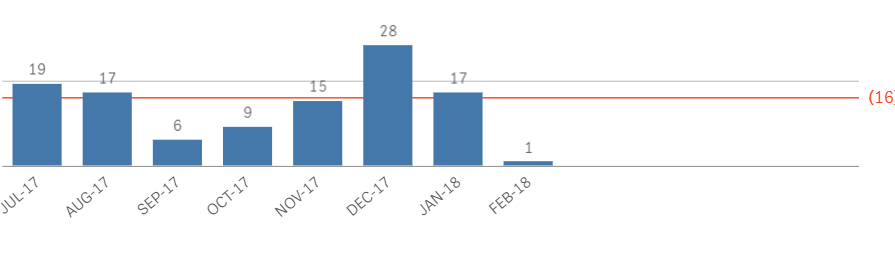
REF line expression is :
Count({$<[Group] = {'dfgdg'}>} DISTINCT xyz )) / Count ([Year Month])
if i remove the feb in the calculation avg line should b 15.9
Please help on this
Thanks

 brunobertels
- Mark as New
- Bookmark
- Subscribe
- Mute
- Subscribe to RSS Feed
- Permalink
- Report Inappropriate Content
Hi
Try this
Count({$<[Group] = {'dfgdg'}>} DISTINCT xyz )) / Count({$<[Year Month]={"<$(=MonthYear(today()))"}>}[Year Month])

 Digvijay_Singh
- Mark as New
- Bookmark
- Subscribe
- Mute
- Subscribe to RSS Feed
- Permalink
- Report Inappropriate Content
You need to exclude current month thru set analysis, need to correct formatting and date fieldname -
Count({$<[Group] = {'dfgdg'},Date = {"<$(=MonthStart(today()))"}>} DISTINCT xyz ))

 surendraj
- Mark as New
- Bookmark
- Subscribe
- Mute
- Subscribe to RSS Feed
- Permalink
- Report Inappropriate Content
Use this in set modifier to eliminate current month count.
May be This
count({<Month -= {"$(=Date(MonthStart(Today()), 'MMM-YYYY'))"}>}DISTINCT xyz )

 nicu1996
- Mark as New
- Bookmark
- Subscribe
- Mute
- Subscribe to RSS Feed
- Permalink
- Report Inappropriate Content
I think that you need to exclude de Month-Year, because that's the format of the dimension from the bottom of the barchart.
If you have a Master Calendar which contains the MonthYear field, just use the following expression:
=Count({$<[Group] = {'dfgdg'}, MonthYear-={"$(=Date(MonthStart(Today()), 'MMM-YYYY'))"}>} DISTINCT xyz )
selvakumara
- Mark as New
- Bookmark
- Subscribe
- Mute
- Subscribe to RSS Feed
- Permalink
- Report Inappropriate Content
I need to exclude the count also in the numerator
in the denominator i can do.
How can do it ?
