Unlock a world of possibilities! Login now and discover the exclusive benefits awaiting you.

- Qlik Community
- :
- Forums
- :
- Analytics & AI
- :
- Products & Topics
- :
- Visualization and Usability
- :
- Engine Not Found
- Subscribe to RSS Feed
- Mark Topic as New
- Mark Topic as Read
- Float this Topic for Current User
- Bookmark
- Subscribe
- Mute
- Printer Friendly Page

- Mark as New
- Bookmark
- Subscribe
- Mute
- Subscribe to RSS Feed
- Permalink
- Report Inappropriate Content
Engine Not Found
Hello,
I have 2 nodes I am trying to connect, Central (with Repository, Scheduler, Proxy, and Engine) and Hub (with Repository, Proxy, and Engine) . I have done an install of each of these nodes on 2 separate remote desktops. After installation of both I went into the Central node qmc and connected the Hub node to make sure that it appeared on in the node tab of Central's qmc, which it does (says 3 out of 3 systems are running). However when I attempt to go to the hub of my hub node I get an error saying that Engine not found.
It should also be noted that I can get onto the Hub's qmc which is identical to Central's qmc.
Why am I getting an engine not found error when the qmc states that all the systems are running?

 Michael_Tarallo
- Mark as New
- Bookmark
- Subscribe
- Mute
- Subscribe to RSS Feed
- Permalink
- Report Inappropriate Content
Hi Donish - is this a purchased copy (licensed) or trial version of Qlik Sense Server?
If purchased - you can can open a case with Qlik support at support@qlik.com - if a trial - you should be able to get someone from the pre-sales side at Qlik to help you. Let me know and I will see if I can facilitate this.
Hey jog - any ideas?
Regards,
Mike T
Qlik
Mike Tarallo
Qlik
 Masaki_Hamano
- Mark as New
- Bookmark
- Subscribe
- Mute
- Subscribe to RSS Feed
- Permalink
- Report Inappropriate Content
Hi,
Before reaching to Qlik support, I advise you to check the followings:
1. On the virtual proxies setting of both central and rim nodes, check if you have added the load balancing nodes in the following manner.
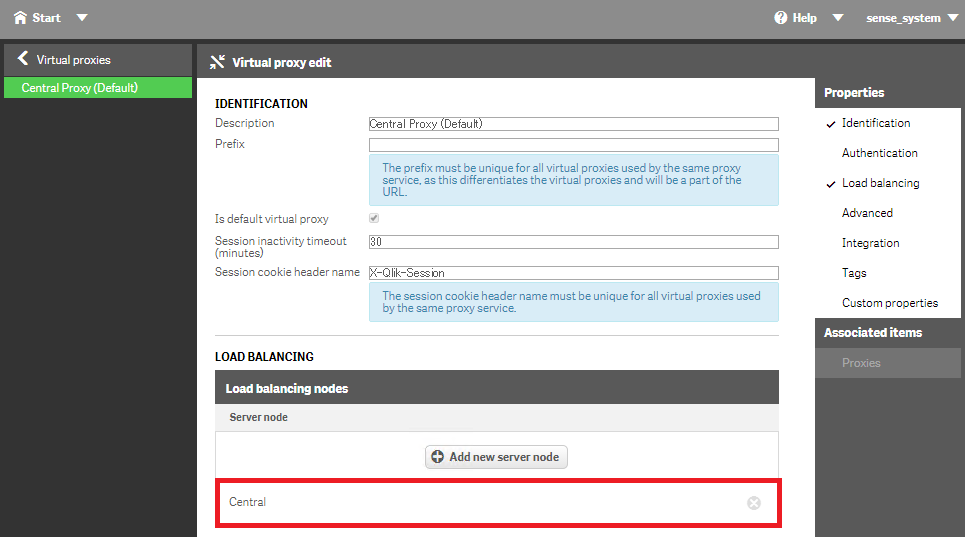
2. If you added a remote node in the load balancing nodes setting, the port 4747 (Engine/QES listen port) needs to be opened in Windows Firewall on the remote node.
Masaki