Unlock a world of possibilities! Login now and discover the exclusive benefits awaiting you.

- Qlik Community
- :
- Forums
- :
- Analytics & AI
- :
- Products & Topics
- :
- Visualization and Usability
- :
- Excel column names include file name
- Subscribe to RSS Feed
- Mark Topic as New
- Mark Topic as Read
- Float this Topic for Current User
- Bookmark
- Subscribe
- Mute
- Printer Friendly Page

- Mark as New
- Bookmark
- Subscribe
- Mute
- Subscribe to RSS Feed
- Permalink
- Report Inappropriate Content
Excel column names include file name
This question is related to other issues. One thing always leads to another...
As a solution to a problem I decided to split my Excel into two seperate files with different data.
This second file has a different name of course.
After imprting this file into my personal files and using it in a worksheet, all colum names have the file name as a prefix. This way I can't see the column name in the drop down so I had to rename all column manually (remove the filename).
Is this a bug or am I doing somethig wrong?
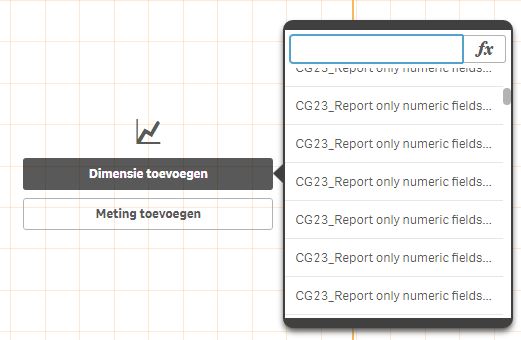
I hope the image illustrates my problem.
To make things worse (for me): after renaming all the columns the problem still exists and even after deleting the original file, I can still see the columns from the original file. What am I doing wrong? How can I solve this and how can I prevent this in the future?
Thanks.