Unlock a world of possibilities! Login now and discover the exclusive benefits awaiting you.

- Qlik Community
- :
- Forums
- :
- Analytics & AI
- :
- Products & Topics
- :
- Visualization and Usability
- :
- Exclude results from Button search string
- Subscribe to RSS Feed
- Mark Topic as New
- Mark Topic as Read
- Float this Topic for Current User
- Bookmark
- Subscribe
- Mute
- Printer Friendly Page

 bartvana
- Mark as New
- Bookmark
- Subscribe
- Mute
- Subscribe to RSS Feed
- Permalink
- Report Inappropriate Content
Exclude results from Button search string
Hello,
I am making a button to "Select values matching search criteria". I understand the basics and can get this working, but I don't succeed in excluding certain results.
In particular, I want to search for "GP*", but exclude "GPF*" and "GP?S*" from the results.
The search term in the screenshot below, namely
='("GP*")'
works fine, but obviously doesn't exclude anything:
What would be the search term for excluding "GPF*" and "GP?S*" ?
Many thanks in advance!
Accepted Solutions

 Nicole-Smith
- Mark as New
- Bookmark
- Subscribe
- Mute
- Subscribe to RSS Feed
- Permalink
- Report Inappropriate Content
Assuming you are using the button Qlik Sense object and not an extension, I would suggest setting your button action to "Select values in a field" and set the Value equal to this expression:
=concat({<[Field Name]={"GP*"}-{"GPF*","GP?S"}>} distinct [Field Name], ';')
This will create a list of all possible values while excluding the ones you don't want.
Nicole-Smith
- Mark as New
- Bookmark
- Subscribe
- Mute
- Subscribe to RSS Feed
- Permalink
- Report Inappropriate Content
Assuming you are using the button Qlik Sense object and not an extension, I would suggest setting your button action to "Select values in a field" and set the Value equal to this expression:
=concat({<[Field Name]={"GP*"}-{"GPF*","GP?S"}>} distinct [Field Name], ';')
This will create a list of all possible values while excluding the ones you don't want.
bartvana
- Mark as New
- Bookmark
- Subscribe
- Mute
- Subscribe to RSS Feed
- Permalink
- Report Inappropriate Content
Thanks for answering!
Yes, that's the button Qlik Sense object.
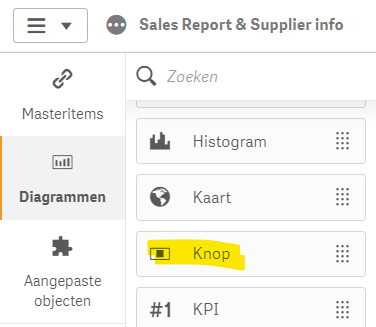
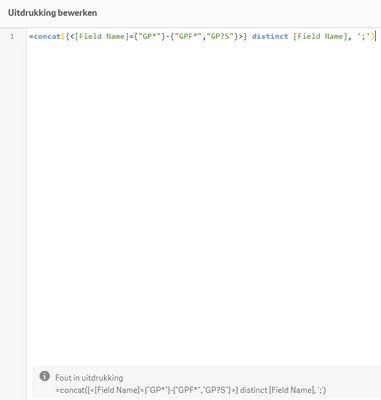
But I seem to get an error in the expression (I copy-pasted your suggestion).
bartvana
- Mark as New
- Bookmark
- Subscribe
- Mute
- Subscribe to RSS Feed
- Permalink
- Report Inappropriate Content
Sorry for my stupid mistake above, I obviously forgot to substitute my specific Field Name...🙄
Works perfectly now of course, thank you!
