Unlock a world of possibilities! Login now and discover the exclusive benefits awaiting you.

- Qlik Community
- :
- Forums
- :
- Analytics & AI
- :
- Products & Topics
- :
- Visualization and Usability
- :
- Re: Excluding values with a particular length
- Subscribe to RSS Feed
- Mark Topic as New
- Mark Topic as Read
- Float this Topic for Current User
- Bookmark
- Subscribe
- Mute
- Printer Friendly Page

- Mark as New
- Bookmark
- Subscribe
- Mute
- Subscribe to RSS Feed
- Permalink
- Report Inappropriate Content
Excluding values with a particular length
Hi
I have the following data.
CLI , Indicator
12345,1
1245698,1
124788,0
12369,1
12369874,1
Now, I want to count the number of CLI's with indicator 1 and where length greater than 5.
Thanks 
Accepted Solutions

 sunny_talwar
- Mark as New
- Bookmark
- Subscribe
- Mute
- Subscribe to RSS Feed
- Permalink
- Report Inappropriate Content
May be just this
Count(DISTINCT {<CLI = {"=Len(CLI) > 5"}, Indicator = {1}>}CLI)

 gsbeaton
- Mark as New
- Bookmark
- Subscribe
- Mute
- Subscribe to RSS Feed
- Permalink
- Report Inappropriate Content
Lots of ways to achieve this, but best practice says, do the transformation in the script first, then your expressions in the front end are really simple.
T1:
Load * inline [
CLI, Indicator
12345,1
1245698,1
124788,0
12369,1
12369874,1
];

T2:
Load *,
IF(len(CLI)>=5,1,0) as Over5Flag
Resident T1;

Drop Table T1;
Then in a text box:
=count({<Indicator={1}, Over5Flag={1}>}CLI)
Hope this helps.
- Mark as New
- Bookmark
- Subscribe
- Mute
- Subscribe to RSS Feed
- Permalink
- Report Inappropriate Content
Could you please tell me how to achieve this in the front end, using set analysis?
sunny_talwar
- Mark as New
- Bookmark
- Subscribe
- Mute
- Subscribe to RSS Feed
- Permalink
- Report Inappropriate Content
May be just this
Count(DISTINCT {<CLI = {"=Len(CLI) > 5"}, Indicator = {1}>}CLI)

 OmarBenSalem
- Mark as New
- Bookmark
- Subscribe
- Mute
- Subscribe to RSS Feed
- Permalink
- Report Inappropriate Content
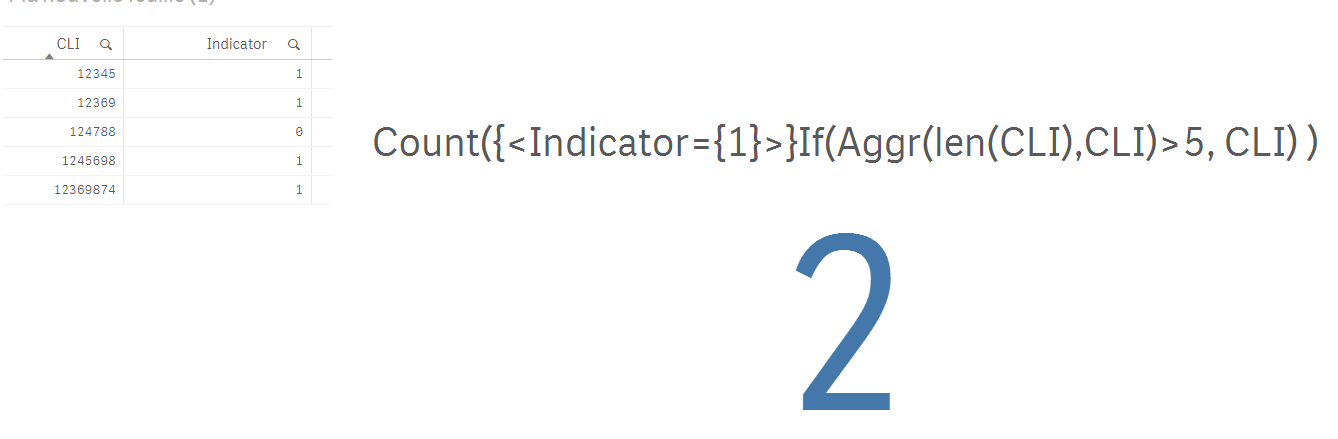
Count({<Indicator={1}>}If(Aggr(len(CLI),CLI)>5, CLI) )
result:
gsbeaton
- Mark as New
- Bookmark
- Subscribe
- Mute
- Subscribe to RSS Feed
- Permalink
- Report Inappropriate Content
Couple of options here for you now. If performance is important to you, pre process in the script and use binary flags to filter out the records you don't want.
sunny_talwar
- Mark as New
- Bookmark
- Subscribe
- Mute
- Subscribe to RSS Feed
- Permalink
- Report Inappropriate Content
omarbensalem this is an option, but I would suggest not to use Aggr() function if we can do it another way.... if you want to use if, why not just this?
Count({<Indicator={1}>}If(Len(CLI)>5, CLI))