Unlock a world of possibilities! Login now and discover the exclusive benefits awaiting you.

- Qlik Community
- :
- Forums
- :
- Analytics & AI
- :
- Products & Topics
- :
- Visualization and Usability
- :
- Execute .bat Qlik Sense Desktop
- Subscribe to RSS Feed
- Mark Topic as New
- Mark Topic as Read
- Float this Topic for Current User
- Bookmark
- Subscribe
- Mute
- Printer Friendly Page

 dmpilars
- Mark as New
- Bookmark
- Subscribe
- Mute
- Subscribe to RSS Feed
- Permalink
- Report Inappropriate Content
Execute .bat Qlik Sense Desktop
Hi people  !
!
In this case I have a .bat file and I'm trying to execute this from Qlik Sense Desktop but this error appears when I try to complete the operation
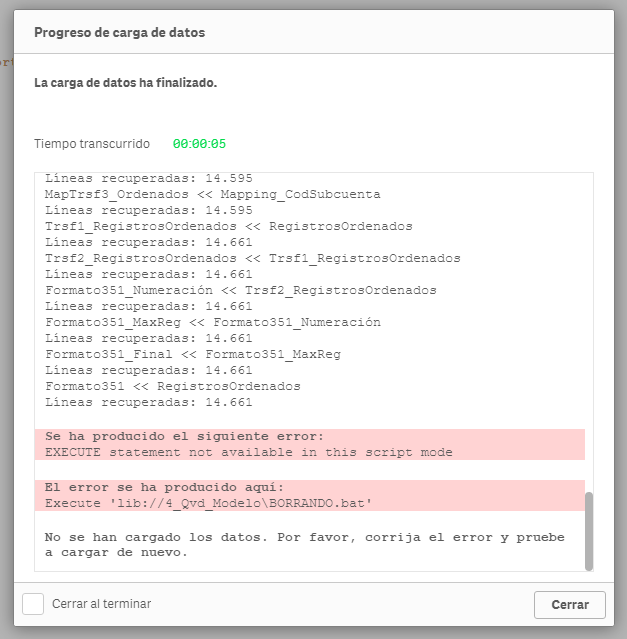
I'm using this expression: Execute 'lib://4_Qvd_Modelo\BORRANDO.bat';
I try also Execute: Execute cmd.exe /C C:\ROLLUP\DESARROLLO\FDN\4_Qvd_Modelo\BORRANDO.bat;
and Execute C:\ROLLUP\DESARROLLO\FDN\4_Qvd_Modelo\BORRANDO.bat;
But no one run correctly. Pleaseee! Help me!
Plus: if anyone know how to eliminate the last row in the .txt whit a .bat, tell me please.
 petter
- Mark as New
- Bookmark
- Subscribe
- Mute
- Subscribe to RSS Feed
- Permalink
- Report Inappropriate Content
You will have to turn on "legacy" mode for Qlik Sense Desktop for the Execute statement to work.
You find the instructions on how to do it here: https://help.qlik.com/en-US/sense/February2018/Subsystems/Hub/Content/Scripting/ScriptRegularStateme...
dmpilars
- Mark as New
- Bookmark
- Subscribe
- Mute
- Subscribe to RSS Feed
- Permalink
- Report Inappropriate Content
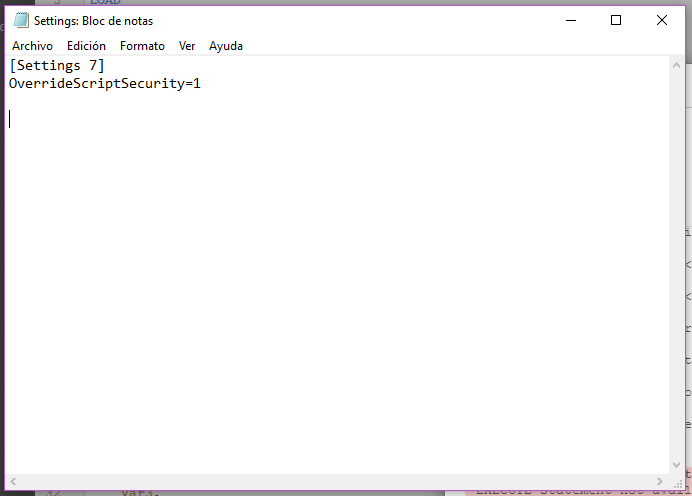
It is correct? not work!
TY!
petter
- Mark as New
- Bookmark
- Subscribe
- Mute
- Subscribe to RSS Feed
- Permalink
- Report Inappropriate Content
You will also need to disable standard mode as was mentioned in the first link I posted. It is easy to overlook...
StandardReload=0
Here it is:
