Unlock a world of possibilities! Login now and discover the exclusive benefits awaiting you.

- Qlik Community
- :
- Forums
- :
- Analytics & AI
- :
- Products & Topics
- :
- Visualization and Usability
- :
- Expression eror in Pick match
- Subscribe to RSS Feed
- Mark Topic as New
- Mark Topic as Read
- Float this Topic for Current User
- Bookmark
- Subscribe
- Mute
- Printer Friendly Page

- Mark as New
- Bookmark
- Subscribe
- Mute
- Subscribe to RSS Feed
- Permalink
- Report Inappropriate Content
Expression eror in Pick match
Hi , I am new to Qlik Sense as i want to create a calculation for each field and i need to take it as a table when i am trying to do that with pick match i am getting an expression error
first i created a valuelist of 5801,5802,5803,58033
Now i am trying create a measure field to match that fields,Here i am facing a problem can u plzz help me to solve these
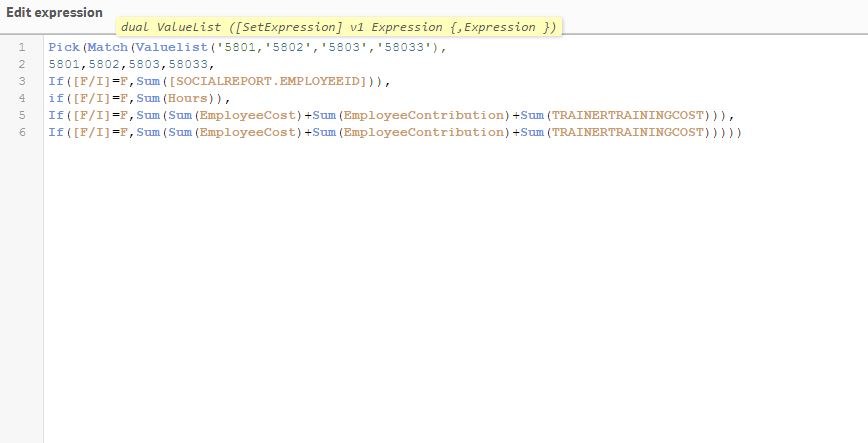
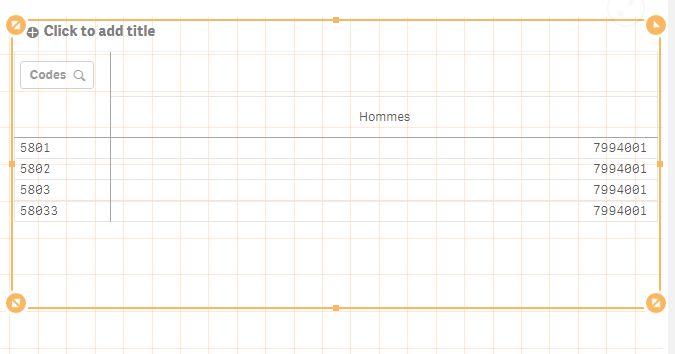
I have show my report as below
- « Previous Replies
-
- 1
- 2
- Next Replies »

 undergrinder
- Mark as New
- Bookmark
- Subscribe
- Mute
- Subscribe to RSS Feed
- Permalink
- Report Inappropriate Content
Hi Aryan,
I think the problem may be at the ValueList function, try define a column instead of.
pick(match([column], ... , .... , ...),if......
G.

 sunny_talwar
- Mark as New
- Bookmark
- Subscribe
- Mute
- Subscribe to RSS Feed
- Permalink
- Report Inappropriate Content
I think there are multiple problems here... would you be able to share your expression as text?

 ggijben
- Mark as New
- Bookmark
- Subscribe
- Mute
- Subscribe to RSS Feed
- Permalink
- Report Inappropriate Content
I think you shouldn't use the PICK() function here, but just use a nested IF instead.
So IF(Valuelist(a,b,c,d) =a, <expression>,
IF(Valuelist(a,b,c,d) = b, <expression>, etc))

 Neymar_Jr
- Mark as New
- Bookmark
- Subscribe
- Mute
- Subscribe to RSS Feed
- Permalink
- Report Inappropriate Content
Please try -
pick(match(valuelist(5801,5802,5803,58033),5801,5802,5803,58033)
,Sum({<[F/I] = {'F'}>}FieldName)
,Sum({<[F/I] = {'F'}>}FieldName)
,Sum({<[F/I] = {'F'}>}FieldName)+Sum({<[F/I] = {'F'}>}FieldName)+Sum({<[F/I] = {'F'}>}FieldName)
,Sum({<[F/I] = {'F'}>}FieldName)+Sum({<[F/I] = {'F'}>}FieldName)+Sum({<[F/I] = {'F'}>}FieldName)
)
- Mark as New
- Bookmark
- Subscribe
- Mute
- Subscribe to RSS Feed
- Permalink
- Report Inappropriate Content
When i add the Measure it is showing as Internal Engine error
- Mark as New
- Bookmark
- Subscribe
- Mute
- Subscribe to RSS Feed
- Permalink
- Report Inappropriate Content
When i am adding the measure in Pivot table i am getting an internal engine error
- Mark as New
- Bookmark
- Subscribe
- Mute
- Subscribe to RSS Feed
- Permalink
- Report Inappropriate Content
Pick(Match(ValueList('5801','5802','5803','58033'),'5801','5802','5803','58033',
Count(distinct total [EMployeeID-MF]),
Sum(total [Hours-MF]),
Sum(total [Total-MF]),
Sum(total [Total-MF])))
 rubenmarin
- Mark as New
- Bookmark
- Subscribe
- Mute
- Subscribe to RSS Feed
- Permalink
- Report Inappropriate Content
Hi aryan, at first sight i see two 2 things:
- Match should be closed after 58033
- Sum inside of sum: use RangeSum(Sum(), Sum()...) instead, or remove the outer sum, in this case seems it's not needed
- Mark as New
- Bookmark
- Subscribe
- Mute
- Subscribe to RSS Feed
- Permalink
- Report Inappropriate Content
I changed the formula, i wrote new formula above
- « Previous Replies
-
- 1
- 2
- Next Replies »