Unlock a world of possibilities! Login now and discover the exclusive benefits awaiting you.

- Qlik Community
- :
- Forums
- :
- Analytics & AI
- :
- Products & Topics
- :
- Visualization and Usability
- :
- Filter pane | Searching for 'greater than'
- Subscribe to RSS Feed
- Mark Topic as New
- Mark Topic as Read
- Float this Topic for Current User
- Bookmark
- Subscribe
- Mute
- Printer Friendly Page

 schmidtj
- Mark as New
- Bookmark
- Subscribe
- Mute
- Subscribe to RSS Feed
- Permalink
- Report Inappropriate Content
Filter pane | Searching for 'greater than'
Hi,
i like the simplicity of the Qlik Sense filters but it gives me some headaches, too.
I have a visualisation where i have a filter with date-items in the format DD.MM.YYYY.
However the user needs to set a 'greater than' filter, for example all dates greater then 14.02.2016.
Right now i would have to select all the single days within the option liste of the filter pane.
Anybody has some advice for me?
Thanks a lot!
Accepted Solutions

 vinieme12
- Mark as New
- Bookmark
- Subscribe
- Mute
- Subscribe to RSS Feed
- Permalink
- Report Inappropriate Content
dates are also numbers, so are your dates actually dates? or are they text?
If a post helps to resolve your issue, please accept it as a Solution.
schmidtj
- Mark as New
- Bookmark
- Subscribe
- Mute
- Subscribe to RSS Feed
- Permalink
- Report Inappropriate Content
I saw that when i format the date like YYYYMMDD i can then use >, < >=, <= to do a range.
However i would like to stick to the original date format.

- Mark as New
- Bookmark
- Subscribe
- Mute
- Subscribe to RSS Feed
- Permalink
- Report Inappropriate Content
We can achieve that using conditions involving set analysis. Will you be able to share a sample .qvf??
vinieme12
- Mark as New
- Bookmark
- Subscribe
- Mute
- Subscribe to RSS Feed
- Permalink
- Report Inappropriate Content
dates are also numbers, so are your dates actually dates? or are they text?
If a post helps to resolve your issue, please accept it as a Solution.
schmidtj
- Mark as New
- Bookmark
- Subscribe
- Mute
- Subscribe to RSS Feed
- Permalink
- Report Inappropriate Content
in my case dates are numbers.
vinieme12
- Mark as New
- Bookmark
- Subscribe
- Mute
- Subscribe to RSS Feed
- Permalink
- Report Inappropriate Content
can you post a sample app
If a post helps to resolve your issue, please accept it as a Solution.
schmidtj
- Mark as New
- Bookmark
- Subscribe
- Mute
- Subscribe to RSS Feed
- Permalink
- Report Inappropriate Content
ok you pointed me to the solution already.
my date was a pure number so now i transformed it into:
date(date#([MY_DATE_NUMBER],'YYYYMMDD'), 'DD.MM.YYYY').
Now i can do the range notation with my format DD.MM.YYYY.
Tanks 

 OmarBenSalem
- Mark as New
- Bookmark
- Subscribe
- Mute
- Subscribe to RSS Feed
- Permalink
- Report Inappropriate Content
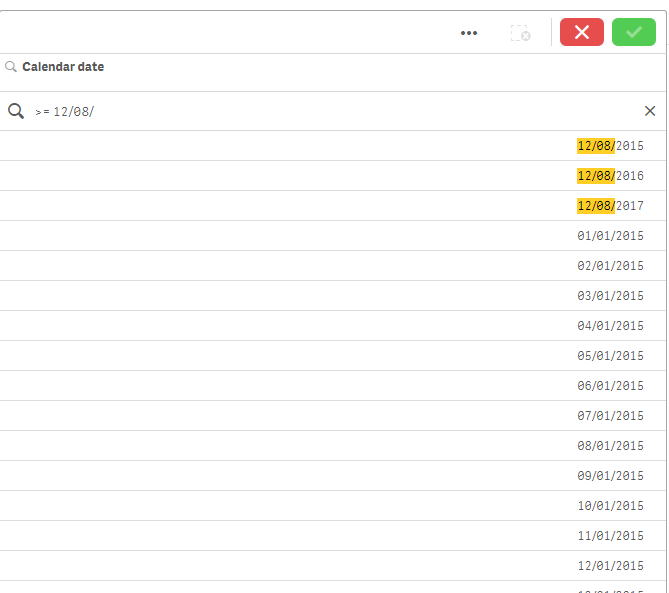
I'm using the format DD/MM/YYYY in my date and can use the >= to filter date !
See the image below:
schmidtj
- Mark as New
- Bookmark
- Subscribe
- Mute
- Subscribe to RSS Feed
- Permalink
- Report Inappropriate Content
Yes my date was a number.
No it is a Qlik date format and it works fine.
Thanks