Unlock a world of possibilities! Login now and discover the exclusive benefits awaiting you.

- Qlik Community
- :
- Forums
- :
- Analytics & AI
- :
- Products & Topics
- :
- Visualization and Usability
- :
- Finding the date range(Qlik Sense)
- Subscribe to RSS Feed
- Mark Topic as New
- Mark Topic as Read
- Float this Topic for Current User
- Bookmark
- Subscribe
- Mute
- Printer Friendly Page

 achakilam1022
- Mark as New
- Bookmark
- Subscribe
- Mute
- Subscribe to RSS Feed
- Permalink
- Report Inappropriate Content
Finding the date range(Qlik Sense)
Hi all,
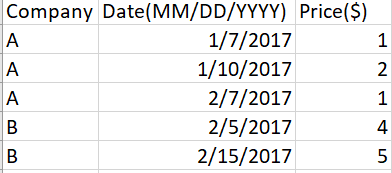
I have two data tables; first one contains the price details of the product sold by a company and this price varies with time. There is a recording made in the table when there is a change in the price or a new company is added.
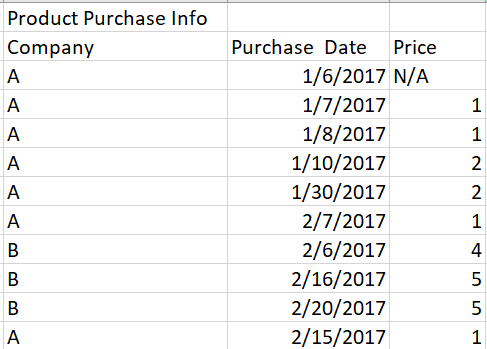
The second table contains the purchase data, i.e, product purchased from which company on which date. I need help in finding the price of the product based on the company it is bought and also check the date to map the price.
Thank you.
- Tags:
- range date
Accepted Solutions

 petter
- Mark as New
- Bookmark
- Subscribe
- Mute
- Subscribe to RSS Feed
- Permalink
- Report Inappropriate Content
If you have the two tables with the same columns as you specify except that the price in table #2 is left out - you can calculate that price in a GUI table with the following expression:
FirstSortedValue( Price , -If(PriceDate<=Date,PriceDate) )
Well to also get the N/A rows you will have to use an If() function also like this:
If(IsNull(FirstSortedValue( Price , -If(PriceDate<=Date,PriceDate) )),'N/A',FirstSortedValue( Price , -If(PriceDate<=Date,PriceDate) ))
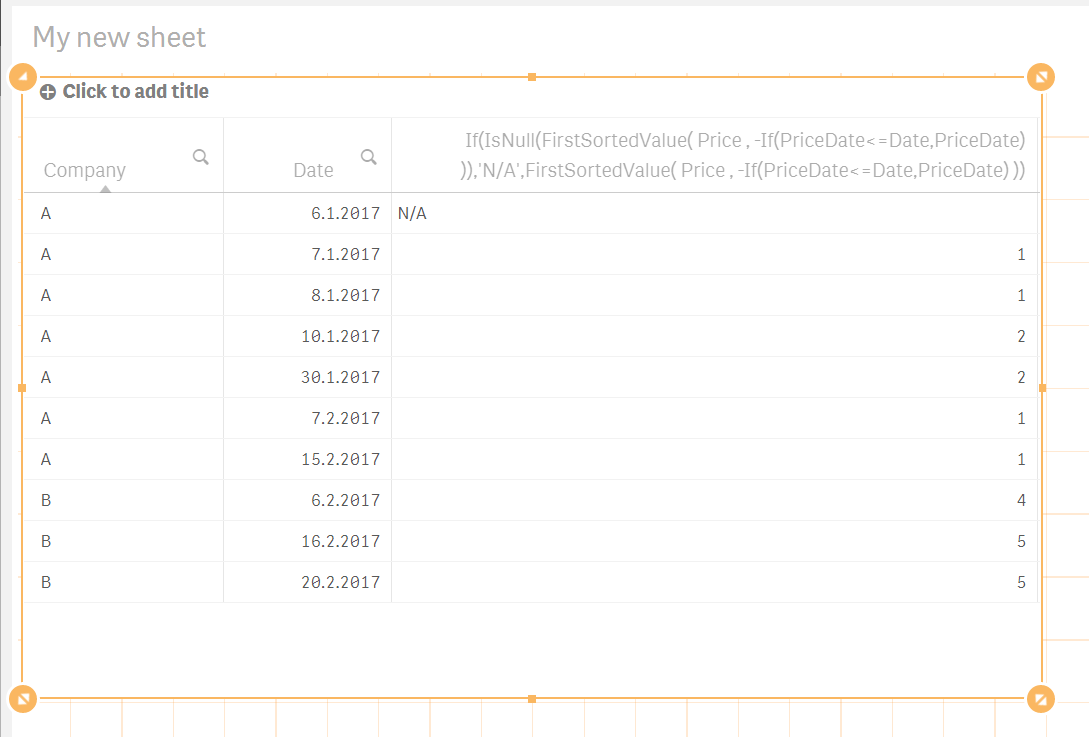
Here is how it looks like in Qlik Sense in a sheet in edit mode:
petter
- Mark as New
- Bookmark
- Subscribe
- Mute
- Subscribe to RSS Feed
- Permalink
- Report Inappropriate Content
If you have the two tables with the same columns as you specify except that the price in table #2 is left out - you can calculate that price in a GUI table with the following expression:
FirstSortedValue( Price , -If(PriceDate<=Date,PriceDate) )
Well to also get the N/A rows you will have to use an If() function also like this:
If(IsNull(FirstSortedValue( Price , -If(PriceDate<=Date,PriceDate) )),'N/A',FirstSortedValue( Price , -If(PriceDate<=Date,PriceDate) ))
Here is how it looks like in Qlik Sense in a sheet in edit mode:
achakilam1022
- Mark as New
- Bookmark
- Subscribe
- Mute
- Subscribe to RSS Feed
- Permalink
- Report Inappropriate Content
Hi Petter,
Thanks a lot. This expression gives perfect answer. I appreciate your help.
Thanks
