Unlock a world of possibilities! Login now and discover the exclusive benefits awaiting you.

- Qlik Community
- :
- Forums
- :
- Analytics & AI
- :
- Products & Topics
- :
- Visualization and Usability
- :
- GetFieldSelections() usando valores não selecionad...
- Subscribe to RSS Feed
- Mark Topic as New
- Mark Topic as Read
- Float this Topic for Current User
- Bookmark
- Subscribe
- Mute
- Printer Friendly Page

- Mark as New
- Bookmark
- Subscribe
- Mute
- Subscribe to RSS Feed
- Permalink
- Report Inappropriate Content
GetFieldSelections() usando valores não selecionados
Boa Tarde,
Necessito de uma ajuda. Preciso saber os valores "NÃO" selecionados de um determinado filtro. É possível???
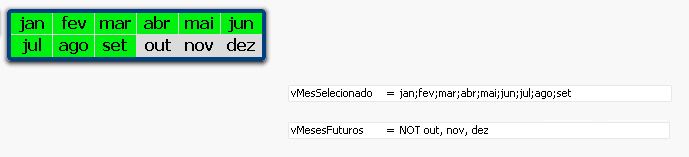
Necessito saber os meses não selecionados para fazer uma análise diferente.
Preciso que a variável retorne "OUT, NOV, DEZ" sem o NOT
Obrigado
- Tags:
- getfieldselections()
- Mark as New
- Bookmark
- Subscribe
- Mute
- Subscribe to RSS Feed
- Permalink
- Report Inappropriate Content
No worry, Qlik current selection does this..
Any way it wud not harm your data or analysis.
You can set the length of your current selections...
PFA..


 tresB
tresB
- Mark as New
- Bookmark
- Subscribe
- Mute
- Subscribe to RSS Feed
- Permalink
- Report Inappropriate Content
Like:
=Concat(DISTINCT{1<MonthField=E(MonthField)>}MonthField, ',')
So, variable definition becomes like:
vNotSelectedMonths='NOT ' & Concat(DISTINCT{1<MonthField=E(MonthField)>}MonthField, ',')
- Mark as New
- Bookmark
- Subscribe
- Mute
- Subscribe to RSS Feed
- Permalink
- Report Inappropriate Content
It work's, thank you!!!! Excelent!!!!
There is a away, when i select "only" 1 month, for example "Set", qlikview will retrieve me the months lower than "Set" in one variable vLowerMonths, and in another variable vHigherMonths????
Thanks!!
- Mark as New
- Bookmark
- Subscribe
- Mute
- Subscribe to RSS Feed
- Permalink
- Report Inappropriate Content
Still have a little problem, it returns "dez, nov, out" how i can use this values to apply another filter???
When i use the variable "vNotSelectedMonths" as a month filter it wont work...
Thank you.
tresB
- Mark as New
- Bookmark
- Subscribe
- Mute
- Subscribe to RSS Feed
- Permalink
- Report Inappropriate Content
Say you want sum of sales for those Note Selected/Excluded values. Then use expression like:
Sum({<MonthField= - $:: MonthField>}Sales)
tresB
- Mark as New
- Bookmark
- Subscribe
- Mute
- Subscribe to RSS Feed
- Permalink
- Report Inappropriate Content
Or, for variable way, create variable like:
vExcludedValues=Chr(39)&Concat(DISTINCT{1<MonthField=E(MonthField)>}MonthField, chr(39)&','&chr(39))&chr(39)
Then in the expression try like:
Sum({<MonthField={$(vExcludedValues)}>}Sales)
- Mark as New
- Bookmark
- Subscribe
- Mute
- Subscribe to RSS Feed
- Permalink
- Report Inappropriate Content
Thank you... it is correct now!!!!!
Excelent