Unlock a world of possibilities! Login now and discover the exclusive benefits awaiting you.

- Qlik Community
- :
- Forums
- :
- Analytics & AI
- :
- Products & Topics
- :
- Visualization and Usability
- :
- Given a start date, how to display 8 week interval...
Options
- Subscribe to RSS Feed
- Mark Topic as New
- Mark Topic as Read
- Float this Topic for Current User
- Bookmark
- Subscribe
- Mute
- Printer Friendly Page
Turn on suggestions
Auto-suggest helps you quickly narrow down your search results by suggesting possible matches as you type.
Showing results for

 shirleyc40
Creator
2021-02-17
03:39 PM
- Mark as New
- Bookmark
- Subscribe
- Mute
- Subscribe to RSS Feed
- Permalink
- Report Inappropriate Content
Given a start date, how to display 8 week intervals
I'm trying to duplicate this table in excel, where I have measures based on date intervals.
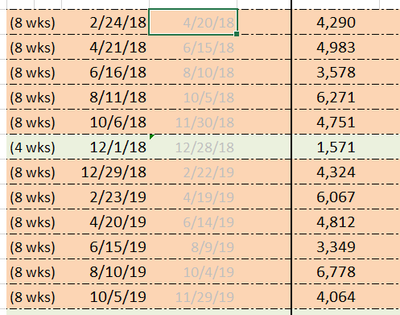
In excel, you can refer to other cells to do the math, but I'm not sure how to do this in Qlik
1,694 Views
1 Solution
Accepted Solutions

 edwin
edwin
Master II
2021-02-17
09:01 PM
- Mark as New
- Bookmark
- Subscribe
- Mute
- Subscribe to RSS Feed
- Permalink
- Report Inappropriate Content
1,658 Views
4 Replies
edwin
Master II
2021-02-17
09:01 PM
- Mark as New
- Bookmark
- Subscribe
- Mute
- Subscribe to RSS Feed
- Permalink
- Report Inappropriate Content
this is very similar:
Customizing date range filter in Qlik hub (10 days... - Qlik Community - 1783642
1,659 Views
shirleyc40
Creator
2021-02-22
03:50 PM
Author
- Mark as New
- Bookmark
- Subscribe
- Mute
- Subscribe to RSS Feed
- Permalink
- Report Inappropriate Content
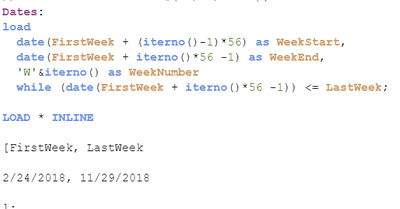
Do you know how I can do two of these while loads and concatenate them? I want to mimic the 4 week one in the middle.
I have this right now
edwin
Master II
2021-02-22
05:55 PM
- Mark as New
- Bookmark
- Subscribe
- Mute
- Subscribe to RSS Feed
- Permalink
- Report Inappropriate Content
Try this
load date(FirstWeek + (iterno()-1)*28) as WeekStart, date(FirstWeek + iterno()*28 -1) as WeekEnd, 'W'&iterno() as WeekNumber while date(FirstWeek + iterno()*28 -1)<=EndOfPeriod;
load date('2/24/2018') as FirstWeek, date('11/30/2018') as EndOfPeriod AutoGenerate (1);
2/24/2018 is a Saturday so your last day should be 11/30 which is a Friday
1,616 Views
edwin
Master II
2021-02-22
05:57 PM
- Mark as New
- Bookmark
- Subscribe
- Mute
- Subscribe to RSS Feed
- Permalink
- Report Inappropriate Content
this should be clearer
load date(FirstWeek + (iterno()-1)*4*7) as WeekStart, date(FirstWeek + iterno()*4*7 -1) as WeekEnd, 'W'&iterno() as WeekNumber while date(FirstWeek + iterno()*4*7 -1)<=EndOfPeriod;
load date('2/24/2018') as FirstWeek, date('11/30/2018') as EndOfPeriod AutoGenerate (1);
1,616 Views
