Unlock a world of possibilities! Login now and discover the exclusive benefits awaiting you.

- Qlik Community
- :
- Forums
- :
- Analytics & AI
- :
- Products & Topics
- :
- Visualization and Usability
- :
- Re: Group by status in load script
- Subscribe to RSS Feed
- Mark Topic as New
- Mark Topic as Read
- Float this Topic for Current User
- Bookmark
- Subscribe
- Mute
- Printer Friendly Page

 nburton78
- Mark as New
- Bookmark
- Subscribe
- Mute
- Subscribe to RSS Feed
- Permalink
- Report Inappropriate Content
Group by status in load script
I currently have data that comes in like this from an excel document:
| Order Number | Status | Date |
| 1 | 10 | 12/1/2019 |
| 1 | 20 | 12/2/2019 |
| 1 | 30 | 12/2/2019 |
| 1 | 40 | 12/3/2019 |
| 1 | 50 | 12/4/2019 |
| 1 | 60 | 12/6/2019 |
| 1 | 70 | 12/6/2019 |
| 2 | 10 | 10/1/2019 |
| 2 | 20 | 10/2/2019 |
| 2 | 30 | 10/10/2019 |
| 2 | 40 | 10/12/2019 |
| 2 | 50 | 10/14/2019 |
| 2 | 60 | 10/16/2019 |
| 2 | 70 | 10/16/2019 |
For each order number I want to load the date it was at a certain status, kinda like this.
| ten status | twentystatus | thirtystatus | |
| order Number 1 | 12/1/2019 | 12/2/2019 | 12/2/2019 |
| order Number 2 | 10/1/2019 | 10/2/2019 | 10/10/2019 |
I want to do this in the load script, but i'm not sure how it should be done. Right now all I have is this:
"LOAD [SO Number]&[Order Type] & ([Line Number]*1000) as [Order Number], [WO
Status] as Status, Min as Date
FROM [LineLevelAnalysisLoader\Updated LLI Files\ALL WO Status.xlsx]
(ooxml, embedded labels, table is [10 WO Sales status]);"
Accepted Solutions

 Taoufiq_Zarra
- Mark as New
- Bookmark
- Subscribe
- Mute
- Subscribe to RSS Feed
- Permalink
- Report Inappropriate Content
Generic load will be helpful in this case
InputTable:
LOAD * INLINE [
  Order Number, Status, Date
    1, 10, 1/1/2019
    1, 20, 1/2/2019
    1, 30, 1/3/2019
    1, 35, 1/4/2019
    1, 40, 1/5/2019
    1, 45, 1/6/2019
    1, 50, 1/7/2019
    1, 60, 1/8/2019
    1, 70, 1/9/2019
    2, 10, 2/2/2019
    2, 30, 2/3/2019
    2, 40, 2/4/2019
    2, 45, 2/5/2019
    2, 60, 2/6/2019
    2, 90, 2/7/2019
    2, 95, 2/8/2019
    3, 10, 3/3/2019
    3, 15, 3/4/2019
    3, 20, 3/5/2019
    3, 40, 3/6/2019
    3, 45, 3/7/2019
    3, 90, 3/8/2019
];


GenTable:
Generic Load [Order Number], Status, Date Resident InputTable;

ResultTable:
LOAD Distinct [Order Number] Resident InputTable;

FOR i = 0 to NoOfTables()
  TableList:
  LOAD TableName($(i)) as Tablename AUTOGENERATE 1
  WHERE WildMatch(TableName($(i)), 'GenTable.*');
NEXT i

FOR i = 1 to FieldValueCount('Tablename')
  LET vTable = FieldValue('Tablename', $(i));
  LEFT JOIN (ResultTable) LOAD * RESIDENT [$(vTable)];
  DROP TABLE [$(vTable)];
NEXT i

Regards,
Taoufiq ZARRA
"Please LIKE posts and "Accept as Solution" if the provided solution is helpful "
(you can mark up to 3 "solutions") 😉
Taoufiq_Zarra
- Mark as New
- Bookmark
- Subscribe
- Mute
- Subscribe to RSS Feed
- Permalink
- Report Inappropriate Content
Hi,
on behalf of the great @sunny_talwar (MVP), I propose to you the solution he proposed:
Table:
LOAD *,
	 If([Order Number] = Previous([Order Number]), RangeSum(Peek('StatusNum'), 1), 1) as StatusNum;

LOAD * INLINE [
    Order Number, Status, Date
    1, 10, 12/1/2019
    1, 20, 12/2/2019
    1, 30, 12/2/2019
    1, 40, 12/3/2019
    1, 50, 12/4/2019
    1, 60, 12/6/2019
    1, 70, 12/6/2019
    2, 10, 10/1/2019
    2, 20, 10/2/2019
    2, 30, 10/10/2019
    2, 40, 10/12/2019
    2, 50, 10/14/2019
    2, 60, 10/16/2019
    2, 70, 10/16/2019
];

FinalTable:
LOAD Distinct [Order Number]
Resident Table;

FOR i = 1 to FieldValueCount('StatusNum')

	LET vField = FieldValue('StatusNum', $(i));

	Left Join (FinalTable)
	LOAD [Order Number],
		 Date as [Status $(vField)]
	Resident Table
	Where StatusNum = $(vField);

NEXT i;

DROP Table Table;
the result:
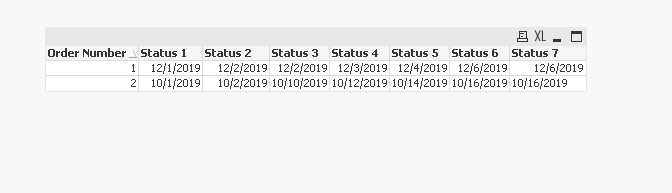
Cheers,
Taoufiq ZARRA
"Please LIKE posts and "Accept as Solution" if the provided solution is helpful "
(you can mark up to 3 "solutions") 😉
nburton78
- Mark as New
- Bookmark
- Subscribe
- Mute
- Subscribe to RSS Feed
- Permalink
- Report Inappropriate Content
this is very close, however what I didn't mention and probably should have mentioned is that an order may not go through all the statuses. for example,
| 1 | 10 | 1/1/2019 |
| 1 | 20 | 1/2/2019 |
| 1 | 30 | 1/3/2019 |
| 1 | 35 | 1/4/2019 |
| 1 | 40 | 1/5/2019 |
| 1 | 45 | 1/6/2019 |
| 1 | 50 | 1/7/2019 |
| 1 | 60 | 1/8/2019 |
| 1 | 70 | 1/9/2019 |
| 2 | 10 | 2/2/2019 |
| 2 | 30 | 2/3/2019 |
| 2 | 40 | 2/4/2019 |
| 2 | 45 | 2/5/2019 |
| 2 | 60 | 2/6/2019 |
| 2 | 90 | 2/7/2019 |
| 2 | 95 | 2/8/2019 |
| 3 | 10 | 3/3/2019 |
| 3 | 15 | 3/4/2019 |
| 3 | 20 | 3/5/2019 |
| 3 | 40 | 3/6/2019 |
| 3 | 45 | 3/7/2019 |
| 3 | 90 | 3/8/2019 |
so the data would look like this:
| 10 | 15 | 20 | 30 | 35 | 40 | 45 | 50 | 60 | 70 | 90 | |
| 1 | 1/1/2019 | 1/2/2019 | 1/3/2019 | 1/4/2019 | 1/5/2019 | 1/6/2019 | 1/7/2019 | 1/8/2019 | 1/9/2019 | ||
| 2 | 2/2/2019 | 2/3/2019 | 2/4/2019 | 2/5/2019 | 2/6/2019 | 2/7/2019 | 2/8/2019 | ||||
| 3 | 3/3/2019 | 3/4/2019 | 3/5/2019 | 3/6/2019 | 3/7/2019 | 3/8/2019 |
Also, the name of the status is somewhat important.
Taoufiq_Zarra
- Mark as New
- Bookmark
- Subscribe
- Mute
- Subscribe to RSS Feed
- Permalink
- Report Inappropriate Content
Generic load will be helpful in this case
InputTable:
LOAD * INLINE [
  Order Number, Status, Date
    1, 10, 1/1/2019
    1, 20, 1/2/2019
    1, 30, 1/3/2019
    1, 35, 1/4/2019
    1, 40, 1/5/2019
    1, 45, 1/6/2019
    1, 50, 1/7/2019
    1, 60, 1/8/2019
    1, 70, 1/9/2019
    2, 10, 2/2/2019
    2, 30, 2/3/2019
    2, 40, 2/4/2019
    2, 45, 2/5/2019
    2, 60, 2/6/2019
    2, 90, 2/7/2019
    2, 95, 2/8/2019
    3, 10, 3/3/2019
    3, 15, 3/4/2019
    3, 20, 3/5/2019
    3, 40, 3/6/2019
    3, 45, 3/7/2019
    3, 90, 3/8/2019
];


GenTable:
Generic Load [Order Number], Status, Date Resident InputTable;

ResultTable:
LOAD Distinct [Order Number] Resident InputTable;

FOR i = 0 to NoOfTables()
  TableList:
  LOAD TableName($(i)) as Tablename AUTOGENERATE 1
  WHERE WildMatch(TableName($(i)), 'GenTable.*');
NEXT i

FOR i = 1 to FieldValueCount('Tablename')
  LET vTable = FieldValue('Tablename', $(i));
  LEFT JOIN (ResultTable) LOAD * RESIDENT [$(vTable)];
  DROP TABLE [$(vTable)];
NEXT i
Regards,
Taoufiq ZARRA
"Please LIKE posts and "Accept as Solution" if the provided solution is helpful "
(you can mark up to 3 "solutions") 😉
nburton78
- Mark as New
- Bookmark
- Subscribe
- Mute
- Subscribe to RSS Feed
- Permalink
- Report Inappropriate Content
Thank you that is Perfect!
