Unlock a world of possibilities! Login now and discover the exclusive benefits awaiting you.

- Qlik Community
- :
- Forums
- :
- Analytics & AI
- :
- Products & Topics
- :
- Visualization and Usability
- :
- Groupby and conditional count in bar chart
- Subscribe to RSS Feed
- Mark Topic as New
- Mark Topic as Read
- Float this Topic for Current User
- Bookmark
- Subscribe
- Mute
- Printer Friendly Page

 sw0
sw0
- Mark as New
- Bookmark
- Subscribe
- Mute
- Subscribe to RSS Feed
- Permalink
- Report Inappropriate Content
Groupby and conditional count in bar chart
Hello all.
I am trying to figure out the measure expression for my bar chart. I want to get a count of the numbers of project each division has completed. The main fields I will be working on are "division", "project id", and "sub-status".
I want to first groupby division and project id. If all the sub-status = 'completed' for the particular division/project id , then I want to add one to the count. How would I go about doing this?

 jwjackso
- Mark as New
- Bookmark
- Subscribe
- Mute
- Subscribe to RSS Feed
- Permalink
- Report Inappropriate Content
Using this data:
Data:
Load * Inline [
Division,Project,SubStatus
1,1,Completed
1,1,Incomplete
1,2,Completed
1,3,Completed
2,4,Completed
2,4,Completed
2,5,Incomplete
];
I set my dimension to Division and the measure
=Count({<Project=E({<SubStatus={'Incomplete'}>}Project)>}Distinct Project)
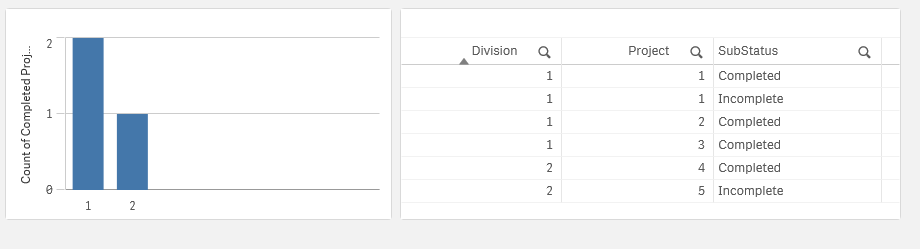
The E() function in the Set Analysis only counts projects that don't have an Incomplete.
sw0
- Mark as New
- Bookmark
- Subscribe
- Mute
- Subscribe to RSS Feed
- Permalink
- Report Inappropriate Content
Hmm...to clarify, multiple divisions can have the same Project_id, but I want to count as long as a division has "Completed" all its SubStatus for the associated project. Also, I have 4 possible values for the SubStatus field, so I might need to have a function that does the opposite of E()
jwjackso
- Mark as New
- Bookmark
- Subscribe
- Mute
- Subscribe to RSS Feed
- Permalink
- Report Inappropriate Content
Using data
Data:
Load * Inline [
Division,Project,SubStatus
1,1,Completed
1,1,Incomplete
1,2,Completed
1,3,Completed
2,4,Completed
2,4,Completed
2,5,Incomplete
2,2,Incomplete
];
Left Join (Data)
Load Division,
Project,
1 as ProjectNotCompleteFLG
Resident Data where Match(SubStatus,'Incomplete','Status2','Status3','Status4') > 0;
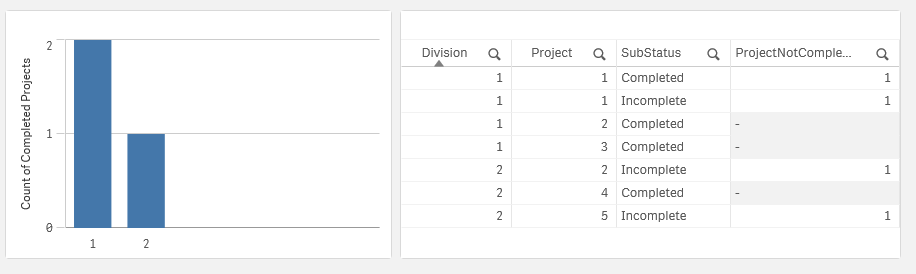
Measure:
=Count(Distinct Project) - Count({<ProjectNotCompleteFLG={1}>}Distinct Project)