Unlock a world of possibilities! Login now and discover the exclusive benefits awaiting you.

- Qlik Community
- :
- Forums
- :
- Analytics & AI
- :
- Products & Topics
- :
- Visualization and Usability
- :
- Hide and show column
- Subscribe to RSS Feed
- Mark Topic as New
- Mark Topic as Read
- Float this Topic for Current User
- Bookmark
- Subscribe
- Mute
- Printer Friendly Page

 smilingjohn
- Mark as New
- Bookmark
- Subscribe
- Mute
- Subscribe to RSS Feed
- Permalink
- Report Inappropriate Content
Hide and show column
Hi All,
I have a inline table "Category" which I am considering as a filter pane.
If I select Category (Cosmatic) then i want to hide my 3 columns (football,cricket and movie) and show only one column BeautyProduct in my pivot table .
and when i dont select Category then BeautyProduct should be hidden and 3 column (football,cricket and movie) should be displayed.
How can I cahive this ?
Thanks in Advance
Accepted Solutions

 MayilVahanan
- Mark as New
- Bookmark
- Subscribe
- Mute
- Subscribe to RSS Feed
- Permalink
- Report Inappropriate Content
Hi @smilingjohn
Try like below
=GetselectedCount(Category)= 0 for 3 columns.
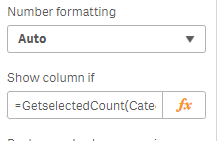
For BeautyProduct , provide the condition like below
=Category='Cosmatic'
Hope it helps
Please close the thread by marking correct answer & give likes if you like the post.
MayilVahanan
- Mark as New
- Bookmark
- Subscribe
- Mute
- Subscribe to RSS Feed
- Permalink
- Report Inappropriate Content
Hi @smilingjohn
Try like below
=GetselectedCount(Category)= 0 for 3 columns.
For BeautyProduct , provide the condition like below
=Category='Cosmatic'
Hope it helps
Please close the thread by marking correct answer & give likes if you like the post.
